AI-Powered · Full Bundle Feature

AI material takeoff for home builders.
Under 60 seconds.

Upload a floor plan PDF. AI extracts every room, fixture, flooring scope, and whole-house quantity automatically. What used to take hours now takes less than a minute.

AI Blueprint Takeoff Demo
0:00 / 0:00

How it works

Three steps. No manual counting. No spreadsheets.

01

Upload your PDF

Drop in any digital CAD floor plan up to 25MB. Labeled rooms and visible dimensions required.

02

AI analyzes the plan

Claude AI Vision reads room labels, dimension lines, fixtures, and whole-house scopes in under 60 seconds.

03

Review & import

Edit any quantity, assign option classes, then import directly into your budgets and design center.

Results across 3 tabs
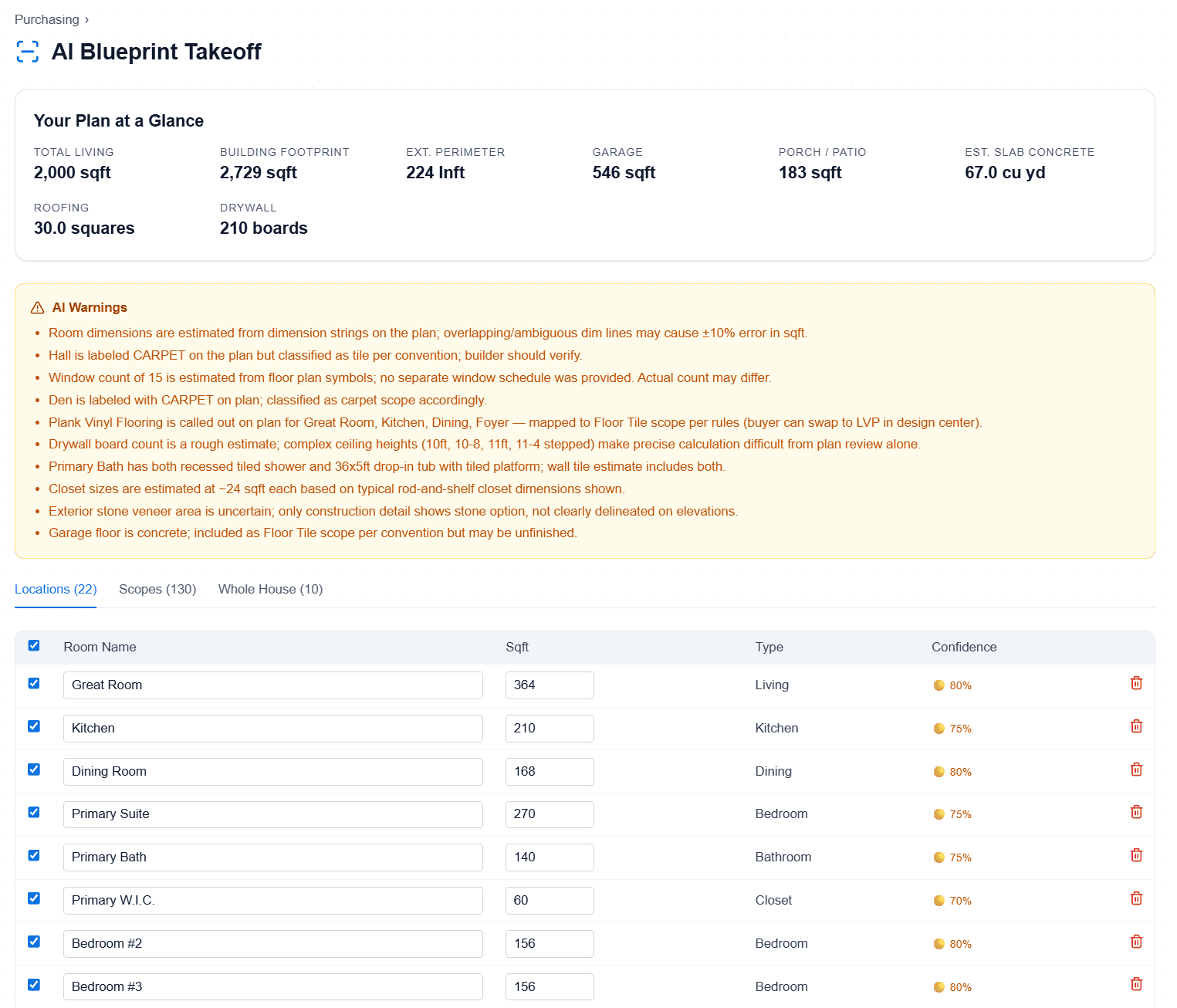
Rooms
Tab 1

Rooms

22 locations detected with square footage and auto-detected names from your plan labels.
Room Scopes
Tab 2

Room Scopes

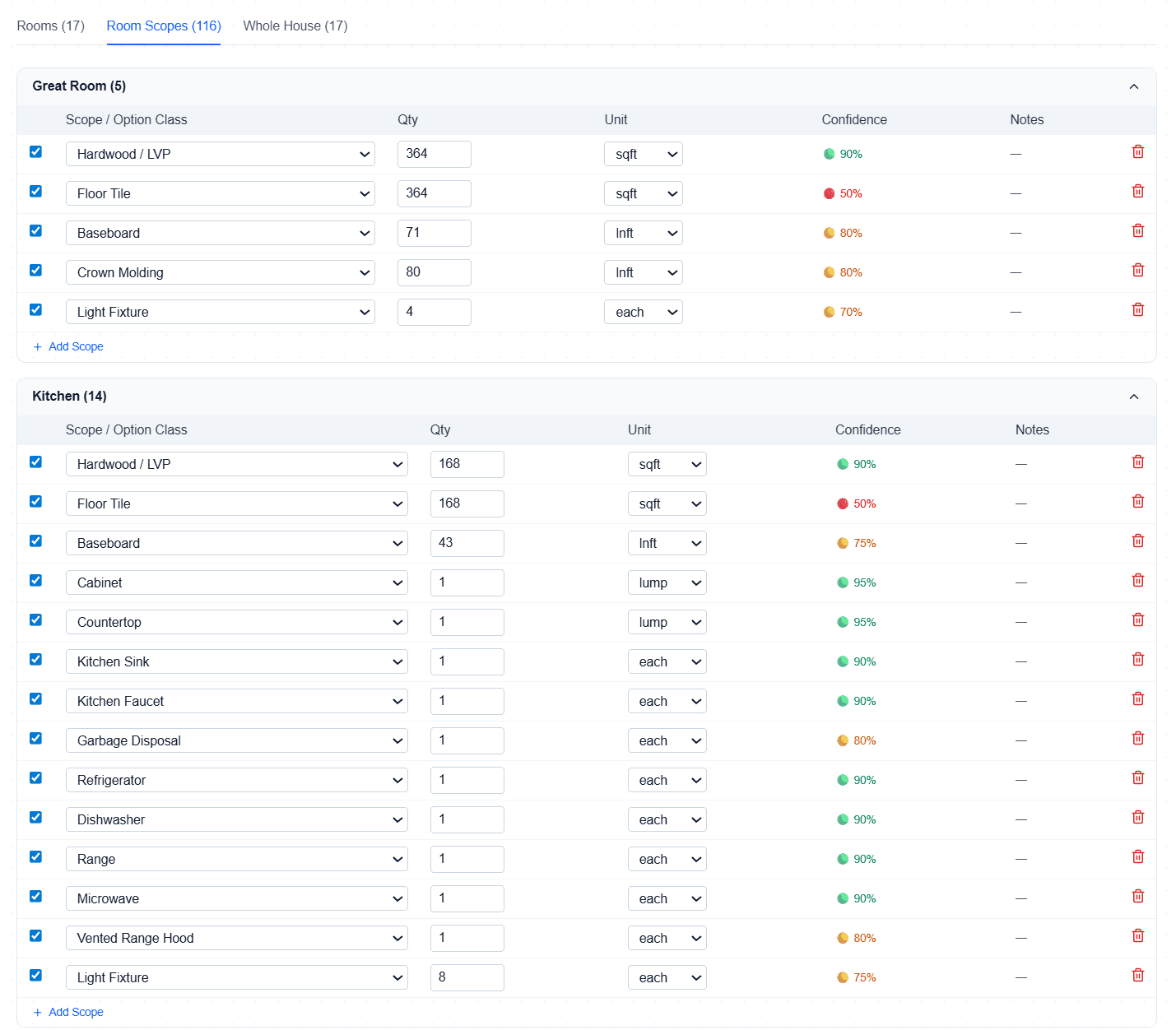
130 per-room scopes — fixtures, flooring, baseboard, countertops, cabinets, crown molding.
Whole House
Tab 3

Whole House

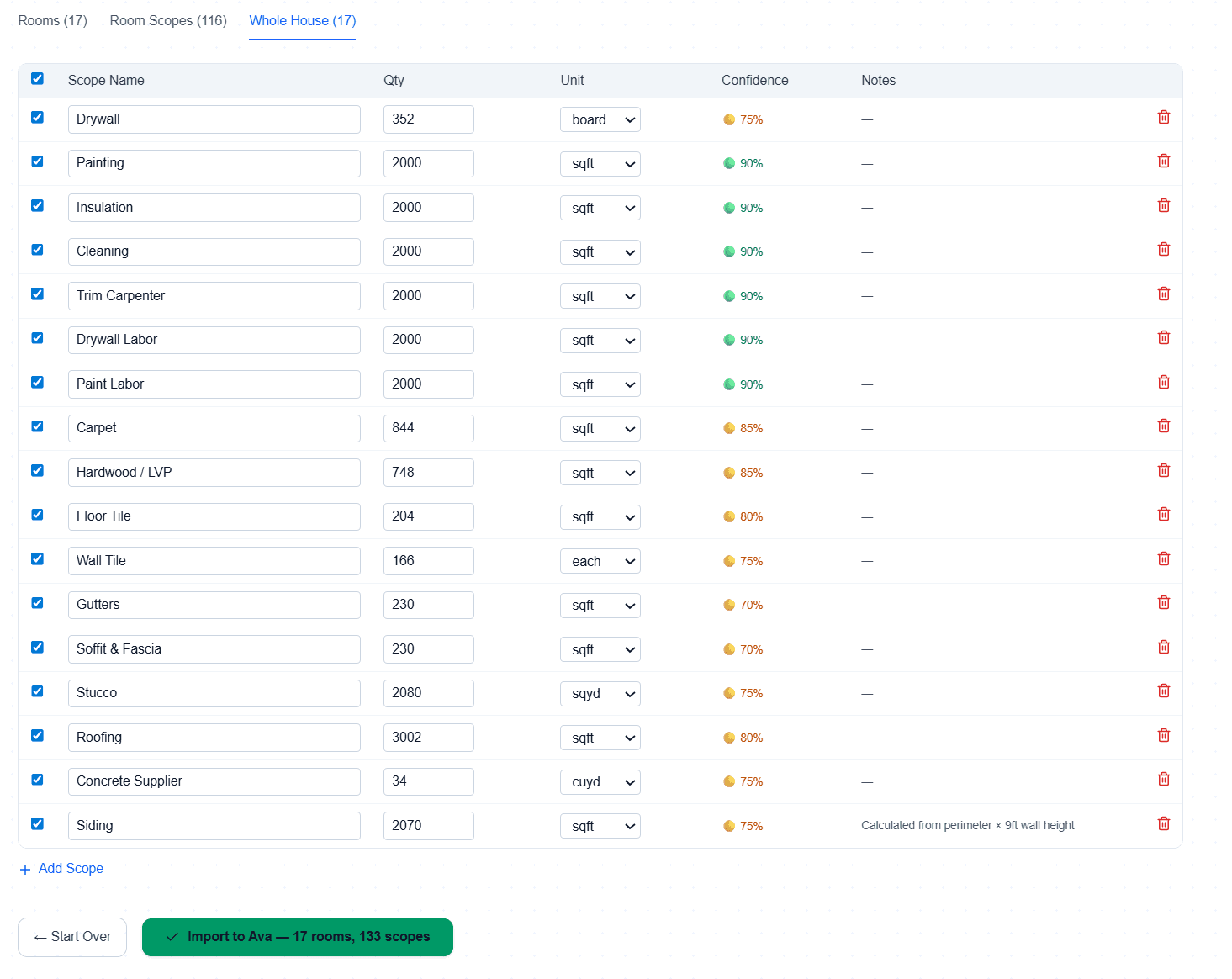
10 whole-house quantities: drywall, painting, roofing, insulation, gutters, siding, concrete.

Plan at a Glance

Key metrics extracted automatically from every plan:

Total living square footage
Footprint square footage
Perimeter (linear feet)
Garage square footage
Porch square footage
Slab concrete (cubic yards)
Roofing (squares)
Drywall (boards)

Everything it does

Upload Any CAD PDF
Digital CAD floor plans up to 25MB. Drop it in and the AI gets to work — no manual setup.
Room Detection
AI reads room labels from the plan and maps every space automatically. Primary Bedroom, Kitchen, Bath — all detected.
Fixture Extraction
Toilets, faucets, lights, doors, hardware, appliances — counted per room from the plan itself.
Flooring Quantities
Tile and LVP for all rooms, carpet for dry rooms only. Square footage calculated from dimension lines.
Baseboard & Trim
Linear feet of baseboard, crown molding, and countertops extracted per room.
Whole-House Scopes
Drywall, painting, insulation, cleaning, gutters, siding, and roofing quantities in a single analysis.
Edit Before Import
Review and adjust any quantity the AI extracted. Change units, assign option classes, correct anything before it hits your budget.
Direct Budget Integration
One click imports rooms and material scopes directly into your floorplan budgets, selections, and design center.
Option Class Assignment
Assign option classes to scopes during review so selections feed straight into the design center.
Plan at a Glance
Key metrics panel: living sqft, footprint, perimeter, garage, porch, slab concrete, roofing, drywall — all on one screen.
Under 60 Seconds
What used to take hours of manual counting is done before your coffee gets cold.
Powered by Anthropic AI Vision
Built on Claude's vision model — the same AI that reads and understands complex technical drawings.
Included in
Full Bundle
$399/mo
$150 value FREE with bundle
Traditional takeoff software$200–500/mo
Manual takeoff (labor)4–8 hrs/plan
Cornerstone AI TakeoffIncluded in Full Bundle
Get Early Access →

Beta limited to 100 builders · No credit card required

Requirements

YesDigital CAD PDFs only (no scans or photos)
YesRooms must have text labels (e.g. "Primary Bedroom")
YesVisible dimension lines for accurate square footage
NoHand-drawn sketches not supported
NoLow-resolution scans won't work well

Stop counting manually.

Join the beta and get 2 years free. Limited to 100 builders.

Request Early Access →