Turn upgrades into
wider margin.
Cross-class upgrades, per-room pricing from real takeoff quantities, 64+ designer packages, and a step-by-step Product Configurator for complex selections like cabinets and countertops. Every selection tracked, priced, and connected to your budget.

StyleSmith AI™ designs the whole house.
Name a home. Name a look. StyleSmith AI™ composes the whole house from real live data— your actual product catalog right here in the Design Center, at your own retail pricing, steered by the inspiration photography your design team curates and by your buyer's own style profile.
Every pick is a product you already sell, chosen inside your style guidelines and held to one palette and one finish family. Say “cap it at Upgrade II” and the whole look stays there. Then it writes the set into the home's real selections — on your say-so.
Because it composes against that buyer— their style profile, their spec level, their ceiling — two families on the same street don't end up with the same kitchen. And when you do want fixed bundles, StyleSmith AI™ drafts those too: bespoke per buyer and a package factory, from the same catalog.
- Real products from your own catalog — not stock imagery
- 10 style themes, every option scored nightly
- Flooring continuity room to room
- Holds your spec band — the included floor and your ceiling
- Buyer style quiz feeds the composition (early access)
- Drafts full Design Packages for review
Options that change the home should be part of the home.
Finished basements, luxury baths, flex rooms, and gourmet kitchens are more than price-book charges. Cornerstone models their rooms, finish selections, quantities, budget impact, and vendor work from the buyer's choice through construction.
Options become selectable rooms
An option can act as its own Design Center location or own multiple rooms and zones. A Finished Basement can contain a Main Area and Basement Steps, each with independent carpet, LVP, or tile selections, per-class quantities, spec levels, and retail pricing.
Replace a base room—reversibly
A Luxury Owner's Bath can replace the Standard Owner's Bath on one home. The base room drops out of that home's budget, purchase orders, selection counts, and selections PDF while the option is committed. Remove the option and everything returns; the floorplan template was never deleted or duplicated.
Net carve-outs without double billing
When a Flex Room is framed inside a Finished Basement, Cornerstone nets its footprint from the parent room class-by-class at pricing time. Carpet, pad, tile, hardwood, and alternates all follow the same room relationship while buyers still select finishes for both spaces independently.
Carry the money through construction
Committed structural selections recompute the live budget, roll up by cost code, and feed auto-generated purchase orders and delivery tickets when construction tasks fire. Under-air and under-roof deltas stay attached to the option.
Guard every choice with compatibility rules
Set Requires, Conflicts, or Includes relationships with a simple rule picker and optional note. Prerequisites are enforced, mutually exclusive options are blocked, and bundled options come along automatically—before an impossible combination can reach a contract, budget, or purchase order.
Everything included
5 options. 7,000+ variations.
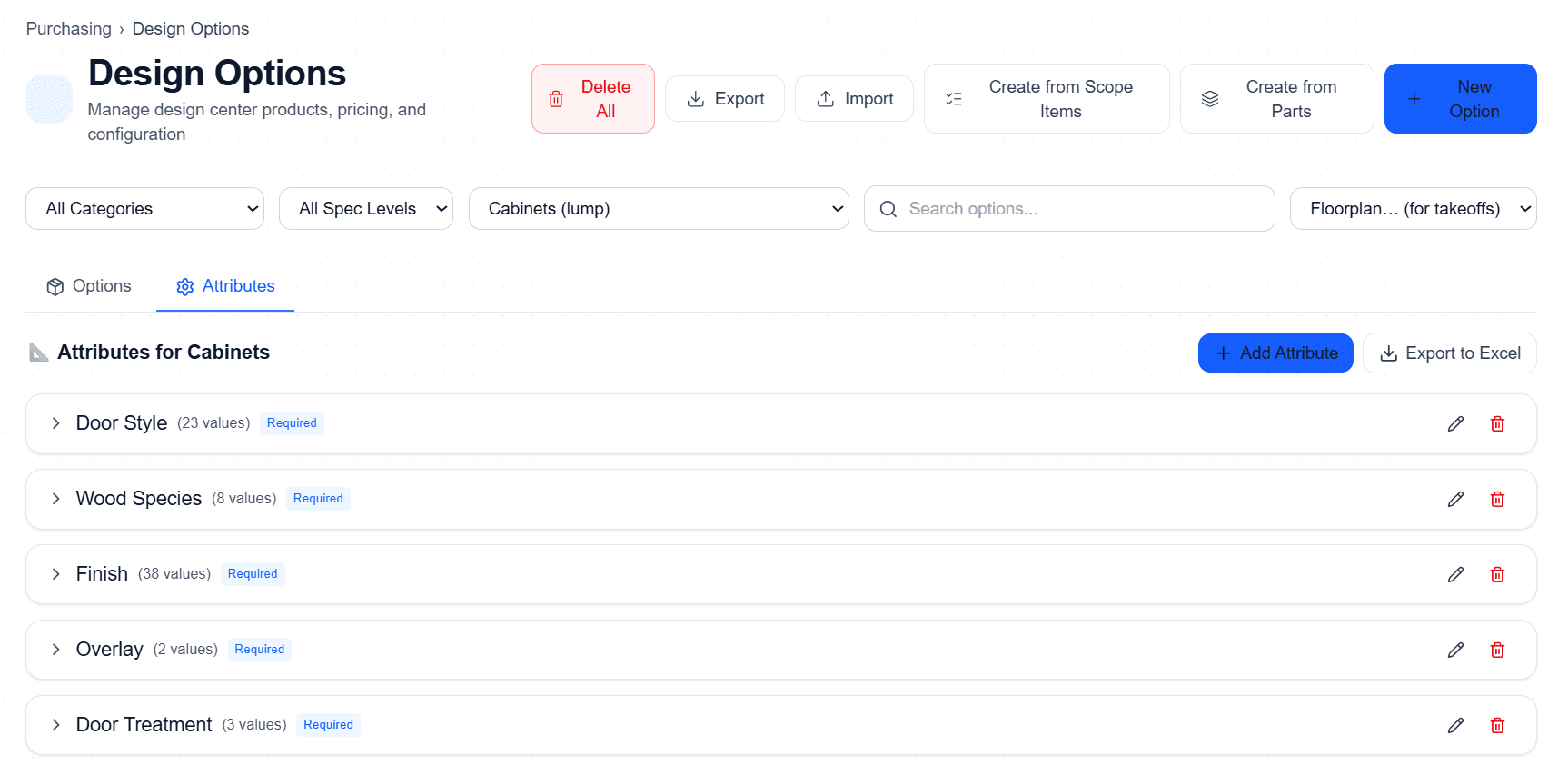
Stop creating thousands of individual SKUs. Options Attributes let you define attribute groups once and manage every possible combination through simple multiplication — not manual data entry.
All managed through just 5 options and 5 attribute groups — not 7,000 individual line items.
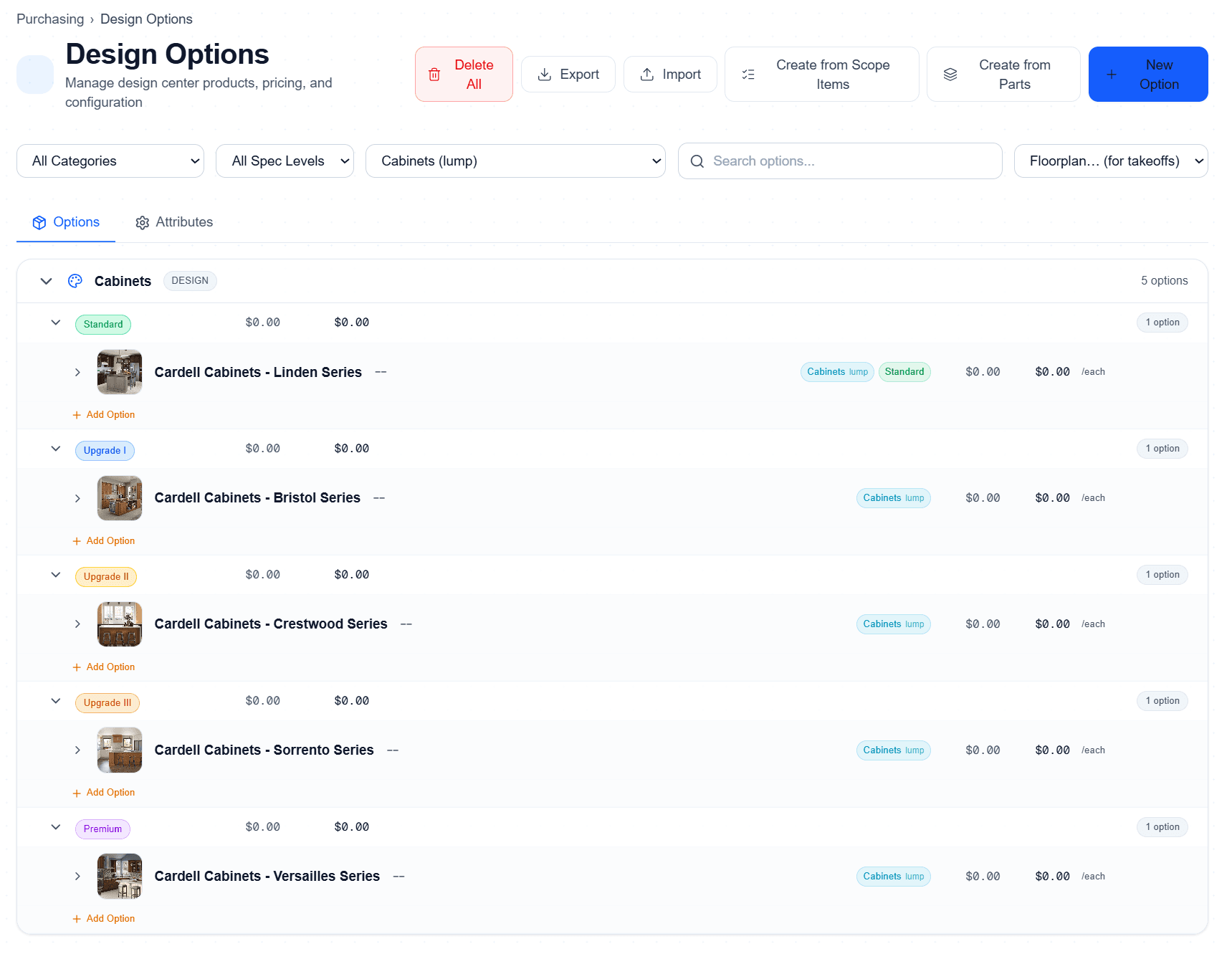
Organize by spec level, not spreadsheet rows
Five cabinet series — Standard through Premium — each with color-coded tier badges. Buyers see their included option and every upgrade path at a glance. Builders control which series each tier unlocks.
Create options from scope items or your parts catalog in one click. Import/export for bulk management.
Define once, multiply everywhere
Five attribute groups — Door Style (23), Wood Species (8), Finish (38), Overlay (2), Door Treatment (3) — each marked Required so buyers can't skip a step. Every group expands to show values, images, and status.
Add, reorder, or deactivate values without touching the options themselves. The math updates automatically.
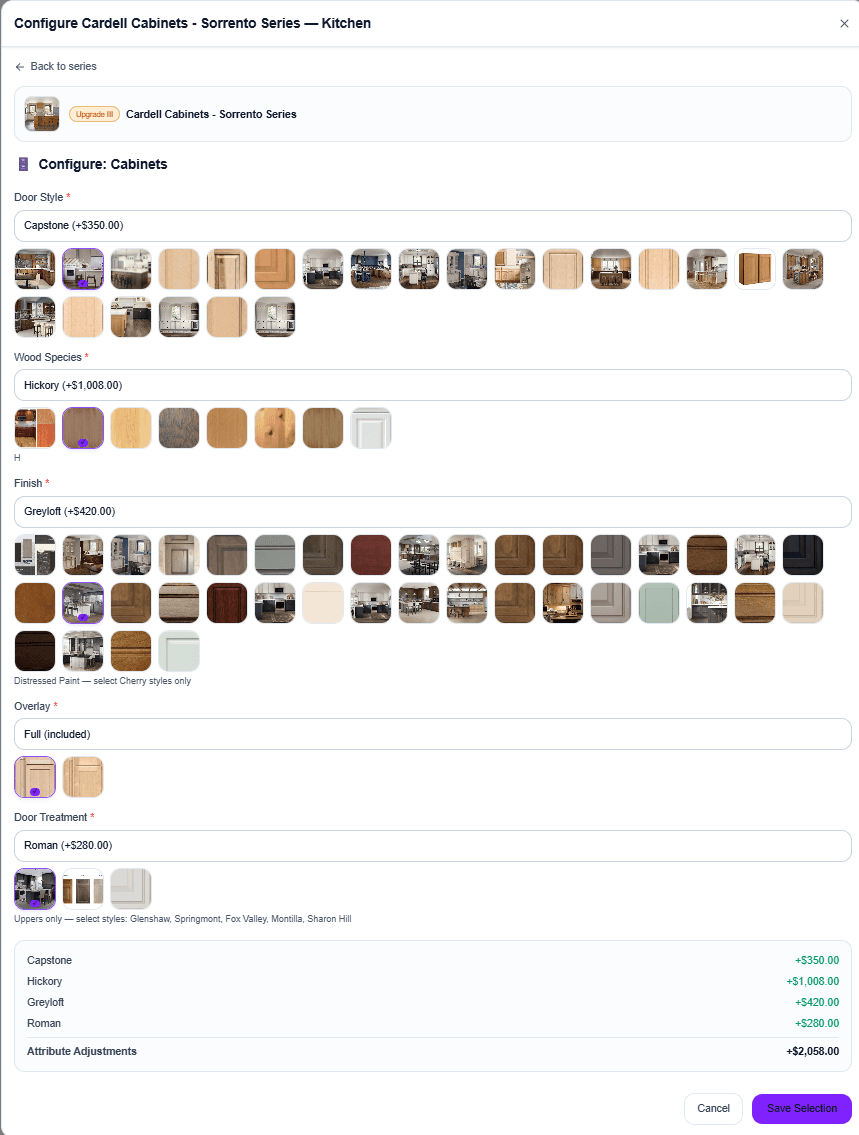
What your buyer actually sees
Every attribute group rendered as a visual swatch grid with photos, descriptions, and a live price delta per choice. The buyer picks Door Style, Wood Species, Finish, Overlay, and Door Treatment — the running total updates instantly at the bottom.
No spreadsheets emailed back and forth. No “let me get back to you on pricing.” The buyer configures the upgrade, sees the exact dollar impact, and saves the selection — all in one flow.
Invalid combos never reach production
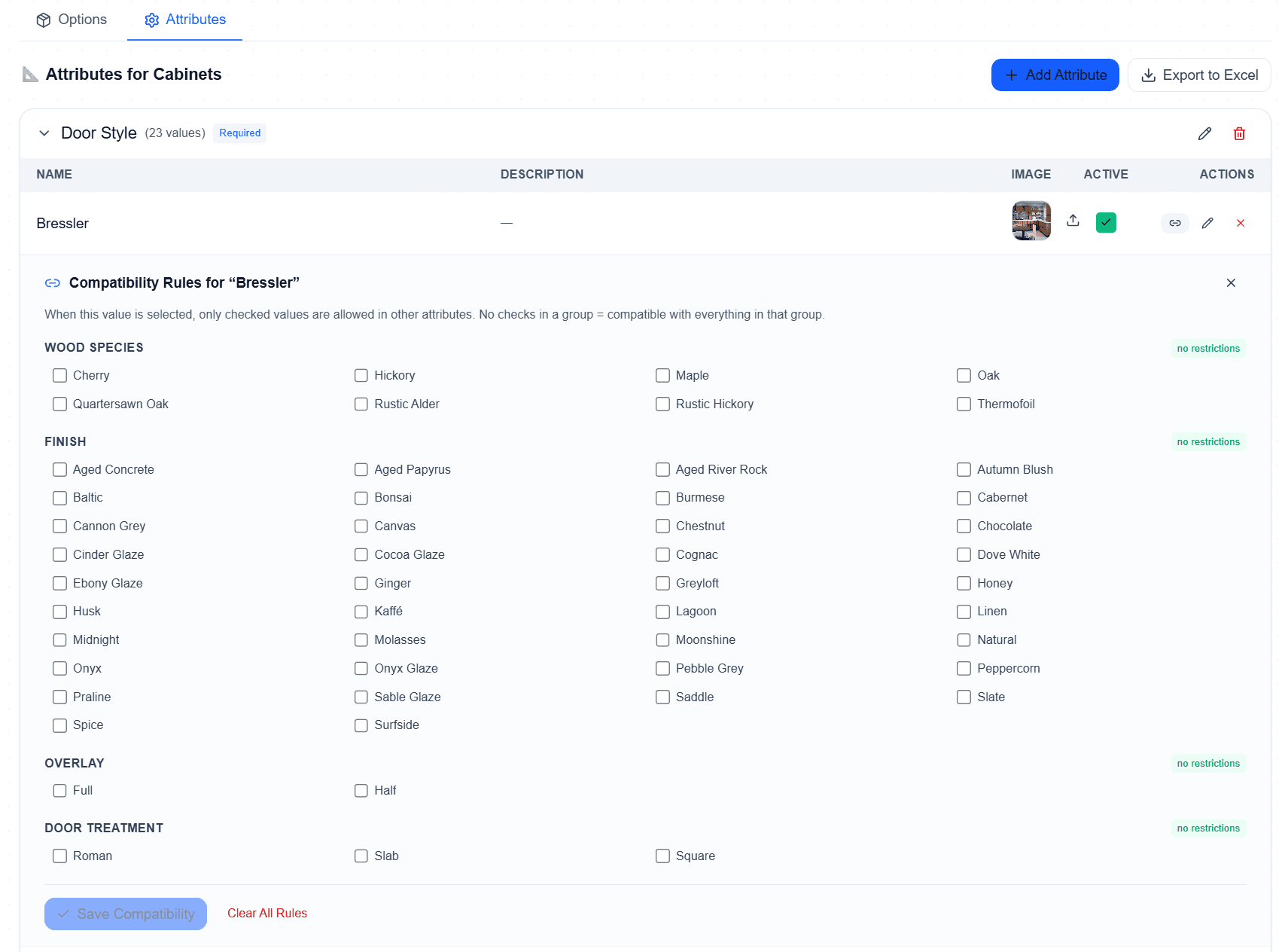
Set per-value restrictions: “Bressler door style is compatible with these wood species and these finishes.” Unchecked values are blocked at selection time. No restrictions? Leave the group open.
No more field orders because someone picked Thermofoil with a stain finish. Compatibility rules catch it before the PO is cut.
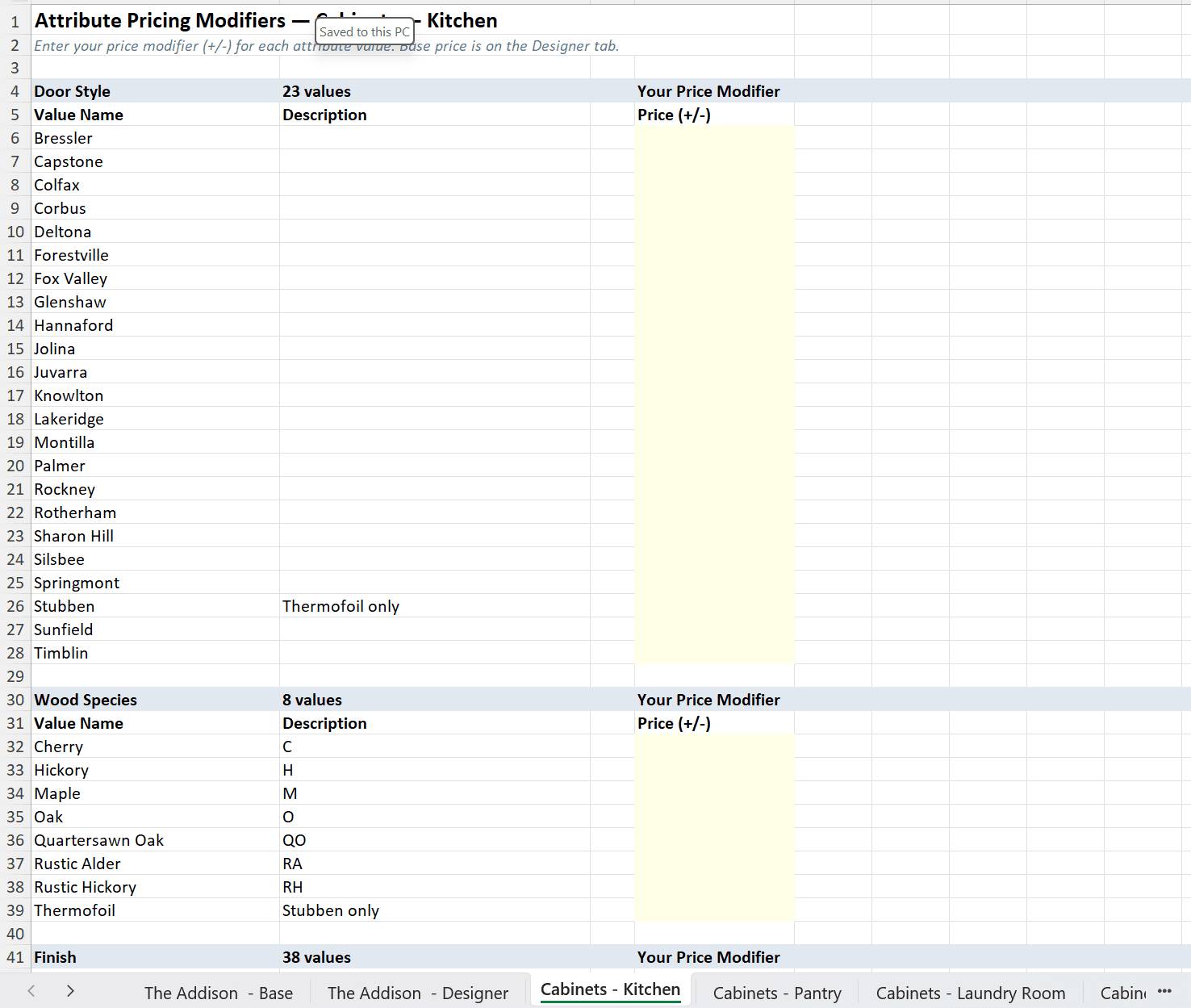
Send vendors an Excel template. Get real cost data back.
Cornerstone auto-generates an Excel bid template for every attribute group — one tab per scope (Cabinets - Kitchen, Cabinets - Pantry, Cabinets - Laundry, etc.) with every door style, wood species, and finish pre-populated. Your vendor just fills the yellow Price (+/-) column.
Upload their completed sheet and every modifier imports back as a real cost — per attribute value, per scope item. The buyer-facing configurator on the previous screen pulls from this exact data. No price matrix in your head. No double-entry.
Multiple vendors bidding the same scope? Compare side-by-side and award the winning quote per community — pricing flows straight into your design center and budget.
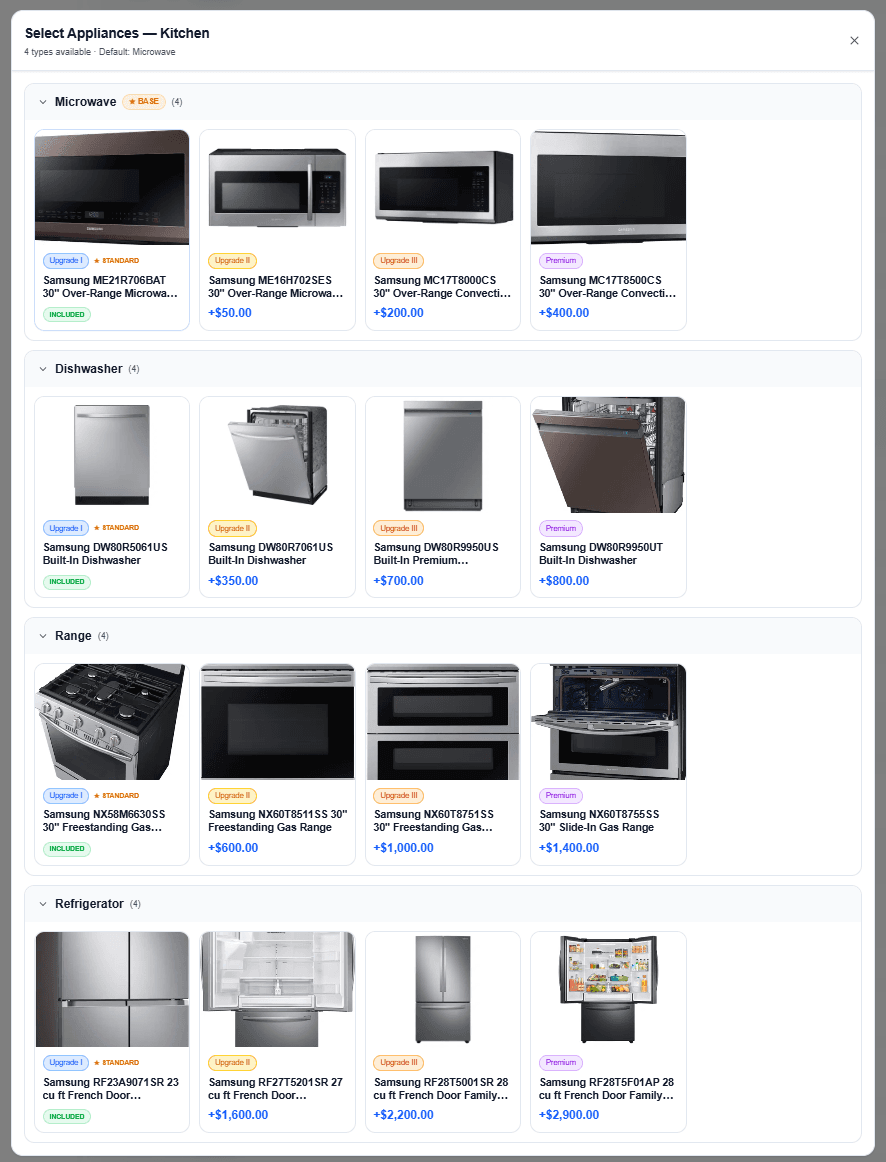
Standard, Upgrade I, II, Premium — in one screen
Microwave, dishwasher, range, refrigerator — every appliance category rendered as a four-tier card grid. Buyers see the included model, every upgrade path, and the exact incremental cost without clicking through screens.
Model numbers, photos, and pricing flow from your parts catalog and vendor bids — not a static brochure. Swap an entire appliance line across a community in minutes, not days.
One spec engine. Every community priced correctly.
Standard included in Community A. Upgrade I included in Community B. Same options, same floorplans, same design center — and every buyer sees the right upgrade math for their community. Automatically.
Set the included spec level per community
Community A includes Standard. Community B includes Upgrade I. Community C includes Premium. Set it once on the community — that's the option tier baked into the home price for every buyer there.
Buyers can't downgrade below their tier
A buyer in an Upgrade I community will never see Standard options. The design center filters them out automatically. No accidental downgrades, no awkward sales conversations, no margin leak.
Upgrade math runs itself
Upgrade cost = selected option price − community included option price. Options at the community's included level show an INCLUDED badge. Everything above shows +$X. Calculated per community, per buyer, in real time.
Same option library. Three different upgrade prices. Zero manual configuration per community.
Pattern, Size, and Grout Color are tier-gated too
Product attributes — Collection, Size, Pattern, Grout Color — are cosmetic spec selectors, not pricing drivers. But their availability can be tier-gated. Herringbone pattern only at Upgrade I+? 12x24 size only at Premium+? Done.
Buyers in lower-tier communities don't see the gated choices at all. No “why can't I pick that?” phone calls.
Most design centers can't do this without a clone
Competitor tools force builders to clone the entire option library per community to get different included levels. That's where pricing drifts, options go stale, and margin disappears.
Cornerstone keeps one option library. Each community points at its included spec level, the math handles the rest.
Beta limited to 100 builders —· No credit card required
Why builders choose Cornerstone for design
Most design center tools are bolt-ons that don't talk to your budget or purchasing system. Cornerstone's Design Center was built as a first-class module — every selection automatically updates the budget and purchasing line items.
Lock your options pricing before the buyer presentation and protect your margin every single time. No spreadsheets, no manual reconciliation, no surprises at closing.
Design Center Software FAQ
Common questions about design center and options engine software for home builders.
Can a structural option have its own rooms and Design Center selections?
How does Cornerstone prevent duplicate costs when a structural option replaces or carves space from another room?
What is design center software for home builders?
What is an options engine?
How do design center allowances work?
How does upgrade pricing work across different communities?
Can different communities start at different spec levels?
What about product attributes like Pattern, Size, or Grout Color?
Does the design center connect to purchasing?
What are Options Attributes?
How is this different from a generic configurator?
Can buyers see their selections in their portal?
Can I give subcontractors a selection sheet without showing pricing?
Do I have to export a trade copy every time selections change?
Can AI make the design selections for a home?
Will an AI-composed design ever pick something outside the buyer's spec level?
Can buyers tell us their style before the design appointment?
What does design center software cost?
Is this a NEWSTAR / BuildPro design center alternative?
Ready to protect your margin?
Join the beta and get 2 years free. Limited to 100 builders.
Request Early Access →