Task Complete, PO Sent: How Production Builders Automate Their Purchasing Loop
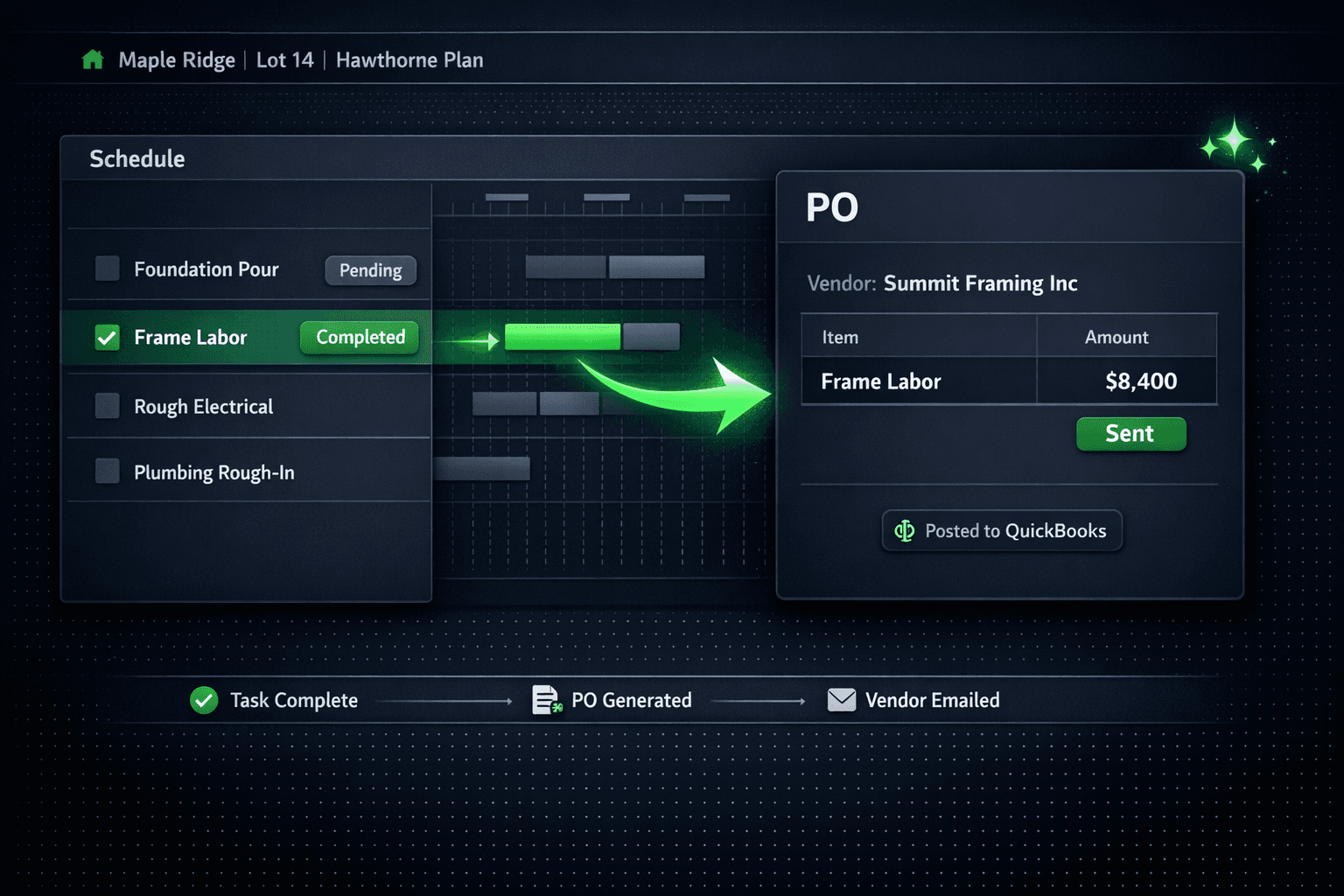
The fastest fix for missed purchase orders is to remove the human step entirely. When a schedule task is marked complete in Cornerstone, the purchase order generates itself, emails the vendor, and posts to QuickBooks as a commitment — without anyone opening the purchasing screen.
Why do purchase orders fall through the cracks?
It's not that superintendents forget on purpose. The problem is structural. Scheduling lives in one system, purchasing lives in another, and the handoff between them depends on a person noticing that a task finished and then switching to a different screen to write the PO. When that person is on three lots with six trades asking questions, the handoff doesn't happen.
The consequences show up later: a vendor waiting on payment they haven't invoiced against, a budget that looks clean until month-end reconciliation exposes a pile of un-issued POs, and a bookkeeper who spent an afternoon reconstructing what went where. The missed PO is not a discipline problem. It is a sequencing problem — the right action needed to happen at the wrong time for a person to do it manually.
How does the auto-PO trigger work?
In Cornerstone, each task in a schedule template can be linked to a vendor. When the task is marked complete — from a phone in the field, from a tablet in the site office, or from a desktop — Cornerstone detects the completion event and generates the purchase order automatically.
The PO is not a blank form. It is built from the scope items and accepted vendor pricing for that community. Because all cost in Cornerstone flows from awarded bids, a line with no accepted price shows as needs pricing rather than carrying an invented number. The hard cost rule applies to auto-generated POs the same way it applies to everything else.
Task Complete
Superintendent marks the task done — field or office
PO Generated
Built from accepted vendor pricing — no invented numbers
Vendor Emailed
PO delivered directly — no vendor login needed
Posted to QuickBooks
Commitment appears in QBO before the invoice lands
What goes into an auto-generated PO?
The purchase order the vendor receives is not a bare dollar total. It carries the scope line items from the accepted vendor bid, the community name, lot number, and street address in the memo, and automatic sales tax on material lines with labor left exempt. A vendor reading the PO knows exactly which lot it is for, what trade it covers, and what they quoted when the bid was awarded.
Because the vendor portal requires no login, the PO lands in the vendor's inbox and they can view it without creating an account. The same design principle that makes bid submission frictionless applies here — outside parties never need a Cornerstone login.
How does the auto-PO connect to QuickBooks?
The moment a PO is generated and sent, it syncs one-way to QuickBooks Online as a Purchase Order — a commitment record that shows up in the books before the invoice arrives. This is the first stage of the two-stage accrual flow that keeps Cornerstone and QuickBooks in agreement.
The second stage fires when the work is received. Marking the PO received triggers the linked Bill to auto-create in QuickBooks, which closes the original Purchase Order automatically. No dangling open POs, no duplicate line items, and no data-entry work for the bookkeeper. The Bill carries the same memo detail — community, lot, address, PO number, cost code — so every transaction in QuickBooks traces back to the exact home and trade without leaving the books.
Cornerstone never auto-pays. Payment approval always stays a manual step in QuickBooks — the builder decides when and how each vendor gets paid. The automation stops at generating and posting the obligation; the release of funds is always a human decision.
What is the setup?
The setup is a one-time configuration in the schedule template — not a per-home task. Assign a vendor to each task in the template and every home that uses that template inherits the assignment. Changing the vendor on the template updates future homes; homes already underway keep their existing assignments.
Template setup — one time
Open the construction schedule template
For each task, select the vendor responsible for that scope
Save — every home using that template inherits the vendor assignment
Community-assigned vendor wins apply automatically per community
What about different vendors in different communities?
Community-assigned vendor wins mean the framing contractor who won Community A is not necessarily the one who won Community B. When an auto-PO fires on a task completion, Cornerstone uses the vendor assigned to that community for that scope — not a global default. A builder running five communities with five different framing contractors gets the right PO sent to the right vendor every time, without any conditional logic to maintain.
Once a bid is awarded it locks, so the price on the auto-generated PO is always the same number the vendor submitted when bidding. Nobody can quietly edit it afterward — not the vendor, not the purchasing team. The PO and the awarded bid are the same record.
Is this the same as an "auto-PO on task completion" in other platforms?
Most platforms that claim task-triggered POs are really just workflow automations that create a blank PO record and assign it to someone. A person still has to fill in the vendor, the line items, and the price. Cornerstone's auto-PO generates a complete, priced purchase order from accepted vendor pricing with the community context attached — ready to send, not ready to fill in. The distinction matters because the human step that eliminates is the one that was getting skipped.
Stop chasing down purchase orders.
Wire your schedule tasks to vendors once in the template. Every completed task generates the PO, emails the vendor, and posts to QuickBooks automatically — available on every Cornerstone plan.
Request Early Access