Auto-Quantity Scope Items: Stop Re-Entering Sqft on Every Floorplan
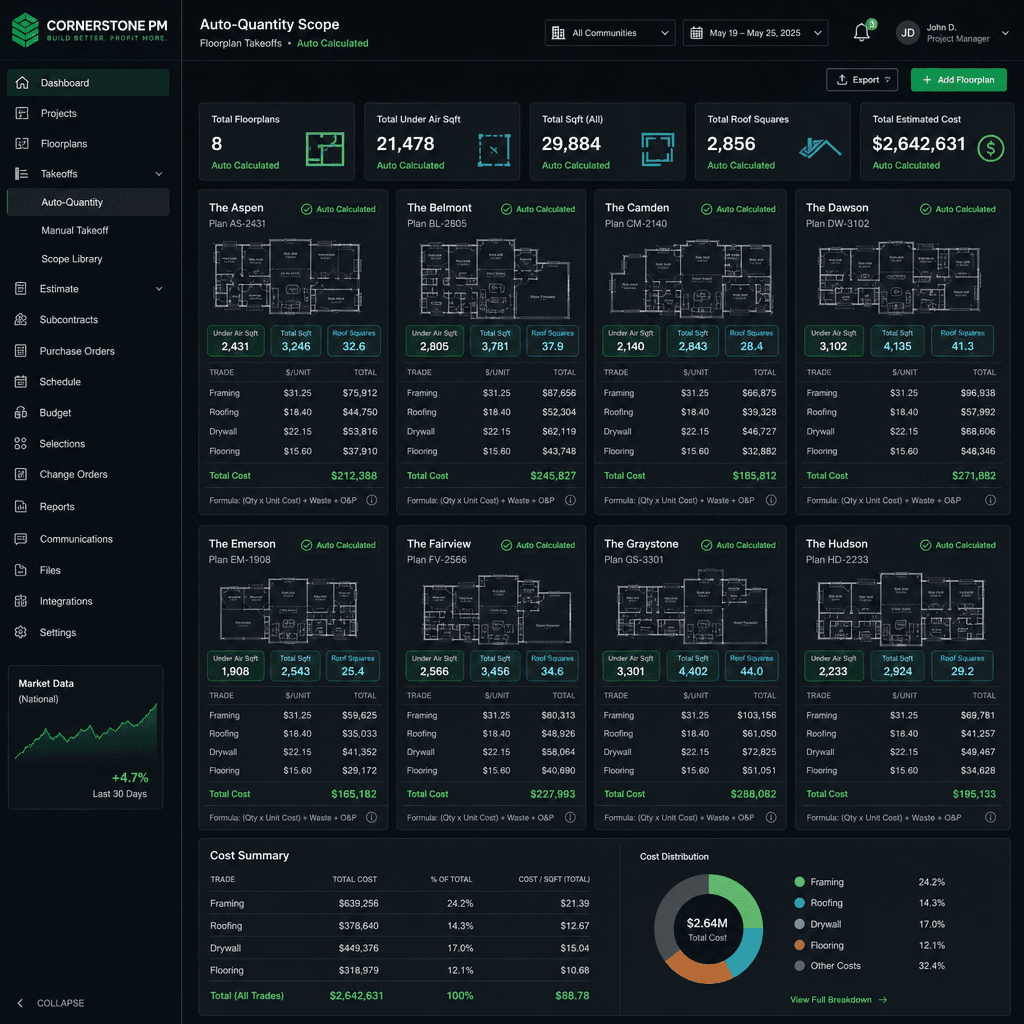
Auto-quantity scope items in Cornerstone PM link a scope item’s quantity directly to a floorplan measurement — Under Air Sqft, Total Sqft, or Roof Squares — so every plan and every structural option prices itself automatically. You define paint cost per sqft once. Cornerstone reprices every floorplan, every elevation, every structural option instantly. No manual re-entry. No stale numbers.
Why Are Purchasing Agents Re-Entering Sqft So Often?
Most construction software stores scope items at the job or floorplan level as fixed numbers. When a builder adds a new floorplan — or when a buyer picks a structural option that changes the footprint — someone has to open each affected scope, recalculate the quantity manually, and type it in again.
For a builder running 12 floorplans with 4 structural options each, that’s 60+ line items to touch every time framing labor rates change. Multiply that by every scope that’s driven by square footage — Frame Labor, Slab Mason, Interior Paint, Final Clean, Trim Carpenter, Roof Labor — and you have a data entry problem that eats hours per month and produces stale pricing between updates.
Buildertrend and JobTread handle this the same way most tools do: per-plan line items, entered manually, updated manually. The auto-quantity approach eliminates the manual step entirely.
The Three Quantity Sources — and Which Scopes They Drive
Cornerstone PM supports three measurement sources pulled directly from each floorplan’s recorded dimensions:
Under Air Sqft
Heated and cooled interior space (ANSI Z765 compliant). Drives interior-finish scopes that scale with livable area.
Total Sqft
Full building footprint including garage and covered porch. Drives structural and exterior-envelope scopes.
Roof Squares
Roof surface area in squares (1 square = 100 sqft). Drives roofing labor and materials scopes directly off the pitch-adjusted area.
How to Set Up Auto-Quantity Scope Items (5 Steps)
Setup takes under 10 minutes per scope item. Once configured, the scope auto-calculates forever — no maintenance required until your unit rate changes.
- 1
Navigate to Purchasing → Scope Items
From your Cornerstone PM dashboard, open Purchasing and select Scope Items. Each scope maps to a vendor trade and appears in the bid templates you send to subs.
- 2
Open the scope item you want to auto-quantity
Pick a scope driven by square footage — Frame Labor, Interior Paint, Final Clean, Roof Labor, etc. Click Edit.
- 3
Set the Quantity Source
In the Quantity Source dropdown, choose Under Air Sqft, Total Sqft, or Roof Squares. Cornerstone pulls that measurement directly from each floorplan's recorded dimensions — no spreadsheet math on your end.
- 4
Enter your unit rate
Type your labor or material rate per unit: $4.25/sqft for Frame Labor, $0.85/sqft for Interior Paint, whatever your vendor pricing says. This is the one number you update when pricing shifts.
- 5
Save — every floorplan and structural option auto-calculates
Hit Save. Cornerstone applies rate × quantity source across every floorplan in your catalog instantly. Change the rate later and all 12 plans reprice in seconds.
Structural Options: The Repricing That Happens Automatically
This is where auto-quantity earns its keep. Most builders know their Magnolia plan is 2,100 sqft Under Air. What they don’t track cleanly is how the Bonus Room option (adds 280 sqft Under Air) changes Frame Labor, Interior Paint, Final Clean, and Trim Carpenter costs simultaneously.
With manual entry, each structural option needs its own priced-out line items — maintained separately for every plan it applies to. A builder with 12 floorplans and a bonus room structural option available on 8 of them has 8 separate line items to keep in sync.
With auto-quantity scope items, the structural option just records its incremental sqft impact. Every auto-quantity scope picks that up automatically. The bonus room on the Magnolia plan prices itself: Frame Labor adds $4.25 × 280 = $1,190. Interior Paint adds $0.85 × 280 = $238. Final Clean adds $0.22 × 280 = $61.60. All without anyone touching a scope item.
How This Compares to Buildertrend and JobTread
Buildertrend’s estimating module stores line items per job. You can build estimate templates, but quantity is still a field you fill in per plan — there’s no native “pull from floorplan sqft” link. When your framing subcontractor raises rates in March, you update the template and apply it to new jobs going forward. Existing jobs and existing plan templates need manual updates.
JobTread uses a similar job-scoped estimating model. Quantity is entered at the line-item level per job. There is no production-builder concept of a floorplan-level scope that propagates to every home of that plan.
The difference isn’t just convenience — it’s a structural model. Buildertrend and JobTread were built for custom builders pricing unique jobs. Auto-quantity scope items are designed for production builders running the same plans repeatedly across multiple communities, where repricing 60 line items manually is not a viable workflow.
One rate change. Every plan repriced.
When your framing sub raises rates in spring, update Frame Labor once in Cornerstone PM. Every floorplan — and every structural option on every floorplan — reprices instantly. No spreadsheet. No data entry marathon.
Works With the Rest of Your Purchasing Stack
Auto-quantity scope items connect directly to the rest of Cornerstone PM’s purchasing workflow. When you send a bid request to vendors, the auto-calculated quantities populate the bid template automatically — subs see the right sqft-based numbers without you preparing a custom spreadsheet for each trade.
If you use Blueprint AI for material takeoff, the extracted floorplan dimensions feed directly into auto-quantity calculations. Blueprint reads your floor plan PDF, records Under Air Sqft, Total Sqft, and Roof Squares, and every auto-quantity scope item prices itself from the output — from PDF upload to fully priced scope in under 60 seconds.
And when you need to ask questions about your purchasing data — “What’s frame labor for the Magnolia with bonus room across all 5 communities?” — Foreman AI can pull that number directly from your scope items and floorplan data. No export to Excel required.
Key Takeaways
- Auto-quantity scope items link directly to Under Air Sqft, Total Sqft, or Roof Squares from each floorplan.
- Structural options (bonus room, finished basement, 3-car garage) inherit the auto-calculation automatically — no separate line items.
- Update one unit rate and every floorplan reprices instantly — 12 plans, 60 scope items, zero manual entry.
- Works with Blueprint AI takeoff (feeds dimensions) and Foreman AI (queries pricing data).
- Buildertrend and JobTread require manual quantity entry per plan — built for custom builders, not production repeats.
Stop Repricing Floorplans by Hand
Auto-quantity scope items are live in Cornerstone PM. Set up your sqft-linked scopes once, and every current and future floorplan prices itself.
Get Early Access