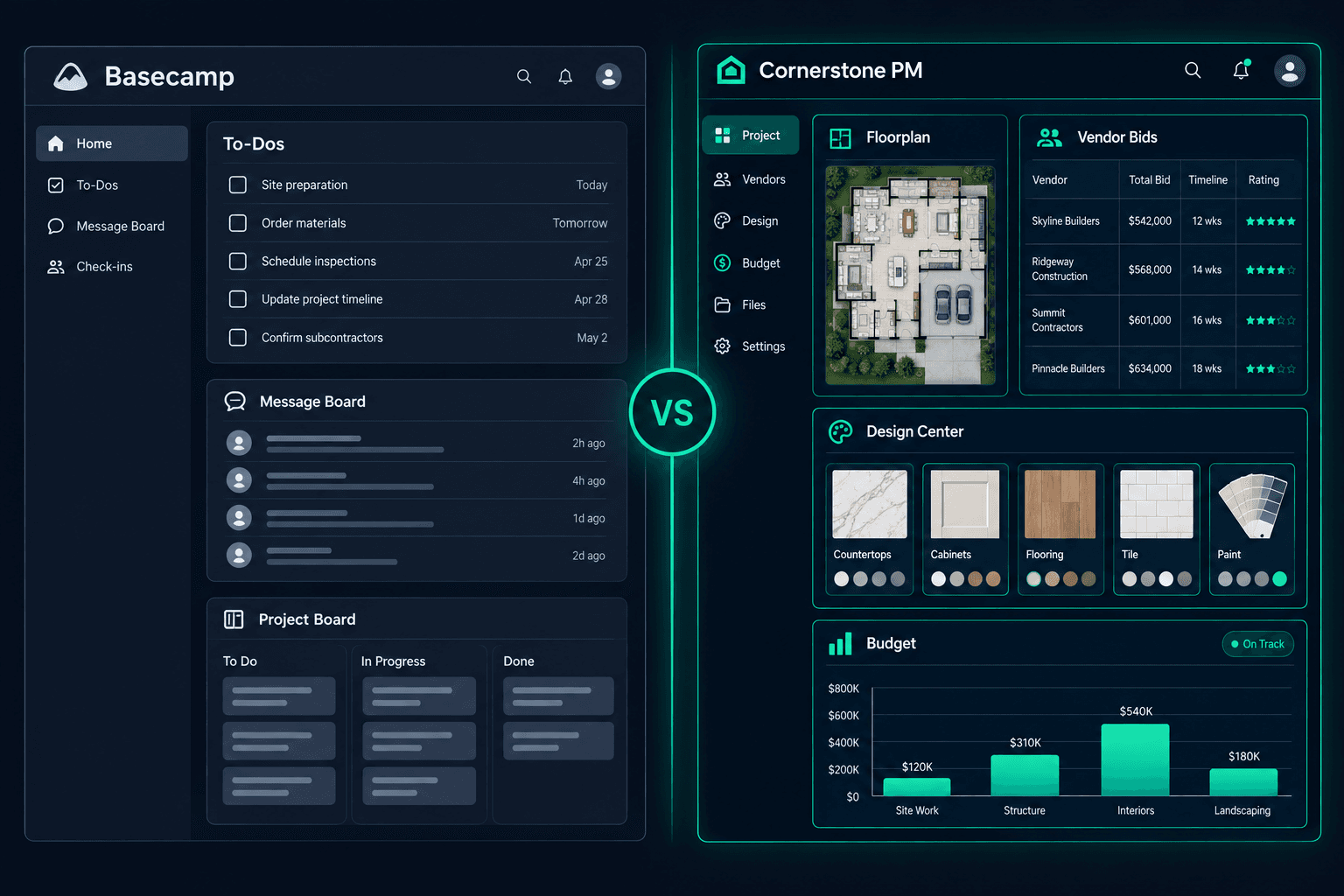
Basecamp vs Cornerstone PM: Team Coordination or Connected Homebuilding?
Basecamp is general team coordination software — to-dos, message boards, and a shared calendar organized around projects. Cornerstone PM™ is a homebuilding platform where floorplan costs, community vendor awards, buyer selections, and purchasing are already connected to each other. The right fit depends on whether a builder needs a place for the team to talk and track tasks, or a workflow built around how production homes actually get priced, sold, and built.
Basecamp markets itself directly on its features page as project organization and communication software for any kind of team — there's no construction, homebuilding, or real-estate vertical called out anywhere on it. That's not a knock; it's a deliberate, flat scope that's made Basecamp a durable tool for small teams for two decades. The question for a production builder is narrower: does a general coordination tool understand a floorplan, a community, or a buyer selection as a first-class concept, or does every home start as a blank project with its own to-do list? For the full category overview, start at home builder project management software.
What does Basecamp actually offer a builder's team?
Basecamp's features page names six categories, and the list is genuinely well scoped for general team coordination:
- To-do lists — assignments, due dates, file attachments, and subtasks on every project.
- Message Boards & Campfire chat — threaded announcements plus a built-in alternative to Slack-style messaging.
- Card Tables & Hill Charts — kanban-style stage tracking and a visual way to see real progress versus bottlenecks.
- The Lineup & Reports — a bird's-eye timeline across every project plus high-level status rollups.
- Docs & Files — a searchable home for images, documents, and cloud assets.
- Client mode, API, and integrations — controlled visibility for outside collaborators and room for third-party or AI agent connections.
For a small team that needs one place to assign tasks, post updates, and keep files organized, that's a credible, simple toolkit. What it doesn't claim to do — and this is worth taking Basecamp at its word on — is model a floorplan, a lot, a community, or a buyer's selections as data the platform understands. Those stay general: a task, a file, a line on a Card Table.
Following a home through each platform
The clearest way to compare the two is to follow one home from floorplan to purchase order:
- Floorplan costs: Cornerstone PM prices options once at the floorplan level and reuses that pricing across every home of that plan, in every community. Basecamp has no floorplan object at all — a plan's cost detail would have to live in a Doc, a file attachment, or a Card Table someone keeps updated by hand across every project that uses it.
- Community vendor awards & accepted pricing: Cornerstone's purchasing module sends scope-filtered bid requests to vendors, lets vendors submit through a no-login portal, and locks accepted pricing per community once awarded. Basecamp's to-do lists and message boards can track that a bid request was sent and a vendor replied, but there's no bid-comparison or price-lock mechanism — that logic would need to live outside the platform entirely.
- Buyer selections: Cornerstone's design center gives home buyers a selections portal with 64 curated Designer Packages that auto-lock category options, plus exclusion groups so picking one flooring option marks that category complete. Basecamp's feature list doesn't include a buyer-facing concept of any kind — selections tracking would have to happen in a to-do list or a shared doc, manually reconciled against what was actually chosen.
- Purchase orders into a connected budget: In Cornerstone PM, an accepted vendor bid flows into the Master Cost Budget the same way for every home of a plan. Basecamp doesn't publish any budgeting or cost tracking feature — Reports summarize project status, not dollars, so a builder would need a separate accounting or spreadsheet system wired in alongside it.
None of this means Basecamp is thin software — Hill Charts and the Lineup are genuinely useful ways to see where work is stuck across many projects at once. It means homebuilding-specific objects — a floorplan, a community, a buyer selection, a priced purchase order — simply aren't things the platform is trying to model, by design.
Feature comparison: Basecamp vs Cornerstone PM™
| Feature | Basecamp | Cornerstone PM™ |
|---|---|---|
| To-do lists & task assignments | ||
| Message boards & team chat | Partial | |
| Hill Charts / progress visualization | Partial | |
| Shared calendar & scheduling | ||
| Docs & file storage | ||
| Client mode (external visibility control) | Partial | |
| Floorplan / model home concept | ||
| Per-floorplan options pricing | ||
| Designer Packages (64 curated, auto-lock) | ||
| Design center exclusion groups (pick one) | ||
| Buyer-facing design center portal | ||
| Multi-community lot management | ||
| Community-assigned vendor bid awards & price locks | ||
| AI material takeoff from PDF | ||
| Foreman AI (396+ skills, persistent memory) | ||
| Connected Master Cost Budget | ||
| API & third-party integrations |
“Partial” reflects capabilities that exist in a different form on each platform — confirm current details directly with Basecamp before relying on this table for a purchase decision.
What does Cornerstone PM™ ship that stays connected out of the box?
Cornerstone PM™'s advantage over a general coordination tool isn't a longer feature list — it's that the homebuilding data is already wired together instead of living in tasks, docs, and someone's memory:
- Floorplans and per-plan options that price once and apply to every home of that plan across every community.
- 64 Designer Packages and exclusion groups in the buyer design center — pick one from many, category done.
- Community-assigned vendor bidding with a no-login vendor portal and price locks after acceptance.
- A connected Master Cost Budget — accepted bids and purchase orders flow into the budget automatically.
- Foreman AI — 396+ skills for purchasing, vendor management, and budget analysis, with persistent memory. Meet Foreman →
That doesn't make Basecamp a bad tool for what it's built to do. It makes Cornerstone PM™ a different kind of tool — one where the homebuilding logic is the product, not a set of tasks and files a team has to keep in sync by hand.
Who should use each platform?
Use Basecamp if you are…
- A small builder or trade team needing to-dos, chat, and a shared calendar
- Already coordinating other parts of the business in Basecamp
- Comfortable tracking floorplan costs and selections outside the platform
- Looking for a flat, simple project-communication tool, not a cost system
Use Cornerstone PM™ if you are…
- A production home builder (5–200 homes/year)
- Selling the same floorplans across multiple communities
- Wanting a buyer design center and community vendor bidding to work out of the box
- Needing accepted bids to flow straight into a connected budget
- Wanting AI agents built for homebuilding rather than a general integration layer
Basecamp is a well-built, well-scoped tool for team communication and task tracking — it's just not trying to be homebuilding software, and its own features page makes that clear. The question for production builders isn't whether Basecamp can keep a team talking and organized — it can — it's whether floorplan costs, buyer selections, community vendor awards, and purchasing need to be reconstructed by hand inside tasks and docs, or whether they already come connected. If you're in the second camp, see the full home builder software category overview and the purchasing workflow to see what a connected homebuilding pipeline looks like in practice.
A homebuilding workflow, not a task list
See how Cornerstone PM™ connects floorplan costs, the design center, community vendor bidding, and the Master Cost Budget — without reconstructing it in to-dos and docs.
Request Early Access →