When One Trade Slips: Cascade Scheduling for Home Builders
When framing runs three days late on a home, every downstream trade — plumbing rough-in, electrical, insulation, drywall — is now scheduled on the wrong date. Cornerstone's cascade scheduling adjusts all of them automatically and notifies every affected vendor so no one shows up to an empty jobsite.
Construction scheduling is a dependency problem. Every trade on a home depends on the one before it. Framing has to be closed in before insulation, insulation before drywall, drywall before paint. When one link in that chain slips — bad weather, material delivery, a crew running over on the previous job — the entire tail of the schedule is now wrong.
Most builders fix this the hard way: a superintendent spends a morning on the phone rescheduling five trades, updating a whiteboard or a spreadsheet that nobody else can see, then hoping the vendors actually received the new dates. On a community with 20 or 30 active homes, a single framing delay can generate dozens of downstream reschedules across the job board. That's not a scheduling problem — it's a coordination tax that eats a superintendent's entire day.
How does cascade scheduling work?
In Cornerstone's construction scheduling module, every task in a home's schedule is connected to the tasks that depend on it. When a task's completion date changes — whether because a superintendent marks it delayed, or because a preceding task pushes its start — all downstream tasks in the dependency chain shift to match.
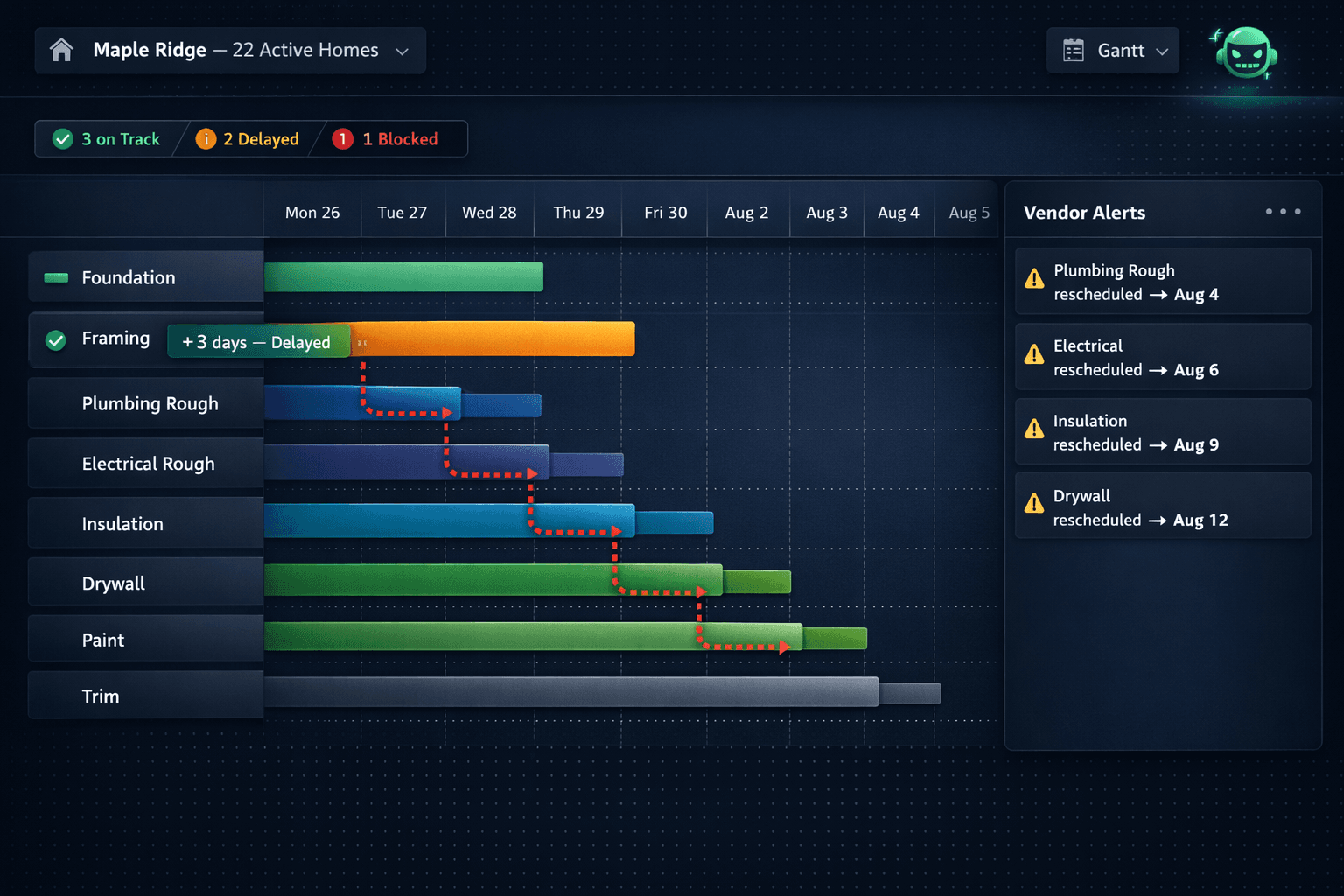
Move framing out three days, and Cornerstone automatically moves plumbing rough-in, electrical rough, insulation, drywall, and every trade after them by the appropriate number of days. The schedule stays internally consistent with one adjustment instead of five separate manual edits.
What a 3-day framing delay looks like across one home
One task update — Cornerstone adjusts the full downstream chain and sends vendor notifications automatically.
Vendors don't need to log into Cornerstone to see updated dates. When a cascade reschedule runs, affected vendors receive automatic notifications with their new start date — so the plumber, electrician, and insulation contractor all know before they plan their week, without the superintendent making a single phone call.
Why production home building needs this more than custom construction
A custom builder running two or three one-off jobs can probably absorb a manual reschedule. A production builder running 20, 40, or 80 homes across two communities cannot. The whole model depends on repeatability: the same Magnolia plan, the same schedule template, applied to every lot in the community.
Cornerstone builds schedules from schedule templates — a reusable sequence of tasks with predecessor relationships baked in. Apply the Magnolia template to Lot 14 and the full schedule generates instantly, correctly sequenced. When that template is tuned over time (a task that always runs long gets an extra buffer; a new trade is added to the sequence), every future home scheduled from that template inherits the improvement.
Generic project management tools — ClickUp, Asana, Monday — let you re-drag bars on a Gantt chart. That works when you have three projects. With 30 active homes and 12 trade sequences per home, the right answer is a cascade that moves everything for you — not a tool that makes re-dragging slightly easier.
The Gantt view across an entire community
Cornerstone's Gantt view isn't per-home — it shows the full community. Superintendents see all active homes and their current task states side by side, with status indicators surfacing which homes are on track, which have delayed tasks, and which have a dependency conflict.
From that view, a single task adjustment on one home ripples through the schedule in real time. The superintendent can see the downstream effect immediately before committing — useful for deciding whether a three-day slip is worth absorbing with an overtime push or whether it needs to propagate and delay the close.
What the scheduling module covers
Cascade scheduling
One task update shifts all downstream dependencies automatically
Schedule templates
Build once, apply to every home of that plan in every community
Vendor notifications
Affected subs get updated dates without a phone call
Community Gantt view
See all active homes, all task states, side by side
Webhook events
37 event types including task completion and schedule changes for automation
Task-to-PO connection
Assigned tasks auto-generate POs to the assigned vendor when the task is scheduled
Schedule changes as automation triggers
Cornerstone ships 37 typed webhook events — including events for task completion, task rescheduling, and cascade-triggered date changes. Builders who want to go further can wire those events to external automations: SMS to the superintendent when a cascade runs, a push to a Slack channel when a closing-critical task slips, or a call to a voice automation system when a vendor's start date changes.
The webhook layer means the scheduling system doesn't have to be the notification system — builders can route schedule change events to whatever channel their team actually checks, without writing custom integrations from scratch.
The purchasing connection: tasks that generate POs
The schedule and the purchasing module in Cornerstone are connected, not siloed. When a task is assigned to a vendor and that task is scheduled, Cornerstone auto-generates the purchase order for that vendor and emails it automatically. The vendor knows the scheduled date, the scope, and the PO details in one message — no separate notification, no back-and-forth to confirm dates.
When the task date cascades due to a delay, the vendor notification goes out with the updated date. The PO they already have reflects the change. The purchasing trail — PO to QuickBooks commitment to bill on completion — follows the updated schedule without anyone rebuilding it.
The whiteboard problem
A schedule that lives on a whiteboard or in a personal spreadsheet is invisible to the team, invisible to vendors, and invisible to the build. When it changes, everyone who needs to know has to be called individually. Cornerstone's schedule is the system of record — visible, live, and capable of notifying the people who need to know without a superintendent dialing five numbers.
How this connects to the broader platform
Cascade scheduling sits inside a full home builder project management platform. The schedule connects to purchasing (tasks generate POs), to the design center (the schedule drives buyer selection deadlines), and to the sales CRM (the projected close date follows the schedule). A delay doesn't just affect the Gantt — it surfaces wherever that date matters across the platform.
Foreman AI, Cornerstone's construction agent with 396+ skills, can read and update schedule tasks by chat. A superintendent can ask Foreman to reschedule a task, see what cascades, and confirm the change — without leaving the conversation. For teams who manage schedules at volume, that's a faster path than navigating a Gantt view for every adjustment.
Production home building is a game of managed repetition. The schedule template is right once, applied many times. When a delay happens — and it always does — the system absorbs it and propagates the change cleanly, rather than making a superintendent absorb it personally on the phone. That's the difference between a scheduling tool and a scheduling platform.
Keep your build on schedule — even when trades aren't.
Cornerstone PM's cascade scheduling adjusts downstream tasks automatically and notifies vendors so one delay doesn't become ten phone calls. See the full scheduling platform in action.
Request Early Access