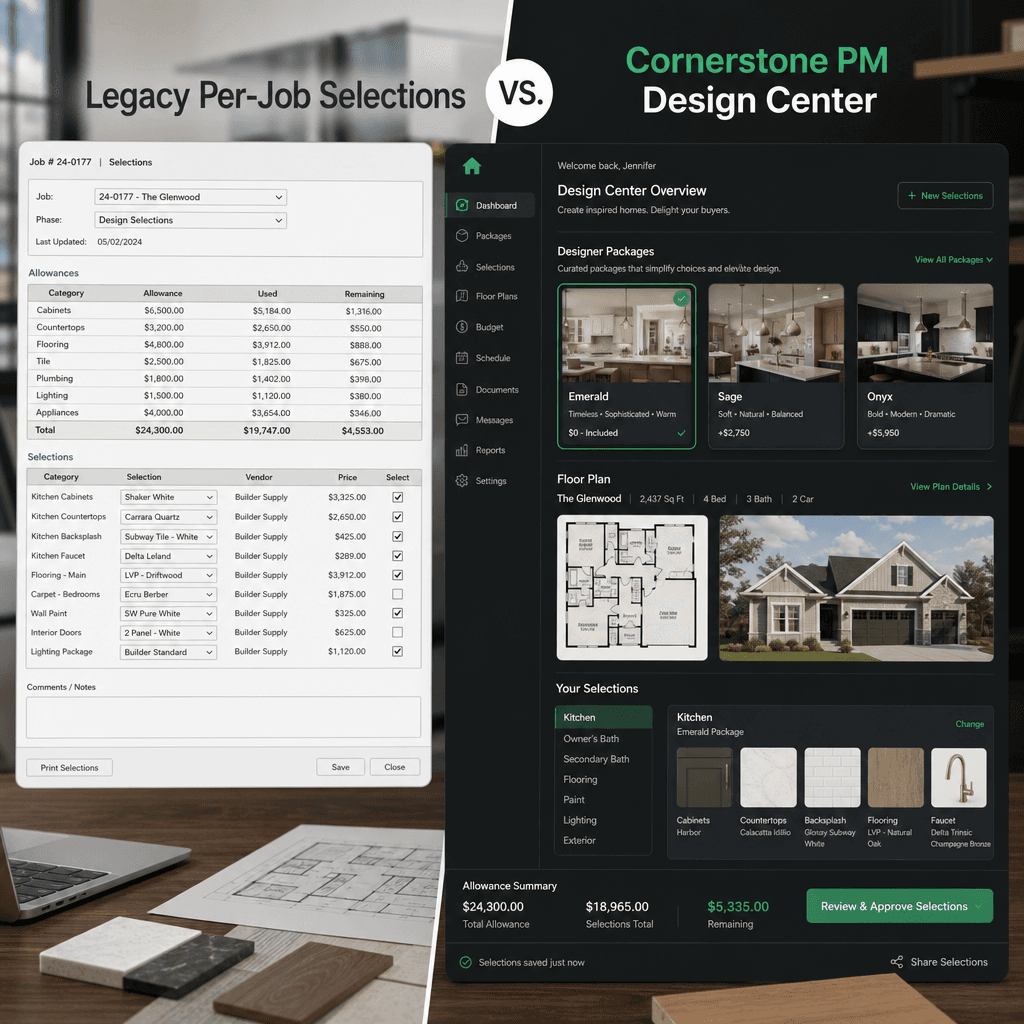
CoConstruct vs Cornerstone PM: Production Builder Design Center
CoConstruct was built for custom home builders managing one-of-a-kind projects with negotiated allowances and job-level selections. Cornerstone PM™ is built for production home builders selling plan repeats across communities with a buyer-facing design center and 64 Designer Packages. These are different product categories solving different problems.
CoConstruct's homepage now redirects to a Buildertrend migration landing page — the platform was acquired and customers are being moved to Buildertrend. If you're a production builder evaluating your next platform and CoConstruct came up in your search, this is the right time to ask whether either product was ever built for your business model. For the full category overview, start at home builder project management software.
What is CoConstruct built for?
CoConstruct was designed for custom home builders and remodelers managing individual projects with unique scopes, client negotiations, and allowance-based selections. The core model is job-level: every home is treated as its own project with its own selection list, its own pricing negotiated with the homeowner, and its own change order log.
For a custom builder who builds five completely different homes every year, each with a different client, different lot, and different finish package, this model makes sense. You are starting fresh on every project because every project genuinely is fresh.
For a production builder selling the same Magnolia plan across three communities? Starting fresh on every home is the problem, not the workflow.
Why does the custom builder model break for production?
Production home building runs on a different set of economics. You sell plan repeats — the Magnolia plan gets sold 80 times across five communities. The kitchen upgrade package is the same product in Community A as it is in Community D. You configure it once; it should sell everywhere without re-entry.
CoConstruct's job-level selection model requires per-home configuration by definition. There is no concept of a floorplan template with shared option pricing. There is no Designer Package abstraction that auto-locks a category when a buyer picks a bundle. There is no plan-level pricing that propagates across communities.
Every home you sell under a job-level model is manual overhead. That overhead scales linearly with home count — which is exactly the wrong direction for a production builder trying to grow.
How does the Cornerstone PM™ design center actually work?
Cornerstone PM™ is built around a plan-level options model. Here is how it works in practice:
- Per-floorplan options:The Magnolia plan's kitchen upgrade is priced once at the plan level. Every Magnolia sold in every community inherits those options automatically. When vendor pricing changes, you update one place and it propagates everywhere.
- 64 Designer Packages:Across 7 categories (flooring, cabinetry, countertops, fixtures, appliances, exterior, and more), buyers choose a package at their design center appointment. When a package is selected, all options in that category auto-lock to the package's selections. No manual per-option configuration. If they want to customize further, they unlock individual options à la carte.
- Structural vs Designer scope separation: Bid templates sent to vendors automatically filter by scope type — structural subs see structural scopes, designer vendors see designer scopes. No manual filtering, no irrelevant line items cluttering vendor bids.
- Option Classes tied to scope: Each option category links to a scope item for budget tracking. Selections flow directly into the Master Cost Budget with no separate data entry.
- Area Cost Pricing: Community-level extras (lot premiums, community upgrades, regional cost adjustments) are managed separately from plan-level options and applied per-community or per-floorplan globally.
None of these concepts exist in CoConstruct. They are not missing features — they are a different product model entirely.
Feature comparison: CoConstruct vs Cornerstone PM™
| Feature | CoConstruct | Cornerstone PM™ |
|---|---|---|
| Plan-level options (priced once, reused across homes) | ||
| Designer Packages (auto-lock category options) | ||
| Multi-community lot and model management | ||
| Community-assigned vendor wins per scope | ||
| Structural vs Designer scope separation | ||
| Area Cost Pricing for community extras | ||
| Zero filler/default pricing (all costs from real data) | ||
| AI material takeoff from floor plan PDF | ||
| Foreman AI (396+ skills) | ||
| Job-level custom selections (allowance model) | Partial | |
| Custom builder project management | ||
| Client portal for change orders | ||
| Still an active, maintained product |
The forced migration opportunity: why now is the right time to switch
CoConstruct customers are being asked to migrate to Buildertrend. That migration friction creates a natural evaluation moment: if you are already moving your data, why move to a platform with the same custom-builder DNA as the one you're leaving?
Buildertrend was built for the same market as CoConstruct — custom builders, remodelers, and single-project GCs. It has better tooling and a larger ecosystem than CoConstruct, but its core model is still job-level selections, not plan-level production. The community/lot/model abstraction production builders need is not in the Buildertrend product roadmap because it serves a different customer.
A production builder being forced to migrate once is already open to the idea of migration. The question is whether you migrate sideways or migrate to a platform actually designed for your business model.
What about the pricing and design center revenue opportunity?
The design center is the highest-margin interaction in a home sale. Buyers who engage with a well-designed options process spend more on upgrades — and they feel better about the purchase because they were in control of the choices.
A job-level allowance model undermines that. When every home has negotiated allowances, you are essentially inviting a pricing conversation on every line item. When you have 64 curated Designer Packages, you are presenting a structured menu of upgrade paths with clear value at each tier. That is a fundamentally different revenue conversation.
Cornerstone PM™ also eliminates filler pricing entirely — every dollar shown to a buyer traces back to real vendor pricing. Material costs come from AI takeoff parts matched to vendor quotes; labor costs come from accepted vendor bids. There are no synthetic estimates, no estimator-inserted placeholders, no defaults that silently drift out of date.
For more on how vendor bidding integrates with the design center, see the Cornerstone PM purchasing overview.
AI capabilities: what Cornerstone PM™ adds to the design center workflow
CoConstruct has no AI agents. Cornerstone PM™ ships five purpose-built AI agents for residential production, with the design center workflow benefiting from three of them directly:
- Blueprint AI — parses a floor plan PDF and extracts 130+ material scopes in under 60 seconds. Takeoff output flows directly into scope items and design option pricing, eliminating the manual estimation step that creates filler pricing. See Blueprint AI →
- Foreman AI — an in-app agent with 396+ skills that reads AND writes data. In the design center context, Foreman can generate scope-of-work documents, run profitability analysis on option pricing, detect gaps between options and scope coverage, and produce vendor scorecards for design-center-related trades. Meet Foreman →
- Bid Import AI — auto-maps vendor bid spreadsheets to your scope items. No manual column matching. Bids from cabinet vendors, countertop suppliers, and fixture distributors flow directly into option pricing.
All five AI agents are bundled at no extra cost. There are no add-on subscriptions, no API key configuration, and no third-party accounts to manage.
Who should use CoConstruct/Buildertrend, and who should use Cornerstone PM™?
CoConstruct / Buildertrend fits if you are…
- A custom home builder or high-end remodeler
- Building fewer than 15 homes per year, each fully customized
- Negotiating unique allowances and selections per client
- Managing change orders at the individual project level
Cornerstone PM™ fits if you are…
- A production builder doing 5–200 homes/year
- Selling plan repeats across one or more communities
- Running a buyer-facing design center with upgrade packages
- Managing multi-trade vendor bids across communities
- Wanting AI agents built for production, not custom one-offs
The bottom line: CoConstruct was a capable platform for custom builders, and Buildertrend continues that model. Neither was designed for production home building — the plan-level options engine, Designer Packages, multi-community vendor management, and AI takeoff are not missing features waiting to be added. They require a fundamentally different data model. If you are a production builder being pushed to migrate from CoConstruct, this is the moment to ask whether you want to migrate to a production-first platform. Start with the full home builder software category comparison to see the landscape, then evaluate specifics.
Built for production, not custom builds
See how Cornerstone PM™ handles plan-level options, Designer Packages, AI takeoff, and multi-community vendor management — the workflows CoConstruct and Buildertrend were never designed for.
Request Early Access →