A Construction Chart of Accounts That Ties to Your Cost Codes
A construction chart of accounts should map one-to-one with your cost codes — accounts for financial reporting, cost codes for operational detail — so every PO, bill, and change order flows into the right account automatically. Cornerstone's purchasing module connects to QuickBooks Online and builds that structure in a single click, reusing account names you already trust.
Why most builders fight their chart of accounts forever
Most home builders inherit a chart of accounts set up by a general-practice bookkeeper who knew QuickBooks but didn't know construction. The result is usually one or two large catch-all COGS accounts — “Subcontractor Costs” and “Materials,” or a single “Cost of Construction” bucket — and a growing stack of journal entries every month to sort things out.
When every framing PO, plumbing bill, and electrical change order lands in the same account, per-home margin becomes a guess. A bookkeeper can tell you what you spent last quarter; they can't tell you what you spent on framing labor for Lot 14 in River Bend without pulling reports and digging through descriptions.
The fix isn't a more complicated chart of accounts — it's a chart of accounts that actually mirrors how you build, with accounts that correspond to real cost codes and transactions that carry enough detail to be traced in both directions.
Accounts vs cost codes: two different layers with one job between them
Accounts live in your general ledger. They're how your CPA, your bank, and the IRS see your money. Chart-of-accounts design follows reporting logic: income, COGS, operating expenses, assets, liabilities.
Cost codes live in your operations. They describe the work: Framing Labor, Framing Material, Plumbing Rough, Electrical Trim, HVAC, Drywall, Roofing. Cost codes tie a purchase order to a trade, a home, and a scope of work. They're what you use to answer the question, “What did we actually spend building this house?”
The structural problem most builders hit is that these two layers aren't connected. Cost codes live in a spreadsheet or a construction platform; accounts live in QuickBooks; and a bookkeeper reconciles between them manually at the end of each month — eating hours and introducing error every time a PO description doesn't match an account name.
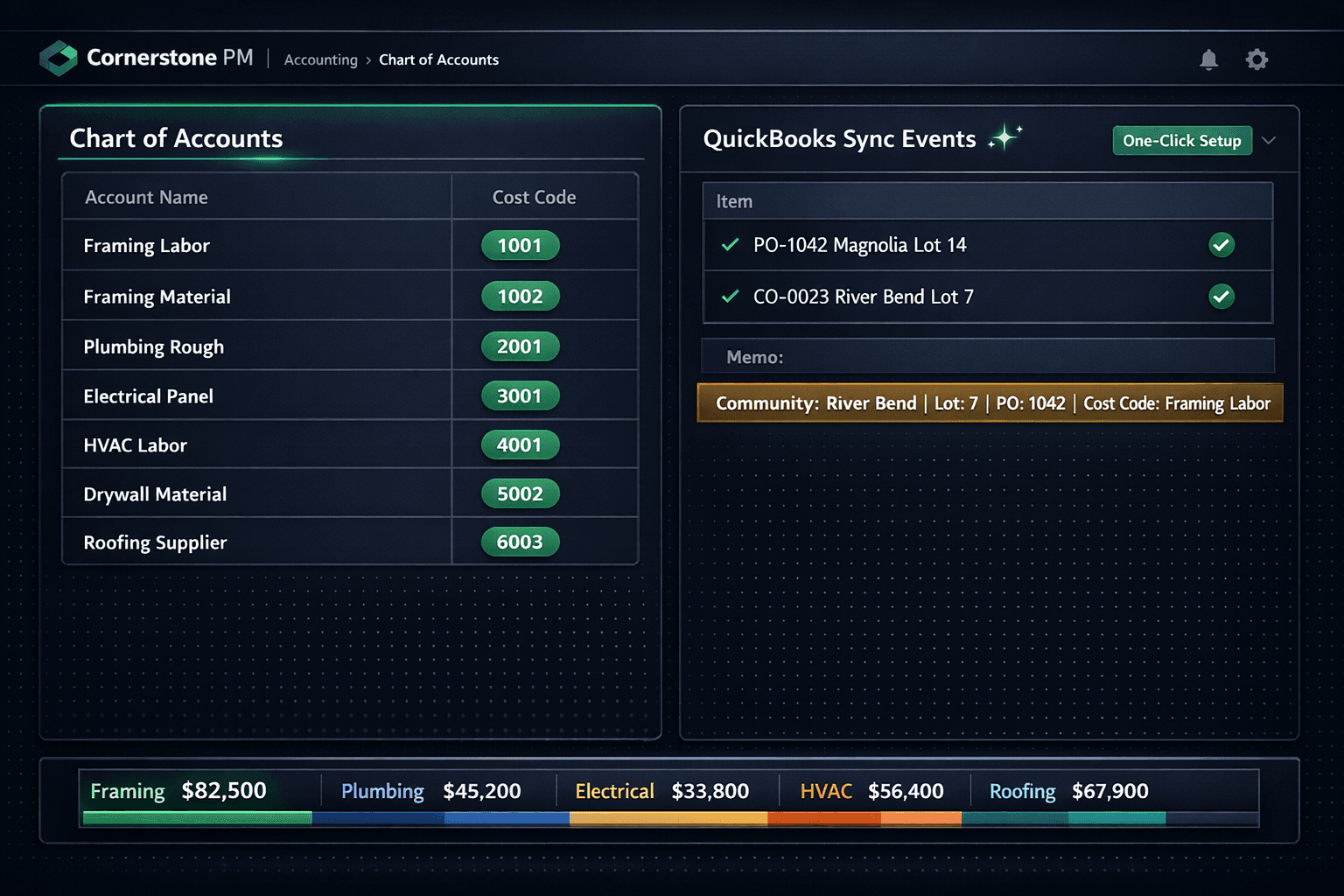
The right design has a one-to-one line: each cost code maps to a dedicated account. Framing Labor is an account. Framing Material is an account. When a framing PO routes to Framing Labor in the books, everyone from the superintendent to the CFO is looking at the same number — no translation, no reconciliation.
How to structure a construction chart of accounts
Audit what you have
Open your current QuickBooks chart of accounts. Identify how construction costs are bucketed. Most builders find one or two large COGS accounts catching everything. Note which are catch-all accounts with no corresponding cost code.
Define cost codes by trade — labor and material separate
List every trade on a typical home. Create a labor cost code and a material cost code for each trade separately. They have different tax treatment (materials are taxable, labor is typically exempt) and different variance patterns.
Map each cost code to a dedicated account
Create or rename QuickBooks accounts so each cost code has a clean home. The account exists for financial reporting; the cost code carries operational detail. A one-to-one line between them means every transaction traces in both directions.
Connect Cornerstone to QuickBooks for a one-click COA build
In Cornerstone PM, connect to QuickBooks Online under Accounting settings. The one-click Chart of Accounts setup builds a construction-ready COA and cost-code items automatically, reusing existing account names so it never restructures books you already trust.
Verify synced memos carry full detail
After the first sync, check a PO in QuickBooks. Every Cornerstone-synced transaction carries community, lot, address, PO number, and cost code in the memo — so a bookkeeper can trace any entry back to the exact home and trade without leaving QuickBooks.
What a clean construction COA looks like in practice
Sample construction chart of accounts (partial)
Account
Cost Code
Tax Treatment
Framing Labor
Framing Labor
ExemptFraming Material
Framing Material
TaxablePlumbing Rough
Plumbing Rough
ExemptElectrical Panel
Electrical Panel
TaxableHVAC Labor
HVAC Labor
ExemptDrywall Material
Drywall Material
TaxableRoofing Supplier
Roofing Supplier
TaxableLabor accounts are typically tax-exempt; material accounts carry sales tax automatically in Cornerstone — no manual tax split required.
Why the memo field matters more than builders realize
Most accounting integrations push a dollar amount and an account. That covers the balance sheet but leaves a bookkeeper with nothing to go on when a bill needs to be traced back to a specific job or a vendor dispute needs to be resolved.
Cornerstone stamps every synced PO, bill, and change order with a structured memo: community name, lot number, street address, PO number, and cost code. The memo travels into QuickBooks with the transaction so a bookkeeper can filter by community, search by PO number, or pull all transactions for a specific lot without leaving QuickBooks or calling anyone.
That detail also protects against month-end reconciliation surprises. If Framing Labor is over budget for River Bend, a bookkeeper can pull every transaction against that account, read the memos, and identify exactly which PO or change order caused the variance — without opening Cornerstone or asking a superintendent.
The one-click shortcut — and what it actually does
Rebuilding a chart of accounts by hand is tedious and the stakes are high — rename the wrong account and old transactions misclassify. The Cornerstone one-click setup takes a different approach: it scans existing QuickBooks account names and reuses any that already match construction cost codes by name. Accounts that don't exist yet get created; accounts that already exist stay exactly where they are, with no reclassification.
The result is a construction-ready COA plus cost-code items that are wired to the right accounts from the start — without a bookkeeper spending a day renaming things and manually mapping cost codes.
From that point, every purchase order, bill, and change order that flows through Cornerstone routes to the correct account automatically. Approved POs sync as QuickBooks Purchase Orders (commitment accounting). On receipt, the linked Bill auto-creates and closes the PO. The Sync Events log shows every push to QuickBooks plus retries, so nothing disappears silently.
Per-home P&L without a separate reporting layer
The final piece of the puzzle is job-level reporting. A chart of accounts tells you what you spent; it doesn't tell you what you spent on a specific home without filtering by job in QuickBooks.
Cornerstone's QuickBooks sync maps each Community to a QuickBooks Customer (parent entity) and each Home to a Project — or a sub-customer Job on QuickBooks tiers that don't include Projects. That means every PO, bill, and change order lands under the right home automatically. A builder can pull a per-home P&L directly from QuickBooks without pivot tables or manual job code entry: open the River Bend project in QuickBooks, filter by account, and see framing labor, electrical, and HVAC costs for that home tied to real vendor invoices.
What the Cornerstone → QuickBooks sync handles automatically
COA build
One-click creates construction-ready accounts and cost-code items, reusing existing names
Two-stage accrual
Sent PO posts as a QBO Purchase Order; receipt creates a linked Bill and closes the PO
Job-level routing
Community → QBO Customer, Home → QBO Project for per-home P&L out of the box
Structured memos
Every transaction carries community, lot, address, PO number, and cost code
Sales tax split
Material lines taxed automatically; labor lines stay exempt — no manual tax entry
Sync Events log
Every push to QuickBooks is logged with retry visibility — no silent failures
The bottom line for home builders
A generic chart of accounts isn't a bookkeeping problem — it's a margin problem. When cost data is too aggregated to trace, builders lose the ability to spot where a plan type is losing money, which trades are consistently over budget, or which communities carry higher material costs than the pro forma assumed.
The fix is simpler than most builders expect: get a COA that mirrors your cost codes, wire it to the transactions that already flow through your purchasing workflow, and let the structured memos do the tracing work in QuickBooks. Cornerstone's one-click setup builds that foundation automatically — and every PO approved from that point carries the detail to back it up.
Get a construction chart of accounts that actually works.
Cornerstone PM builds a construction-ready chart of accounts in one click and syncs every PO, bill, and change order to QuickBooks with full cost-code detail in the memo.
Request Early Access