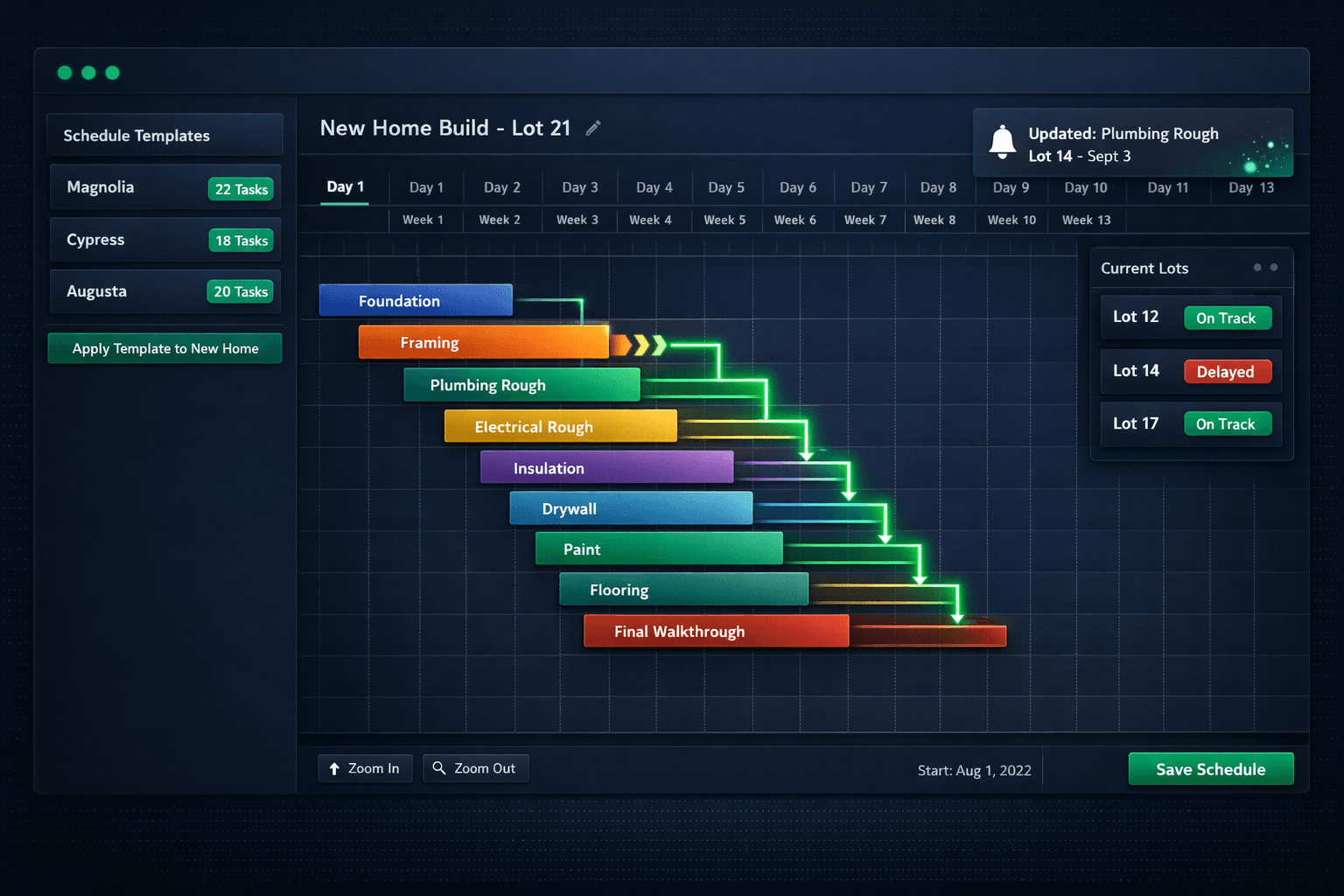
Schedule Templates: Build the Plan Once, Run It on Every Home
Production home builders repeat the same floorplans across communities — so rebuilding a 120-task construction schedule from scratch for every new start is pure waste. Define a schedule template once per floorplan, apply it to every home, and let cascade scheduling handle the rest.
A production builder closing 80 homes per year is not running 80 different projects. They're running the same project — the Magnolia plan, the Cypress plan, the Augusta plan — repeated across different lots and communities, each with the same sequence of trades and the same critical-path logic. The framer always follows the foundation crew. Plumbing rough always follows framing. Insulation never precedes electrical rough. These relationships are fixed by the craft, not by the lot number.
Despite that repeatability, most builders rebuild the schedule from scratch for every start — dragging tasks, setting predecessors, assigning vendors, entering durations — because their tools treat every home as a blank slate. That's not a scheduling problem. It's a template problem.
How do construction schedule templates work?
In Cornerstone's construction scheduling module, a schedule template captures the full task sequence for a floorplan: task names, durations, predecessor relationships, and trade or vendor assignments. Build it once — correctly — and every future home started on that plan inherits the full schedule in one step.
Apply the Magnolia template to Lot 14 and Cornerstone generates a complete, sequenced 120-task schedule with start dates computed from the start date you assign, predecessor links intact, and trade assignments already in place. The schedule is ready before the first concrete is poured.
Manual scheduling vs. template-based scheduling
What makes a template live rather than static?
A schedule template is only useful if the schedule it generates stays accurate when reality changes. That's where cascade scheduling makes the difference.
When framing runs two days long — bad weather, a crew overrun on the previous job — every downstream trade is now scheduled on the wrong date. In Cornerstone, adjusting the framing task date triggers an automatic cascade: plumbing rough, electrical rough, insulation, drywall, and every subsequent task shift by the right number of days, with predecessor constraints respected. The schedule stays internally consistent with one edit, not a morning of phone calls.
Vendors don't need to log into Cornerstone to see updated dates. Affected subs receive notifications with their new start date automatically so no one shows up to a jobsite that isn't ready for them.
How do schedule templates connect to purchasing?
The schedule and the purchasing module in Cornerstone are wired together, not siloed. When a task in the schedule is assigned to a vendor, Cornerstone auto-generates the purchase order for that vendor and emails it when the task is scheduled. The vendor receives the scope, the date, and the PO details in one message — no separate notification step, no back-and-forth to confirm dates or scope.
When a cascade reschedule runs, the vendor notification goes out with the updated date. The approved PO then posts to QuickBooks Online as a committed cost, and when the work is marked complete the linked bill auto-creates and closes the PO — no dangling open commitments, no manual bill entry. The purchasing trail follows the schedule automatically.
What schedule templates give you
One template, every home
Apply the Magnolia template to Lot 14 and the full 120-task schedule generates instantly with correct sequencing and predecessor links.
Cascade scheduling built in
Adjust one task date and every dependent task shifts automatically. The schedule stays internally consistent with one edit, not five.
Vendor notifications on change
Affected subs receive updated start dates automatically — without a phone call or a login to the platform.
Auto-generated POs from tasks
Assigned tasks auto-generate purchase orders and email them to the assigned vendor when the task is scheduled.
Community Gantt view
See all active homes and all task states side by side, with at-a-glance indicators for on-track, delayed, and conflicted homes.
Template improvements carry forward
Tune a duration or add a task to the template and every future home inherits the update. No retroactive re-keying.
How do you manage 30 active homes at once?
Template-generated schedules only pay off if you can see across the full community pipeline. Cornerstone's community Gantt view shows every active home and its current task state side by side — not one home at a time, but all of them together.
Status indicators surface which homes are on track, which have delayed tasks, and which have a dependency conflict. A superintendent can scan the community Gantt in a few seconds and know exactly which lots need attention today, without clicking into each home individually.
When a task is adjusted on one home, the cascade ripples through the schedule in real time and the Gantt updates to reflect it. The superintendent sees the downstream effect before committing — useful for deciding whether a two-day slip is worth absorbing with an overtime push or whether it needs to propagate and delay the close.
What happens when the template needs to change?
Production building improves through iteration. A task that always runs long gets an extra buffer. A new inspection step gets added between drywall and paint. A trade reassignment updates the vendor for a scope.
In Cornerstone, those changes are made once to the template. Every future home started from that template inherits the improvement automatically — no retroactive editing of homes already in progress, no version-control gymnastics, no hoping the superintendent remembered to apply the new sequence to the latest starts.
Over time, the template gets better because the build process gets better. That's the compounding value of a template-first approach: each schedule starts from the most current version of how the team actually builds, not the version that was current when someone set up the project two years ago.
Time saved compounds with volume
At 80 homes per year, rebuilding a 120-task schedule by hand for each start can consume a full work week annually — before accounting for the time lost to manual reschedules and vendor calls after delays. Templates and cascade scheduling eliminate both.
How does AI fit into schedule management?
Cornerstone's Foreman AI — a construction agent with 396+ skills — can read and update schedule tasks by conversation. A superintendent can ask Foreman to reschedule a task, see what cascades, and confirm the change without leaving the chat or opening a Gantt view. For teams managing schedules at volume across multiple communities, that's a faster path than navigating the full interface for every small adjustment.
Foreman also connects the schedule to the broader home builder project management platform. A schedule delay surfaces in the CRM as a projected close-date change. A buyer's selection deadline adjusts when the design-center milestone shifts. The schedule isn't a standalone module — it's the backbone the rest of the platform runs on.
Production home building is a game of managed repetition. The right schedule template means that repetition works for the team instead of against them — each new start inherits the best current version of the plan, cascade scheduling absorbs the delays that always happen, and the superintendent's day is spent building instead of rebuilding calendars.
Build the plan once. Run it on every home.
Cornerstone PM's schedule templates and cascade scheduling eliminate the manual work of rebuilding schedules for every start — and keep the whole community on track when delays happen. See the full scheduling platform in action.
Request Early Access