How to Run a Design Center Appointment Without Losing the Budget
A design center appointment should end with a signed selection sheet that flows directly into the budget — not a PDF someone re-keys into a spreadsheet two days later. The Cornerstone PM design center structures the appointment as prep, selection, and close so the numbers the buyer sees are the numbers in the budget.
Most design center problems are configuration problems. They show up during the appointment — the wrong price for this community, two conflicting options both marked selected, a standard finish that should have been an upgrade — but the root cause is usually something that could have been resolved before the buyer sat down. A repeatable appointment process eliminates most of them.
How do you prepare for a design center appointment?
Preparation happens in Cornerstone before the buyer walks in. The most important step is confirming the community, because community-based upgrade pricing means the same option can be a standard inclusion in one community and a paid upgrade in another. Starting an appointment in the wrong community — or without checking the spec levels — means the running total is wrong from the first selection.
Before the buyer walks in
Confirm the floorplan and community
Community-based upgrade pricing means the same option may be standard in one community and a paid upgrade in another. Start here.
Verify spec levels for this community
Know which options are included in the base price before the buyer walks in. Surprises mid-appointment undermine trust.
Check structural options for this buyer
If the buyer has a bonus room or finished basement, the square footage drives some costs automatically — confirm those are in the system.
Confirm the appointment duration
Designer packages can compress a two-hour appointment to 45 minutes. Set expectations accordingly.
Why do designer packages make the appointment faster?
The most time-consuming part of a design center appointment is the first thirty minutes — when a buyer faces a blank options list across six or seven categories and has no anchor for what they want. Designer packages solve this directly.
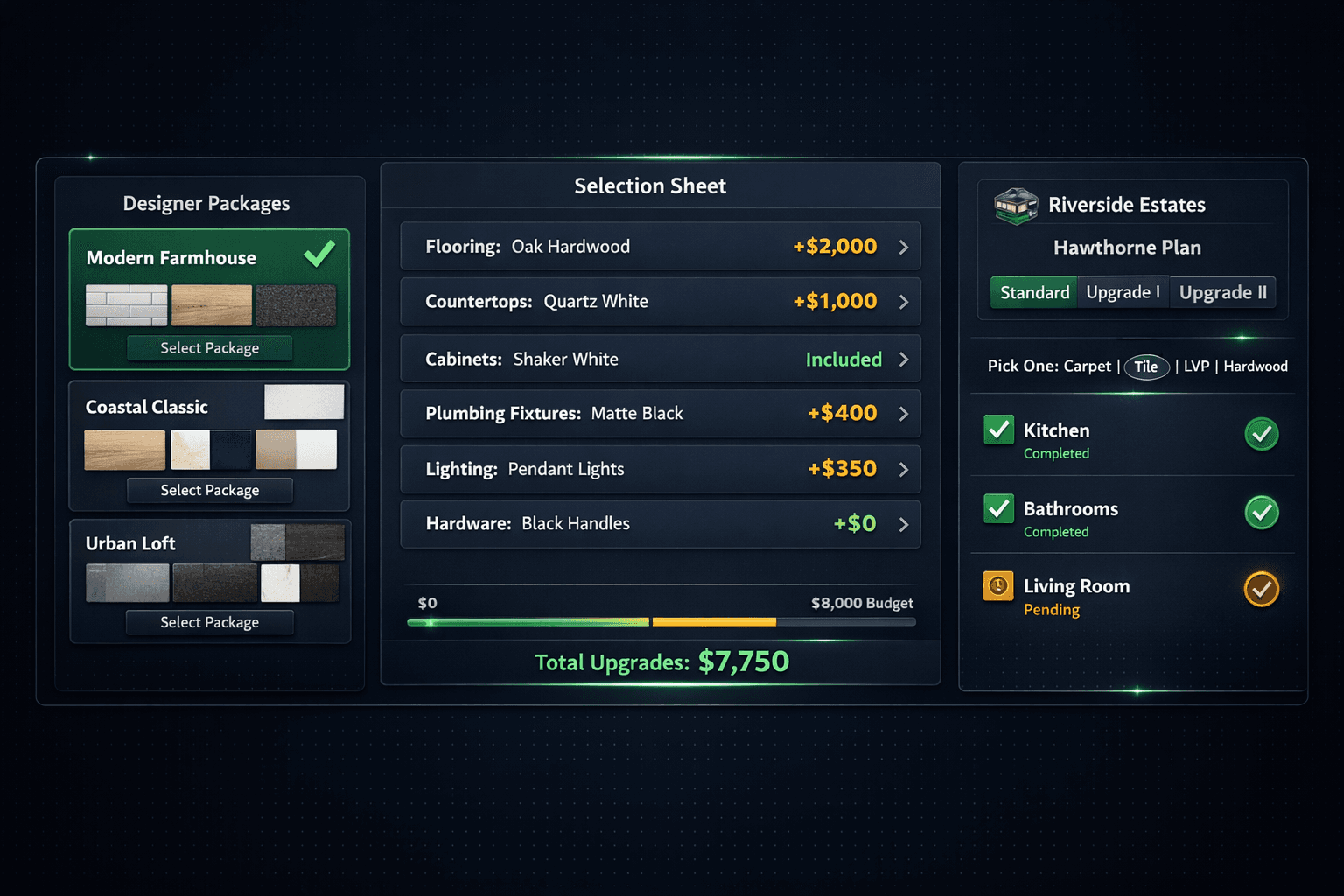
Cornerstone ships 64 curated packages across 7 categories. When a buyer selects a package — Modern Farmhouse, Coastal Classic, Urban Loft, or whichever styles you have configured for your communities — every category option auto-locks to the coordinated look. The buyer makes one confident choice instead of forty uncertain ones, and the appointment moves to the categories they actually want to customize.
À la carte is still available for any category the buyer wants to control independently. Remove the package lock on that category and the rest of the package stays intact. This structure — package first, customize where it matters — is faster for the buyer and easier for the design coordinator than a pure à la carte session from a blank slate.
How do exclusion groups prevent impossible selections?
Some option classes are physically mutually exclusive. Carpet and LVP in the same room is not a buyer preference — it is an impossible outcome that produces a selection sheet that cannot be built. Without exclusion groups, the only protection is a coordinator remembering to catch it mid-appointment, and that is not a repeatable process.
Exclusion groups in Cornerstone let you define pick exactly one for any set of conflicting option classes. Configure the flooring category with an exclusion group across Carpet, Tile, LVP, and Hardwood — when the buyer selects LVP, the flooring category is complete. Selecting a second option is not allowed. The selection sheet that leaves the appointment reflects what can actually be built.
This also cleans up reporting. Without exclusion groups, categories that allow multiple selections never read as complete — the design coordinator's progress dashboard shows incomplete flooring even when the buyer made a perfectly valid choice.
How do you control what's included vs. an upgrade?
Spec levels give builders granular control over the included-versus-upgrade boundary — down to a single option, not just the whole category.
A standard option becomes a paid upgrade by changing its spec level from Standard to Upgrade I, Upgrade II, or Premium. It drops out of the base price and appears as a +$X line on the selection sheet. An entire option class can be excluded from the base budget using the Standard/Upgrade toggle on the Spec Levels page. Both levers are available because the right decision depends on the option, the community, and the margin target — not a blanket rule.
The pricing that populates the upgrade delta comes from accepted vendor pricing. A spec-level change does not invent a number — it exposes the real price the vendor was awarded for that option in that community. A line with no accepted bid shows as $0 / needs pricing rather than a placeholder that quietly misprices the home.
What leaves the appointment?
The running upgrade total in Cornerstone reflects accepted vendor pricing throughout the appointment, so the number the buyer sees at any point during the session is the number that will appear in the Master Cost Budget. There is no reconciliation step after the appointment because the design center and the budget share the same pricing source.
When the appointment closes, the selection sheet flows into the purchasing pipeline directly. Option selections tied to scope items update the budget automatically — so the option class the buyer picked lands under the right trade, at the right cost, against the right floorplan and community. No coordinator re-keys the numbers into a spreadsheet. No purchasing agent transcribes the PDF.
Structural option pricing works the same way. If the buyer selects a bonus room or a finished basement, the additional square footage feeds auto-quantity scope items — frame labor, paint, cleaning — that reprice automatically against the updated footprint. The structural option is priced correctly at selection, not estimated after the fact.
What goes wrong in most design center appointments?
Common pitfalls and the fix
Starting with à la carte instead of packages
Open with a designer package to anchor a look. À la carte on top of a package is fast; à la carte from a blank slate is exhausting.
Skipping exclusion groups for conflicting options
If two flooring options can both be selected, they will be. Set up exclusion groups before the appointment, not during.
Using placeholder pricing for included options
Every upgrade price in Cornerstone comes from accepted vendor pricing. A line with no awarded bid shows as $0 / needs pricing — not a guess.
Printing the selection sheet to re-key later
The selection sheet in Cornerstone flows directly into the purchasing pipeline. Printing and re-keying introduces a second opportunity to lose a number.
How does the design center connect to sales?
The design center appointment is a milestone in the sales pipeline, not a separate workflow. When a buyer moves from prospect to signed contract, the floorplan and community already in the pipeline follow them into the design center — the coordinator does not re-enter the buyer's information from a different system.
After selections are complete, the signed selection sheet lands in purchasing. The upgrade totals update the Master Cost Budget. The design selections feed scope items and option classes that inform bid requests when it is time to price the trade work. The sales coordinator, the design coordinator, and the purchasing team all work from the same record.
A design center appointment that ends with a signed selection sheet flowing automatically into budgets and purchasing is the goal. The setup work — configuring spec levels, exclusion groups, and designer packages — pays off in every appointment that runs on top of it. The Cornerstone design center is built to run that process repeatedly, across every floorplan and every community, without the coordinator rebuilding it from scratch for each buyer.
Design appointments that hit the budget, every time.
Cornerstone PM's design center combines designer packages, exclusion groups, spec-level upgrade control, and real vendor pricing so what the buyer sees on screen is what lands in the budget — and the selection sheet writes itself into purchasing.
Request Early Access