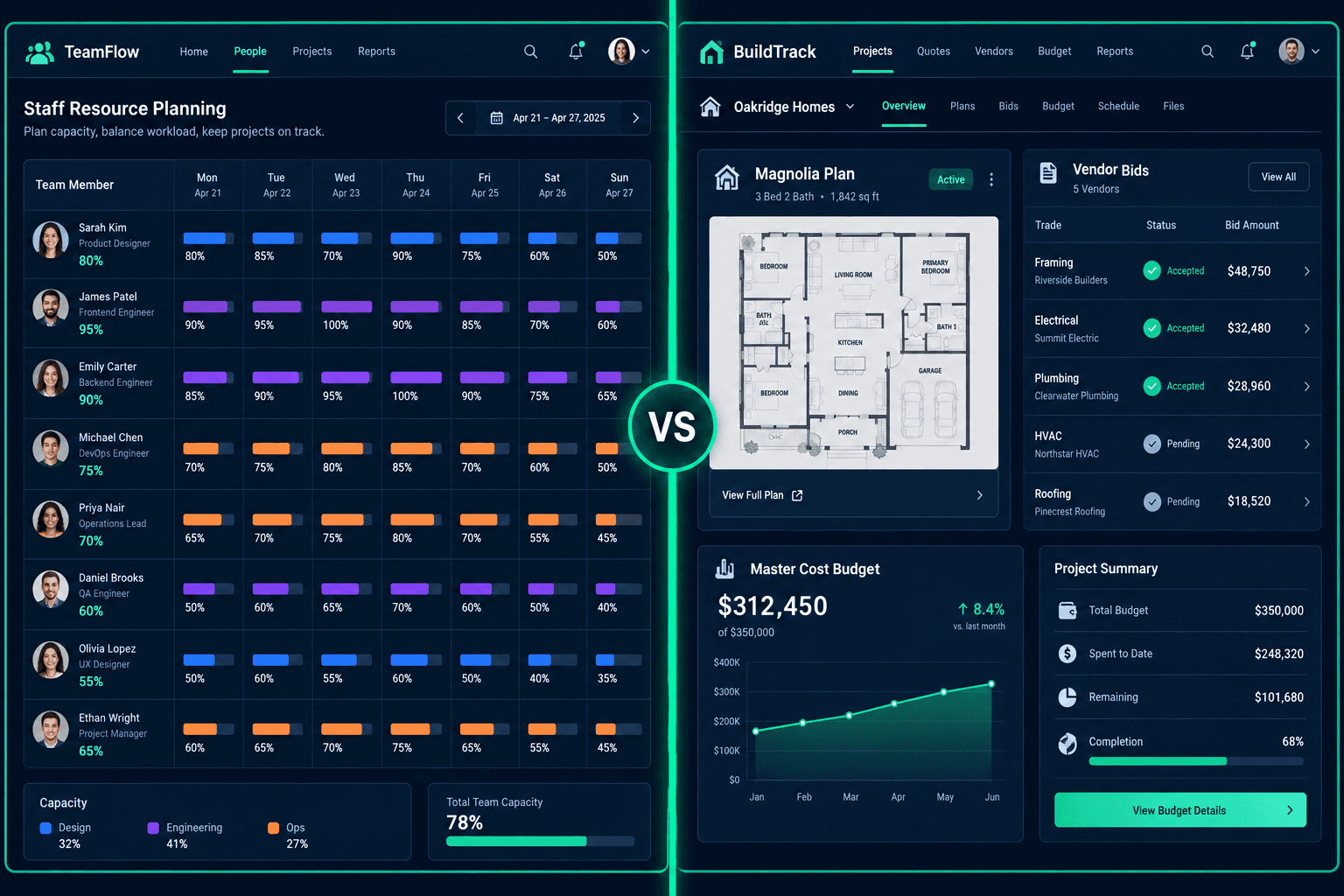
Float vs Cornerstone PM: Staff Capacity Planning or Connected Homebuilding?
Float is resource management software for scheduling staff hours and tracking team capacity. Cornerstone PM™ is a homebuilding platform where floorplans, options, community vendor awards, buyer selections, and purchasing are already connected to each other. A builder may need one, the other, or genuinely both — they're built to coordinate different things.
Float markets itself directly on its project planning page as the resource management platform for modern delivery teams: who's available, how booked they are, and whether a project's staffing plan still matches its budget. None of that overlaps with what a production home builder needs to run day-to-day operations — floorplans, community lots, vendor bids, and buyer selections aren't staffing problems. For the full category overview of what homebuilding-specific software looks like, start at home builder project management software.
What does Float actually offer?
Float's product pages are specific about what it does, and it's worth taking that at face value rather than dismissing it:
- Resource scheduling & allocation — assign people to projects against a visual capacity calendar.
- Capacity planning — see who's over- or under-booked across a week or month at a glance.
- Project cost estimation & budget monitoring — forecast project financials based on staffed hours and rates.
- Time tracking — log actual hours against planned allocations.
- AI-assisted staffing recommendations — suggest who to assign based on availability and skills.
- Reporting & dashboards — utilization, capacity, and project health rollups across the team.
That's a credible toolkit for the audience Float names on its own site: agencies, consultancies, and delivery-focused professional services teams whose core coordination problem is people and hours, not physical construction. Its product pages make no mention of construction, floorplans, or homebuilding at all.
Following a home through each platform
The clearest way to see the gap is to follow one home from floorplan to purchase order — a workflow Float's public materials simply don't describe:
- Floorplan takeoffs: Cornerstone PM's AI takeoff reads a floorplan PDF and extracts material scopes directly into the plan, priced once and reused across every home of that plan in every community. Float has no concept of a floorplan or a scope of work — its unit of work is a staffed project task.
- Community vendor awards & accepted pricing: Cornerstone's purchasing module sends scope-filtered bid requests to vendors, lets vendors submit through a no-login portal, and locks accepted pricing per community once awarded. Float's budget monitoring tracks staff cost against a project forecast — it doesn't model a subcontractor bid or a trade award at all.
- Buyer selections: Cornerstone's design center gives home buyers a selections portal with 64 curated Designer Packages that auto-lock category options, plus exclusion groups so picking one flooring option marks that category complete. Float's public materials don't describe anything resembling a buyer-facing selections flow — there's no customer or homeowner persona in its product at all.
- Purchase orders into a connected budget: In Cornerstone PM, an accepted vendor bid flows into the Master Cost Budget the same way for every home of a plan. Float's budget monitoring is staff-hours-and-rates based — a reasonable fit for billable-hours delivery work, but not built to track material purchase orders against a home's budget line.
This isn't a case of Float being thin on features — its resource planning and capacity forecasting are genuinely well-built for the audience it targets. It's that the two platforms aren't coordinating the same thing: Float schedules people, and Cornerstone PM runs homes.
Feature comparison: Float vs Cornerstone PM™
| Feature | Float | Cornerstone PM™ |
|---|---|---|
| Staff capacity & resource scheduling | ||
| Team utilization dashboards & reporting | Partial | |
| Project financial forecasting (staff cost based) | Partial | |
| Time tracking | ||
| AI-assisted staffing recommendations | ||
| Floorplan / model home concept | ||
| Per-floorplan options pricing | ||
| Designer Packages (64 curated, auto-lock) | ||
| Buyer-facing design center portal | ||
| Multi-community lot management | ||
| Community-assigned vendor bid awards & price locks | ||
| AI material takeoff from PDF | ||
| Foreman AI (396+ skills, persistent memory) | ||
| Connected Master Cost Budget | Partial | |
| REST API + BYOA (Pro+) | Partial |
“Partial” reflects capabilities that exist in a different form on each platform — confirm specifics directly with Float before relying on this table for a purchase decision.
What does Cornerstone PM™ ship that stays connected out of the box?
Cornerstone's advantage isn't a longer feature list than a resource planning tool — it's that homebuilding objects are already wired together:
- Floorplans and per-plan options that price once and apply to every home of that plan across every community.
- 64 Designer Packages and exclusion groups in the buyer design center — pick one from many, category done.
- Community-assigned vendor bidding with a no-login vendor portal and price locks after acceptance.
- A connected Master Cost Budget — accepted bids and purchase orders flow into the budget automatically.
- Foreman AI — 396+ skills for purchasing, vendor management, and budget analysis, with persistent memory. Meet Foreman →
None of this makes Float a worse product — it's not solving the same problem. It makes Cornerstone PM™ the right tool when the coordination challenge is the home itself, not the staff building it.
Who should use each platform?
Use Float if you are…
- An agency, studio, or consultancy staffing billable project work
- Trying to balance who's over- or under-booked across projects
- Forecasting project financials off of staffed hours and rates
- Not managing floorplans, vendor bids, or buyer selections at all
Use Cornerstone PM™ if you are…
- A production home builder (5–200 homes/year)
- Selling the same floorplans across multiple communities
- Wanting a buyer design center and community vendor bidding to work out of the box
- Needing accepted bids to flow straight into a connected budget
Float is a well-built resource planning tool for teams whose main coordination problem is staff availability and project financials. A production home builder's main coordination problem is the home — the floorplan, the community vendor award, the buyer's selections, the purchase order. If that's the gap you're trying to close, see the full home builder software category overview and the purchasing workflow to see what a connected homebuilding pipeline looks like in practice.
A homebuilding workflow, not a staffing calendar
See how Cornerstone PM™ connects floorplans, the design center, community vendor bidding, and the Master Cost Budget — built around the home, not the headcount.
Request Early Access →