One Platform for Home Builder Accounting and Project Management
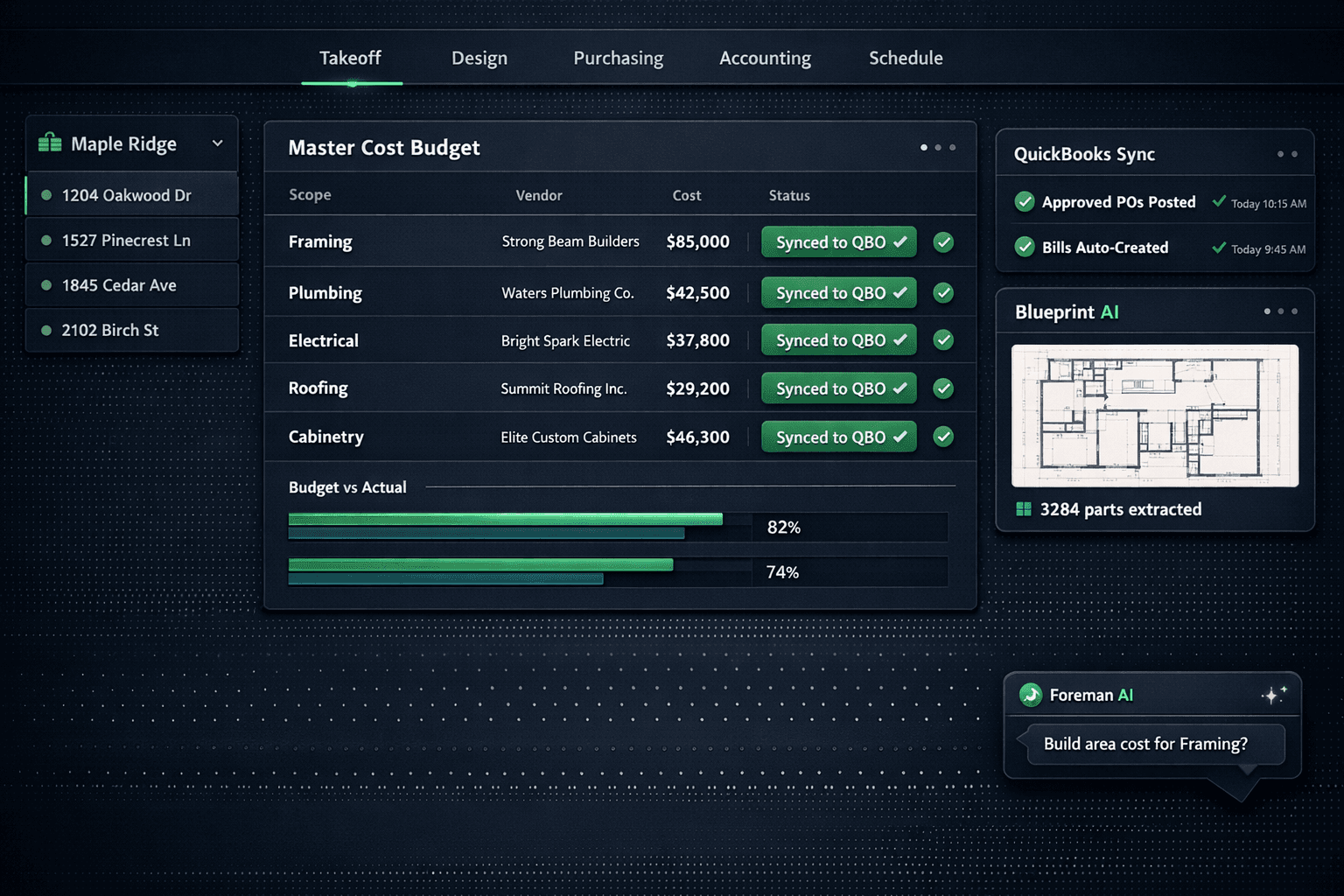
Cornerstone PM is a single platform where AI takeoff, a buyer-facing design center, automated vendor bidding, purchasing, and QuickBooks Online sync all share the same data — so your home builder project management software and your accounting system stop disagreeing. No double entry. No CSV exports. One honest set of numbers from blueprint to bookkeeper.
Most production home builders run their operations across three to five systems that were never designed to talk to each other: a spreadsheet for budgets, a separate tool for scheduling, a design selections folder on Dropbox, and QuickBooks sitting in a silo that only the bookkeeper touches. The result is a reconciliation problem that surfaces at month-end — or worse, at draw time — when the numbers in each system don't match.
Cornerstone PM is designed around a different premise: everything from the first takeoff to the last sync to QuickBooks lives in the same system, governed by the same hard-cost rule. Here is how that end-to-end flow works in practice.
Step 1: Blueprint AI extracts scopes from the floor plan
The workflow starts before a vendor quote exists. Blueprint AI reads a floor plan PDF and extracts 130+ material scopes and 3,284+ parts in under 60 seconds — framing, plumbing, electrical, roofing, cabinetry, and more. What used to take a senior estimator four to eight hours per plan now takes a minute, and the output lands directly in the Master Cost Budget as scope-structured line items ready for vendor pricing.
Because Blueprint AI follows the platform's hard-cost rule, every extracted part shows up at $0 / needs pricing until a real vendor bid arrives. There are no filler costs, no default labor rates, no synthetic splits. The takeoff tells you what you need; vendor bids tell you what it costs.
Step 2: The design center prices options by community
Once the base plan is structured, the design center layers options on top — and it's built for production, not custom builds. Option Classes tie buyer selections to scope items, so a cabinet upgrade automatically flows to the cabinetry scope in the Master Cost Budget. Community-based upgrade pricing means the same plan can carry different option costs across different communities without duplication. Spec levels give builders granular control: promote any standard finish to a paid upgrade with a single change, down to the individual option, not just the category.
64 curated Designer Packages across 7 categories let buyers start from a coordinated look instead of a blank checklist. Exclusion groups — Carpet OR Tile OR LVP — ensure one selection marks the category complete. Every upgrade price in the design center traces to accepted vendor pricing, so the design center and the budget never diverge.
Step 3: Automated bid requests award real vendor pricing
Scope items priced at $0 need bids. Cornerstone's purchasing module sends bid requests to vendors with a single click — auto-generating scope-filtered Excel bid templates so each vendor only sees their trade. Vendors submit through a no-login portal; the builder compares bids side-by-side and awards by community.
Once a bid is awarded, the pricing locks and flows into the Master Cost Budget. Community-assigned vendor wins mean the same scope can go to different vendors in different communities — you're not running a lowest-bid auction, you're managing real vendor relationships. The Bid Import AI handles re-imports cleanly: three modes (takeoff-only, pricing-only, or both), with replace-instead-of-duplicate logic so budget rounds stay clean.
Step 4: Purchasing generates POs and tracks change orders
When a task completes in the schedule, Cornerstone auto-generates the purchase order and emails the vendor — no manual PO creation required. Change orders flow through the same system and update the Master Cost Budget in real time. Automatic sales tax applies to materials and keeps labor exempt, so the numbers are right before they ever reach QuickBooks.
The hard-cost rule holds throughout: every line in the Master Cost Budget traces to an accepted vendor bid, a takeoff part, or an explicit allowance. A line with no accepted price shows $0 / needs pricing. No estimator fudging, no made-up numbers, no month-end surprises.
Step 5: Approved records sync one-way to QuickBooks Online
Approved POs, change orders, bills, and vendors post automatically to QuickBooks Online — no CSV exports, no manual re-entry, no bookkeeper copy-paste sessions. The mapping is built for construction job costing: each Community becomes a QuickBooks Customer and each Home becomes a QuickBooks Project, so builders get per-home and per-community P&L inside QuickBooks without any setup.
The sync is one-way. Cornerstone stays the source of truth; changes made inside QuickBooks never overwrite Cornerstone records. Cornerstone never auto-pays — payment approval always stays manual in QuickBooks, preserving the human pay gate. Every synced PO, Bill, and change order carries a clean transaction memo with community, lot, address, PO number, and cost code, so any transaction is traceable from QBO back to the exact home and trade without leaving QuickBooks.
The Accounting → Sync Events log shows every push and retry, so nothing is a black box. If something fails, the log tells you exactly which record and what happened.
Foreman AI runs across all of it
Every step in this workflow has a corresponding Foreman AI skill. Foreman can build area costs by chat, update vendor pricing, generate profitability reports and vendor scorecards, attach product images, create design options, and run multi-step purchasing workflows — all from plain English instructions. It has 396+ skills across 20 categories, per-user memory (so it remembers your preferred vendors and communication style), and a context-health meter that keeps long sessions running without losing track.
Foreman is an agent that reads and writes your live data, not a chatbot that answers questions in isolation. A superintendent who always orders from the same framing crew doesn't have to tell Foreman every time — it remembers.
The sales pipeline connects the front end to the build
The data flow starts even earlier than takeoff. Cornerstone's sales pipeline is wired into the rest of the platform: leads from QR scans and the website move through the pipeline, and a sold lot hands off directly to the schedule and the design center. Buyer selections made in the design center feed the Master Cost Budget automatically. There's no re-entry step from sales to build — the handoff is inside the same system.
Fewer systems. One set of numbers. No double entry.
The reason most builders run too many systems isn't that those systems are wrong — it's that no single platform covered the whole workflow until now. Blueprint AI handles takeoff. The design center handles selections. Purchasing handles bids, POs, and change orders. QuickBooks sync handles the books. Foreman AI handles the in-between tasks that used to require manual effort. And the sales pipeline keeps buyer data flowing into the build from the start.
The modern production home builder platform doesn't ask you to reconcile across systems. It gives you one source of truth from blueprint to bookkeeper — governed by the hard-cost rule that makes every dollar traceable.
Ready to run your build on one platform?
Blueprint AI takeoff, a production design center, automated vendor bidding, purchasing, and native QuickBooks sync — all in one place, governed by one hard-cost rule.
Request Early Access