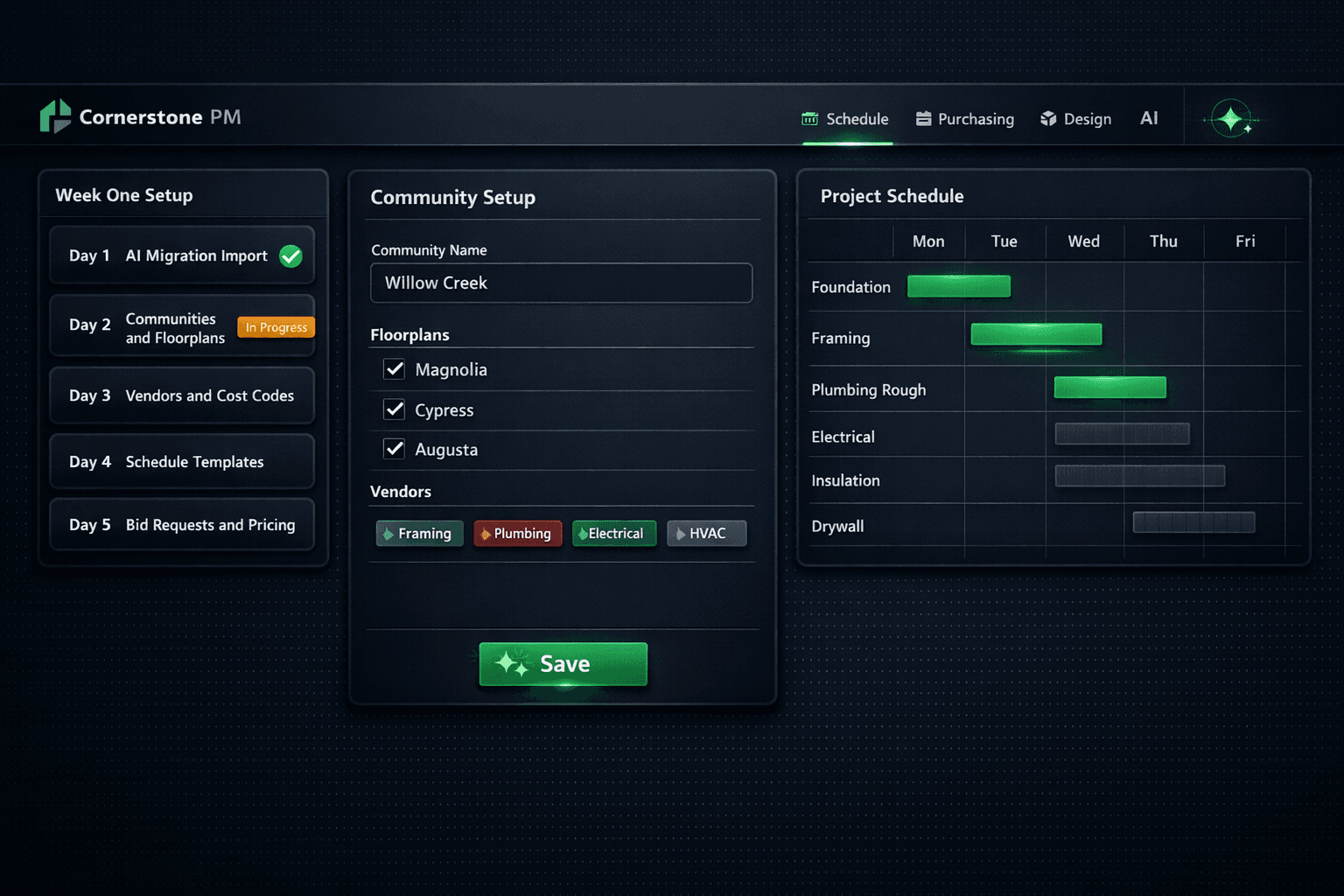
What Week One on New Home Builder Software Actually Looks Like
Most builders are live on new software — running real homes, sending real POs — in week two. The fear of a six-month implementation is the single biggest reason builders stay on tools they already dislike. Here is what a realistic home builder software implementation actually looks like, day by day, and what you should refuse to pay for.
Why does implementation have a bad reputation?
Legacy platforms — NEWSTAR, MarkSystems, BuilderMT — were designed for the IT departments of top-100 enterprise builders. Implementation meant months of data conversion, dedicated consultants, custom reporting setup, and a go-live party with a five-figure invoice. That framing stuck, and builders who shopped those platforms in the early 2010s still carry the assumption that switching software is a capital project.
It is not — if the platform was designed for it. The difference is whether the software treats migration as an edge case or a primary path. Platforms built on modern infrastructure have AI that reads your existing exports, maps the columns, and asks you to confirm the gaps rather than making you clean a spreadsheet for six weeks first.
Implementation myth vs. reality
Day one: import what you already have
The first step is not setup — it is import. Export a CSV or Excel file from your current tool. Buildertrend, JobTread, CoConstruct, and Procore all support this. You do not need a clean file; the AI migration wizard detects the source platform, maps columns to Cornerstone fields, and flags anything it cannot confidently match for a quick manual review. Most imports complete in minutes.
The cost comparison is stark. Legacy platforms charge white-glove migration fees that can run $25,000 to $100,000 or more. AI-powered column mapping costs roughly a penny per run. You can re-import as many times as you need to get it right.
Early week: structure — communities, floorplans, vendors, cost codes
With the import done, days two and three are about skeleton setup: the structure everything downstream hangs from. Create each community. Assign the floorplans that sell in it. Add vendors by trade — this is also where you set the AP payment terms each vendor uses, so when bids come back the due-date schedule is already in place.
Schedule templates are the other early-week priority. Define the task sequence, durations, predecessor relationships, and trade assignments for each floorplan once. Every future home started on that plan inherits the full schedule in one step — you will not rebuild a 120-task construction schedule from scratch for every start.
Week one — day by day
Upload your Buildertrend, JobTread, or CSV export. AI maps columns, surfaces gaps, and imports in minutes.
Create each community, assign floorplans, add cost codes. The skeleton the rest of the platform hangs from.
Add vendor records by trade. Build one schedule template per floorplan — task sequence, durations, trade assignments.
Send scope-filtered bid requests to vendors. They submit through a no-login portal; your job is to wait.
Connect QBO (it builds the CoA for you), then set up option classes, spec levels, and designer packages.
Mid-week: bid requests and the thing budgets say until they're priced
Day four is when bid requests go out. In Purchasing → Bid Requests, select the floorplans, vendors, scopes, deadline, and optional message — Cornerstone generates scope-filtered Excel templates with Base, Structural, and Designer tabs and emails them to the right vendors automatically. Each vendor gets only the scopes that belong to their trade.
While bids are in flight, every budget line that lacks an accepted price shows as $0 / needs pricing. This is the correct behavior, not a gap. The platform's hard-cost rule means no line inherits a stored default or estimator fudge number — every dollar traces back to a real awarded bid, and a line without one says so honestly. Accept that budgets start empty and fill as bids land.
Budgets that start at zero are more honest than budgets that start with guesses
The industry default is to ship a cost library full of regional averages nobody updates. Those averages quietly drift away from reality and builders forget the numbers are made up. A $0 / needs pricing line is more accurate than a $4.15 per square foot someone entered in 2021.
Later in the week: QuickBooks and the design center
The QuickBooks Online connection takes minutes to set up and delivers immediately. Link your QBO account from Settings and Cornerstone builds a construction-ready chart of accounts plus cost-code items on connect — reusing existing accounts by name so it never restructures books you already trust. From that point, every approved PO, bill, change order, and vendor posts itself to QuickBooks automatically, one direction, with community, lot, address, PO number, and cost code in the memo.
The design center is last because it depends on the vendor pricing you are still collecting. Add option classes tied to their scopes. Bulk-create options from your parts catalog or scope items instead of entering hundreds by hand. Set spec levels per community so included options differ from paid upgrades correctly, and assign designer packages if you use curated selection bundles. Foreman AI can drive catalog work by chat for builders who prefer describing what they need over clicking through screens.
What should wait until week two?
Not everything needs to be live before the first home runs. The advanced design center configuration — exclusion groups, community-specific upgrade pricing, retail pricing mode — can be tuned after the first buyer appointment. Webhook automations and the REST API can come after the purchasing loop is running. The AI purchasing agent (Foreman) learns your preferences over the first few weeks naturally as it sees how you award bids and write POs.
The goal of week one is a system that can run a home — not a system that has every feature configured. Start a real home on the platform in week two, even if a few non-critical screens are still empty.
The sign-off question to ask before you start
Ask any platform you evaluate: "Can I export my full database as CSV or JSON at any time, with no notice and no fee?" If the answer is anything other than yes, the switching cost is baked in by design. A system that is easy to leave is easier to join.
Exit rights before day one
Implementation effort is only worthwhile when you are not locked in. Cornerstone's database backup and export feature gives any Admin a one-click full-database export in CSV or JSON at any time — with nightly auto-backups retained for seven days and on-demand manual exports available whenever you want them. There is no exit fee, no escalation to a sales rep, no "please allow 30 days for your data export."
That exit right is the same reason week-one implementation is low-risk. You are not betting the business on a platform that charges you to leave. You are joining one where the data is yours, the migration is cheap, and running a home on it proves the value faster than any demo.
Ready to see week one in action?
Cornerstone PM is purpose-built for production home builders — AI migration, schedule templates, vendor bidding, and QuickBooks sync in one platform. See how it runs from day one.
Request Early Access