Long-Lead Materials: Review the Release Date Before the Trade Is Ready
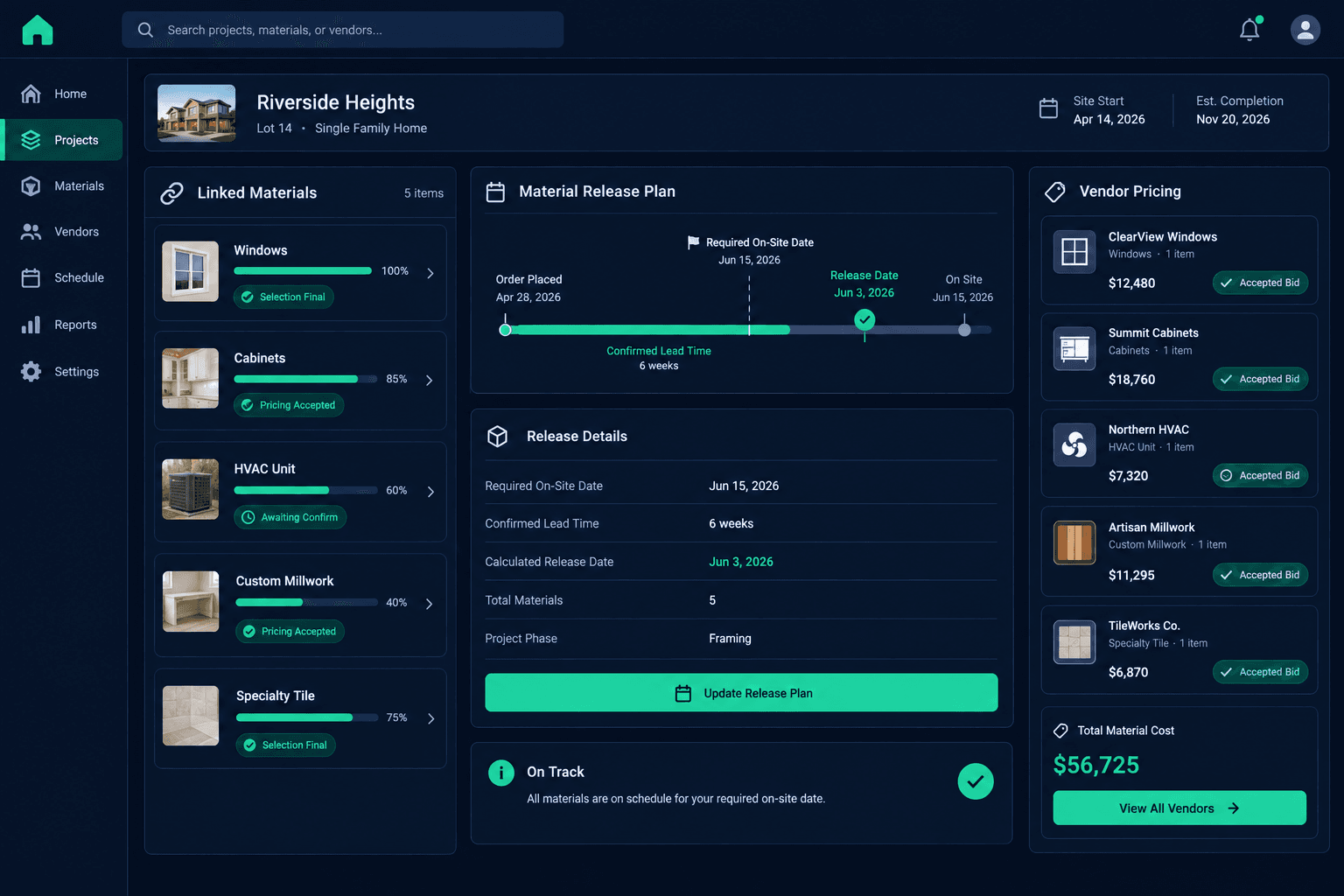
Release a long-lead material by working backward from the required on-site date using a lead time you confirmed directly with the supplier — then check that the buyer's selection and accepted vendor pricing are both final before the order goes out, using the home's linked schedule as shared context.
Windows, cabinets, custom millwork, specialty tile, certain HVAC equipment — the materials that take eight, twelve, or sixteen weeks to arrive are rarely the ones that cause a same-week scramble. They're the ones that get released too early against an unfinished selection, or too late because nobody rechecked the lead time after the schedule moved. Either mistake is expensive, and neither one shows up as an obvious error at the moment the order is placed.
This isn't a guide to resolving a delivery that's already late, or to recovering a schedule that's already slipped. It's a checklist for the decision that happens before any of that: when is the right moment to release a long-lead order, and what has to be true before you pull the trigger.
What does a long-lead release review actually check?
The review covers six things, and all six need to line up before an order goes out — not just the date math, but the selection and the pricing underneath it.
What the review checks
Required on-site date
Pulled from the home's current linked schedule, not the original plan date
Confirmed lead time
Checked directly with the supplier for this specific item, not reused from memory
Latest safe release date
On-site date minus confirmed lead time, with the team's usual buffer included
Buyer selection status
The specific option is final, not still in progress or likely to change
Accepted vendor pricing
Price on the release matches the vendor's accepted bid for that community
Named owner for re-review
A specific person responsible for revisiting timing if the schedule shifts
Why start from the on-site date instead of today's date?
It's tempting to release a long-lead order as soon as it crosses your mind, on the theory that earlier is always safer. But working forward from today tells you nothing about whether you're early, on time, or already behind. Working backward from the date the trade actually needs the material on-site — pulled from the home's current schedule, not the original plan date — is the only version of the calculation that accounts for whatever has already shifted in that home's build.
A schedule that moved two weeks earlier or later changes every long-lead release date downstream of it. Reviewing against the current schedule, not a date someone remembers from the original sales contract, is what keeps the release timing accurate.
Why confirm lead time with the supplier instead of reusing a number?
Lead times are not fixed. A twelve-week window quoted last quarter can be sixteen weeks now, or eight, depending on the supplier's backlog and the specific product line. Reusing a lead time from a past order — even a recent one, even from the same supplier — is a guess dressed up as a fact.
Before doing the backward math, get a current number directly from the supplier for the specific item being ordered. It takes one phone call or email, and it's the input the entire release date depends on.
Cornerstone doesn't calculate lead times or predict delivery
Cornerstone links the home schedule, buyer selections, and purchase orders so the team reviewing a release has shared, current context. It does not pull supplier inventory feeds, calculate lead times automatically, or predict procurement timing. Confirming the lead time and deciding when to release the order stays a human decision.
Why check the buyer's selection before releasing the order?
A long-lead item that's released while the buyer's design selection is still open is a bet that the current choice is the final one. Sometimes it is. When it isn't, the cost of changing a custom order already in production is almost always higher than the cost of waiting a few extra days to confirm the selection first.
Check the selection status before release, not just the schedule date. A selection marked complete and a selection still being discussed with the buyer should never trigger the same release decision, even if the schedule math says the window is open.
Why verify accepted vendor pricing at the same time?
The release date answers "when." It doesn't answer "at what price." Before the order goes out, confirm the price attached to it matches the vendor's accepted bid or current price agreement for that community — not a placeholder number or a quote that expired weeks ago.
A release built on stale pricing doesn't fail at the moment of order; it fails when the invoice shows up higher than budgeted and the team has to explain a variance that could have been caught in a two-minute check before the order went out.
What happens when the build changes after an order is placed?
Schedules move. A permit delay, a trade that falls behind, a change order that touches the room a material is going into — any of these can turn a previously sound release decision into one that needs a second look. The right response isn't to automatically re-trigger every open order whenever a task closes out; it's to have a named person responsible for checking long-lead releases against the home's current timing whenever something changes.
That person needs the schedule, the selection status, and the purchase order in one place to make that call quickly. That shared context is what Cornerstone's linked records provide — the decision itself still belongs to the team.
Give your team shared context for every long-lead decision.
Cornerstone links the home schedule, buyer selections, and purchase orders so your team can review release timing with current information — not a spreadsheet someone forgot to update.
Request Early Access