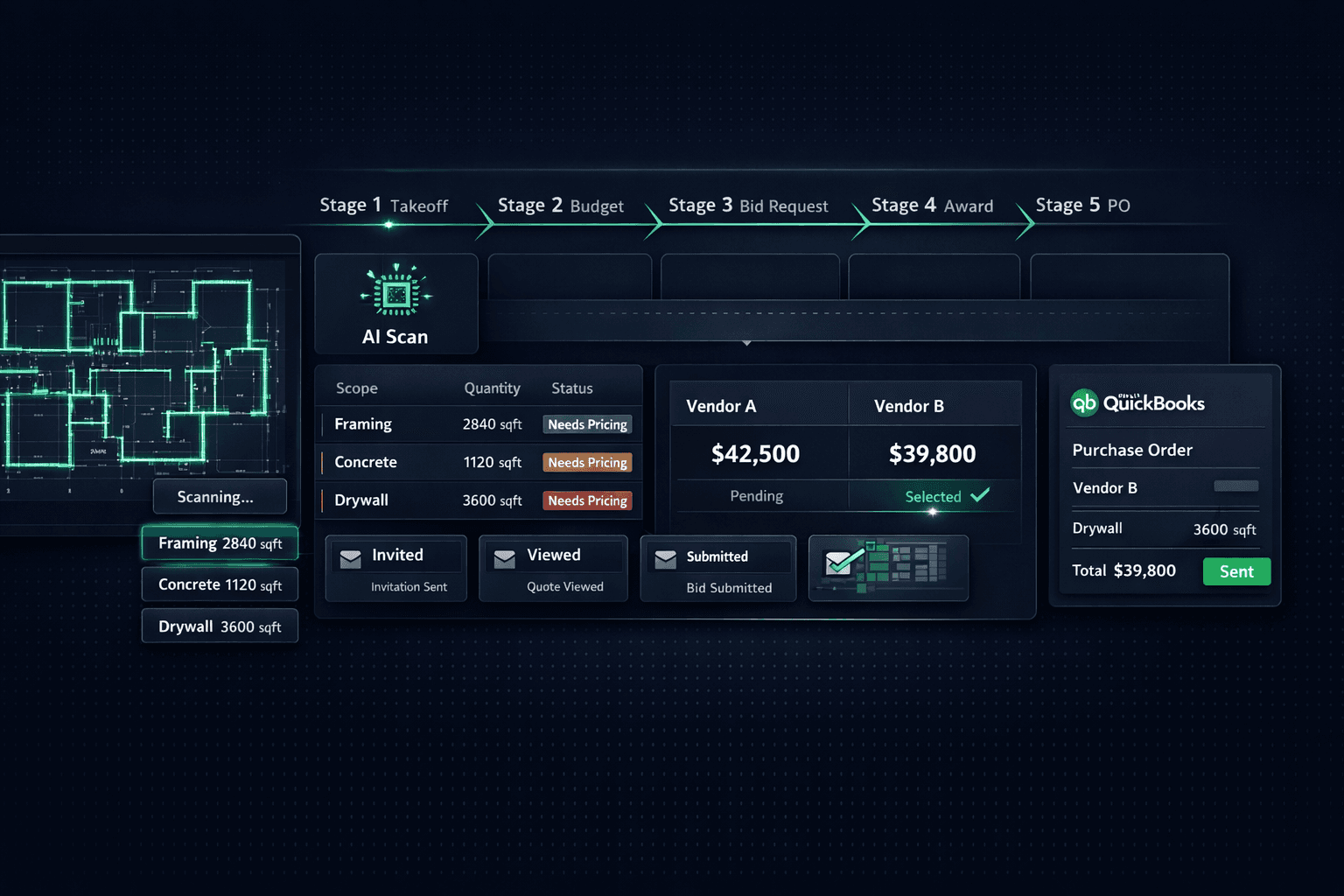
From Plan Set to Purchase Order: The Five Handoffs That Break
Between a floor plan PDF and a paid vendor, there are five handoffs — takeoff, budget, bid, award, PO — and each one is a place where a number gets retyped by hand. Every retype is an opportunity to lose money. The fix is AI takeoff and purchasing automation that carry the quantities all the way through without asking anyone to type them again.
Most builders know the individual parts exist somewhere. They've seen estimating software, they've sent Excel bid templates, they've used QuickBooks for years. The problem is the gaps between the parts — the moments where data leaves one system and has to be manually re-entered into the next. Those gaps are where hours go, where errors hide, and where the budget stops reflecting reality.
What are the five handoffs?
The chain from plan set to purchase order has five distinct transition points. Here is what typically happens at each one — and what happens when the platform handles it instead.
Estimator counts manually, types into spreadsheet. Transcription errors and scope gaps are invisible until cost overruns happen.
Blueprint AI extracts 130+ scopes from the plan PDF in under 60 seconds. Quantities flow directly into the Master Cost Budget.
Someone copies scope items from the budget into an email or a shared spreadsheet for vendors. Each vendor gets different information.
Cornerstone generates scope-filtered Excel bid templates automatically from the budget. Every vendor gets the same structured format for their trade.
Bids come back in three different formats. Someone re-keys them all into a comparison spreadsheet to pick a winner.
Vendors submit through a no-login portal. Cornerstone shows 2+ bids side by side on identical scope lines — no re-keying, no format translation.
Purchasing opens the spreadsheet, copies the awarded price and scope into the PO software, and emails it. Each PO is a manual step.
Awarded vendor pricing becomes the budget instantly. A completed schedule task auto-generates the PO and emails the vendor without anyone opening the purchasing screen.
A bookkeeper re-keys the PO into QuickBooks. The bill gets entered a second time when the invoice arrives. Two entries, one cost.
Approved POs post to QuickBooks as purchase order commitments automatically. The linked Bill auto-creates on completion and closes the PO. One-way, no re-entry.
Handoff 1: How does AI takeoff replace manual counting?
A traditional takeoff is an estimator with a scale ruler, a highlighter, and a plan set spread across a drafting table — or a screen and a digital measurement tool. The work is accurate when the estimator is careful and unhurried. It typically takes four to eight hours per plan. A builder running twelve floorplans across four communities has forty-eight to ninety-six hours of takeoff work before any vendor has been contacted.
Cornerstone's Blueprint AI takeoff reads the plan set PDF and extracts 130+ material scopes in under sixty seconds — concrete, framing lumber, insulation, drywall, roofing, plumbing rough, electrical rough, windows, doors, and more — as structured line items with quantities already attached. The estimator reviews the output rather than producing it. Time per plan drops from hours to minutes.
For labor and area-based costs that Blueprint does not read directly off the plans — frame labor per square foot, paint, slab finishing, cleaning — auto-quantity scope items link to the floorplan's square footage. A frame labor rate of $4.25 per total square foot reprices automatically across every floorplan and every structural option. Change the rate once and sixty line items update; no one opens the spreadsheet.
Handoff 2: How do bid requests go out without reformatting scope?
Most bid requests start with someone opening the budget, copying scope lines into a Word document or a shared spreadsheet, and emailing it with a plan PDF attached. Different vendors get different information depending on who sent it and how carefully they sliced the master list. One vendor quotes on a complete framing scope; another quotes on a different version of the same scope from last month's template.
In Cornerstone's Purchasing → Bid Requests workflow, the bid template generates from the scope items that are already in the system. Select the floorplans, vendors, scopes, deadline, and message — send in one click. Cornerstone builds an Excel file for each vendor with three tabs (Base, Structural, Designer) filtered to their trade. A framer sees framing lines. A plumber sees plumbing. Neither sees what doesn't apply to them.
Vendors click a link from their email and land on a token-protected portal — no Cornerstone login, no account creation. They download the template, fill in their numbers, attach any supporting PDFs, and submit. The builder sees each invite move through Invited → Viewed → Submitted → Declined, so a non-response is visible rather than assumed.
Handoff 3: How are bids compared without re-keying them?
Three vendors quoting the same scope typically return three different formats. One sends a lump sum. One breaks out labor and material. One attaches a PDF with assumptions buried in footnotes. The PM ends up translating all three into a single comparison spreadsheet before anyone can make a decision — and that translation introduces another opportunity for error.
Because every vendor submitted against the same scope-item template, their bids are already in the same format when they arrive. Cornerstone displays them side by side on identical lines. Two framers quoted the same eleven scope items; the comparison shows each line across both bids, with totals at the bottom. No re-keying, no format translation.
The key detail: cheapest is not the only decision rule. Awards in Cornerstone are assigned per community rather than globally. The framer who won last year's community is still your framer in that community even if a new entrant quotes lower elsewhere. You can hold accepted bids from multiple vendors for different communities on the same scope simultaneously. Once a bid is awarded it locks — neither the builder nor the vendor can edit the number afterward, so the awarded price is the number that runs downstream.
Handoff 4: How does a completed task become a purchase order?
In most operations, someone in purchasing looks at the schedule, sees that framing is coming up, opens the budget to pull the scope and price, drafts the PO, and emails it. That sequence is five minutes per PO on a good day. On a day with thirty active homes across three communities, it becomes a morning.
Cornerstone connects the schedule to the purchasing module directly. Each scheduled task is assigned to the vendor who was awarded that scope for that community. When the task is due, Cornerstone auto-generates the purchase order — with scope, quantity, price, and vendor contact details pre-filled from the awarded bid — and emails it. No one opens the purchasing screen to make it happen. The task completion is the trigger.
Every line on that PO traces back to accepted vendor pricing under the platform's hard-cost rule. Nothing carries a stored or default cost. A line with no awarded bid shows as $0 / needs pricing rather than inheriting a made-up number — which means the PO that goes out reflects what was actually agreed, not what the estimator guessed.
Handoff 5: How does the PO get into QuickBooks without a bookkeeper re-keying it?
The last handoff is usually the most expensive in bookkeeper time. A PO approved in the field management system has to be entered into QuickBooks as a purchase order or a bill, then entered again as a bill when the invoice arrives. Two entries, one cost, and a reconciliation problem if the two entries don't match.
Cornerstone's QuickBooks Online integration is one-directional — Cornerstone pushes, QuickBooks receives, and QuickBooks changes never overwrite Cornerstone. When a PO is approved, it posts to QuickBooks Online automatically as a Purchase Order commitment, so committed cost shows up in the books without anyone touching QuickBooks. Each synced transaction carries a clean memo with community, lot, address, PO number, and cost code, so a bookkeeper can trace any QuickBooks entry back to the exact home and trade without leaving QBO.
When work is marked complete, the linked Bill auto-creates in QuickBooks and closes the original PO — no dangling open commitments, no duplicate entry. Because each community maps to a QuickBooks Customer and each home to a Project, every bill lands on the right job automatically and shows up in per-home and per-community P&L without a journal entry.
What does the full chain look like when it runs without gaps?
Blueprint AI reads the plan PDF and extracts scopes with quantities. Auto-quantity scope items extend that to square-footage-driven labor and material. A bid request goes out with scope-filtered templates. Vendors submit through a no-login portal and bids come back in the same format. The side-by-side comparison drives an award decision; the locked price becomes the budget. A scheduled task fires and the PO generates and emails itself. The approved PO posts to QuickBooks as a commitment. On completion, the Bill auto-creates and closes the PO.
At no point in that chain does a number need to be retyped. The quantity the AI extracted from the plan is the quantity on the bid template, which is the quantity on the vendor's quote, which is the quantity on the PO, which is the quantity on the QuickBooks bill. If the quantity is wrong, it is wrong once and correctable once — not wrong in five separate places with five separate fixes.
That is the real value of tying AI takeoff to purchasing to QuickBooks in a single platform rather than stitching together three separate tools. The data moves forward; the people do the work that requires judgment. The home builder project management platform that earns its place is the one where every handoff happens inside the system, not between systems.
Stop retyping quantities at every handoff.
Cornerstone PM connects AI takeoff, vendor bidding, auto-generated purchase orders, and QuickBooks sync in one platform — so quantities carry from the plan set all the way to the books without manual re-entry. See the full purchasing workflow in action.
Request Early Access