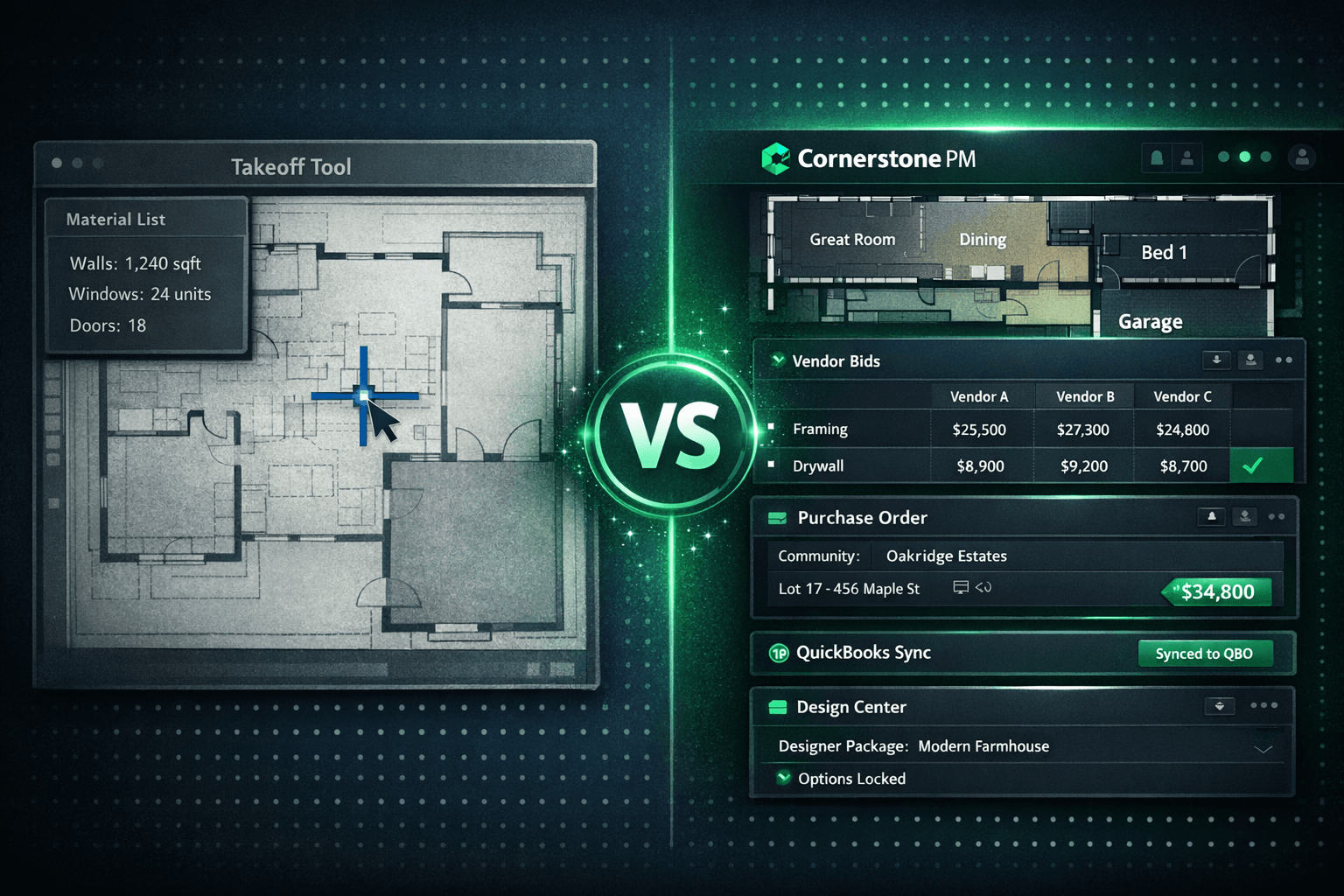
PlanSwift and STACK vs Cornerstone: A Takeoff Tool Is Not a Build System
PlanSwift and STACK are genuinely good at what they do. An experienced estimator can measure a plan set faster in either tool than in any spreadsheet or general-purpose platform. The question is what happens after the measure — and for production home builders, the answer is a lot of work those tools were never designed to handle. The Cornerstone PM AI takeoff is not a competing measuring tool — it is takeoff built into the system that runs the rest of the build.
The boundary matters. A takeoff tool outputs a quantity list. The quantity list is the beginning of the job, not the end of it. Everything downstream — bid requests, vendor awards, purchase orders, design center pricing, QuickBooks job costing — sits outside the takeoff tool and has to be rebuilt by hand every time the quantities change.
Where does a digital takeoff tool end?
Walk through what a production builder actually does after an estimator finishes in PlanSwift or STACK. The output is a quantity spreadsheet — walls, windows, doors, square footages. From there, the quantities have to get onto scope items so vendors know what to price. Bid request templates have to be assembled and sent to subcontractors. Bids come back in different formats and get compared by hand. Someone awards a vendor, and that award has to live somewhere so the purchasing team can write a purchase order against it. The PO gets sent, the task completes, and someone updates QuickBooks.
Every one of those steps is manual, and every one is a place a number can change without the rest of the chain knowing. The takeoff tool is not responsible for any of it — it just holds the original measures.
For a custom builder running a handful of one-off projects, that workflow is manageable. For a production builder running the same floorplans across multiple communities and multiple starts per month, it compounds. Each plan revision means a new measure. Each new community means re-assembling bid templates for the vendors working that location. The manual steps that felt fine on project five feel different on project fifty.
What does Cornerstone PM do differently with takeoff?
Blueprint AI reads the plan set and extracts material scopes — room locations, dimensions, and material assignments — in under 60 seconds. The output does not go to a spreadsheet. It lands directly into Cornerstone's scope item and area cost structure, which is the same structure that drives bid requests, purchase orders, and the Master Cost Budget.
Quantities also auto-calculate against room-level floorplan square footage. When a buyer picks a bonus room structural option, the additional square footage feeds frame labor, insulation, and paint scope items automatically — without a new manual measure. When a plan revision changes a room size, the affected quantities update with it. The system of record is the floorplan in Cornerstone, not a snapshot export sitting in a file folder.
What does the rest of the chain look like?
After quantities land on scope items, Cornerstone generates scope-filtered bid request templates — Excel files with Base, Structural, and Designer tabs where each vendor only sees the trade they bid. Templates go out automatically; vendors receive a link in their email, click through to a token-protected portal that needs no account, download their template, upload their bid, and submit. No vendor app. No Cornerstone login.
Submitted bids come back on the same scope-item lines, so comparison is apples-to-apples by default. Award is per community, not per job — one framing crew wins Oakridge Estates, a different crew wins Willowbrook Estates, and the budget for each community carries the right accepted price. Once awarded, the bid locks. Neither party edits the number quietly afterward.
When a task on the schedule completes, Cornerstone generates the purchase order automatically and emails it to the vendor. The PO posts to QuickBooks Online as a commitment entry with community, lot, address, PO number, and cost code in the memo. When the work is done and the bill arrives, the matching bill auto-creates in QuickBooks and closes the PO — no dangling open commitments, no double-entry.
What lives where
Takeoff Tool
Cornerstone PM
Scope items and area costs
Scope-filtered vendor bid templates
No-login vendor portal for bid submission
Side-by-side bid comparison
Community-level vendor bid awards
Auto-generated POs on task completion
One-way QuickBooks sync with job context
Production design center with Designer Packages
AI takeoff from plan set (< 60 seconds)
Manual click-to-measure by estimator
Quantity list as standalone output
Should builders keep both tools?
Some builders legitimately keep a dedicated takeoff tool for odd projects — a commercial renovation, a one-off custom home, something that does not fit the production floorplan model. That is a reasonable choice and not the argument being made here.
The argument is about where the system of record lives for the production business. If quantities exist only in a PlanSwift or STACK export, and that export does not connect to bidding, purchasing, scheduling, or accounting, then every downstream team is working from a snapshot that may already be stale. When the plan changes, the snapshot changes, and every team that was working from it has to reconcile.
A production builder doing 50 homes a year across three communities cannot run that reconciliation reliably. The takeoff tool becomes a bottleneck — the estimator holds the measure, and nothing downstream is confident until they export it and someone else manually enters it somewhere useful. Moving the system of record into Cornerstone removes that bottleneck because the measure, the bid, the award, and the purchase order are all in the same place.
What about the design center?
Takeoff tools have no concept of a design center. They measure; they do not sell. But for a production home builder, the design center is where a significant part of the margin is set — upgrade pricing on flooring, countertops, cabinets, and structural options.
In Cornerstone, the design center and the takeoff share the same floorplan model. A structural option that adds a bonus room triggers both an updated takeoff quantity and a priced design option at the right spec level for the right community. Sixty-four curated Designer Packages across seven categories let buyers lock a coordinated look in one decision. Exclusion groups prevent conflicting selections. Every option price traces back to accepted vendor pricing — not a placeholder number somebody will reconcile later.
That connection is impossible in a standalone takeoff tool. The measure and the design selection live in separate systems, and linking them requires manual work or a custom integration that someone has to maintain.
The honest split
PlanSwift and STACK are strong measuring tools that do what they say they do. Builders who have built speed in those environments are right to be careful about what they give up. The real question is not whether the measuring tool is good — it is whether the measuring tool is the right system of record for a production home building operation.
For production builders repeating the same floorplans, the measure is the easy part. The hard part is getting from that measure to a correct budget, an awarded vendor, a generated purchase order, and an accurate QuickBooks entry — across fifty homes, in three communities, with plan revisions in flight. The Cornerstone PM AI takeoff handles the measure as the first step in a chain that runs through purchasing and accounting without anyone re-keying a number.
Takeoff that connects to your whole build system.
Blueprint AI extracts material scopes from your plan set in under 60 seconds, landing quantities directly into scope items, vendor bid requests, and the Master Cost Budget — not a standalone spreadsheet somebody re-keys later.
Request Early Access