Scope-First Budgeting: Every Cost Filed Under Its Trade
In Cornerstone PM, you pick the trade first — then add costs to it. Every Part, Scope Item, and Allowance lives under the scope it belongs to, so a framing line can never end up inside an electrical bucket, and every dollar traces back to real vendor pricing.
Most construction budgets are flat lists. A builder opens a spreadsheet, adds a row for framing lumber, another for rough electrical, another for plumbing fixtures — and nothing stops those rows from landing in the wrong column, carrying a number pulled from three years ago, or disappearing into a tab nobody checks. The result is a budget that looks complete until a cost code gets the wrong trade, a lender draw doesn't match the job record, or a change order rolls up to the wrong scope.
Cornerstone's Area Costs model flips the order of operations. You don't start with a line item. You start with a scope.
What does “scope-first” mean in practice?
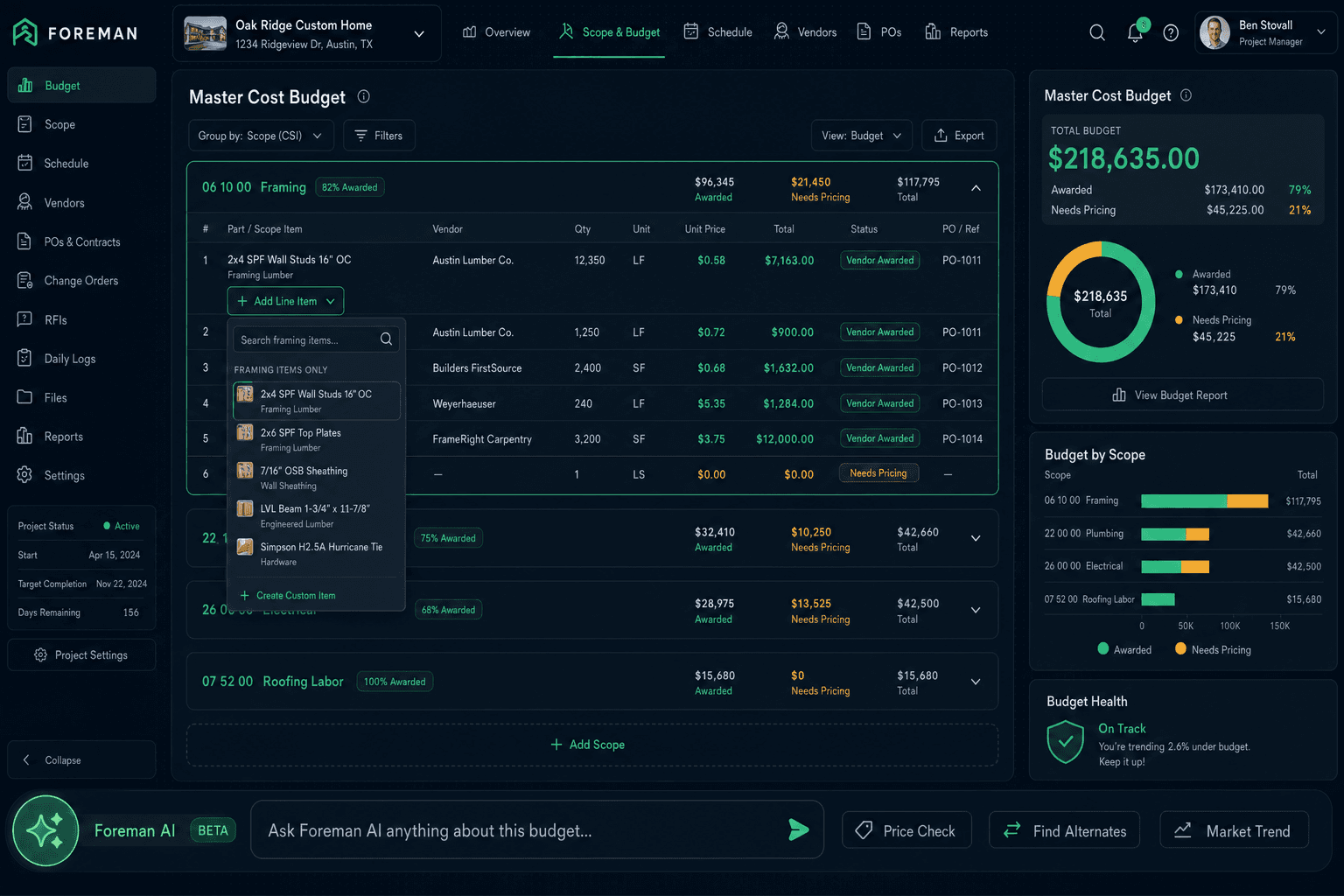
When you create an Area Cost in Purchasing, the first decision is the scope — the trade this bucket belongs to: Framing, Plumbing, Electrical, Concrete, HVAC, or any custom scope your team uses. The bucket title IS the scope name. Everything you add to that bucket is, by definition, filed under that trade.
That structure isn't cosmetic. The Parts picker and Scope Items picker inside a scope bucket are filtered to the current trade — so when you're inside the Framing bucket, the picker only shows framing-related materials and labor. You can't accidentally select a plumbing fixture from inside an electrical scope. The filter eliminates the miskey before it can happen.
Scope-first structure in Cornerstone Area Costs
Pick or create a scope
Framing, Plumbing, Electrical, HVAC, or custom — the bucket title is the scope name
Add scope-filtered Parts
Picker surfaces only materials belonging to this trade; priced from accepted vendor bids only
Add scope-filtered Scope Items
Labor and trade-specific lines, also filtered and vendor-priced only
Use an Allowance for un-bid placeholders
The only line type that can carry a direct dollar — a budget placeholder until the real bid arrives
Three line types — and only one can hold a placeholder number
Inside every scope bucket there are three kinds of lines: Parts, Scope Items, and Allowances. They look similar on the surface but behave differently around pricing.
Parts and Scope Items can only get a price from an accepted vendor bid. If no bid has been awarded for that line, it shows as $0 / needs pricing— an honest signal instead of a fabricated number. An Allowance is the exception: it's a true budget placeholder, the only line that can carry a direct dollar amount a builder enters by hand.
The Hard-Cost Rule
Nothing in Cornerstone stores a default or made-up cost. All cost flows from accepted vendor pricing — or from an explicit Allowance the builder sets as a placeholder. A line with no awarded bid shows $0 / needs pricing rather than pulling from a default cost library. Every dollar is either real or explicitly flagged.
Why scope-filtered pickers stop miskeying
Miskeyed costs — a framing line filed under plumbing, a labor item in a materials bucket — are more common than most builders realize because the error often doesn't surface until a draw request or a job cost report shows a trade wildly over or under budget.
Scope-filtered pickers remove the opportunity. When you're inside the Plumbing scope bucket, the Parts list only shows plumbing materials. The Electrical bucket shows electrical materials. A builder can't misfile a HVAC part into a Concrete scope because the HVAC part simply doesn't appear in the Concrete picker.
This also speeds up data entry. Instead of scrolling a full catalog of hundreds of parts, a superintendent sees only the 20-30 items relevant to the trade they're budgeting. The right options rise to the top.
Allowances: honest placeholders for un-bid line items
Not every line in a budget has a real bid behind it at plan-time. Appliances, finish fixtures, landscaping, builder fees — these often get quoted later. Most tools handle this one of two ways: they either force a fake bid entry or let the builder type a number that looks like a real cost but isn't traceable to anything.
Cornerstone uses an Allowance: a line explicitly labeled as a placeholder. It sits in the same scope bucket as the vendor-priced lines, but it's clearly marked as an estimate. When the real bid arrives, the builder replaces the Allowance with a Part or Scope Item and the budget updates from the accepted vendor price — no double-counting, no leftover placeholder lines.
The distinction matters at draw time. A lender or owner reviewing the Master Cost Budget can see which lines are confirmed (vendor-priced) and which are still estimates (Allowance). Nothing is presented as firm that isn't.
How scope-first Area Costs connect to the broader purchasing flow
Area Costs don't live in isolation. They sit at the end of a purchasing flow that starts with vendor bids and ends with POs, change orders, and QuickBooks sync. The scope buckets in Area Costs define the cost structure; bid requests go out by scope so vendors get only the trades relevant to their work; awarded bids flow into the scope bucket as the priced Part or Scope Item lines.
That connection is what makes the hard-cost rule enforceable. If a line in the Framing bucket shows $0 / needs pricing, a purchaser knows exactly what's missing: a framing bid hasn't been awarded yet. The budget structure and the bid workflow share the same scope vocabulary, so there's no translation layer between “what we budgeted” and “what we bid.”
From bid to budget — the scope stays consistent
Foreman AI can build scope-first Area Costs by chat
Builders who want to set up Area Cost structure without clicking through each picker manually can ask Foreman AI to build it. Foreman creates area costs and adds scope-filtered Parts and Scope Items by chat — following the exact same scope-first, vendor-priced flow a purchaser would use by hand. The hard-cost rule holds whether a human or Foreman builds the structure: no default costs, prices pulled only from accepted vendor bids, and lines with no awarded bid left at $0 / needs pricing.
This is particularly useful at the start of a new community build, when the cost structure needs to be replicated across multiple floorplans quickly. Ask Foreman to set up the standard scope buckets and it creates the skeleton — a purchaser then fills it in as bids come back from vendors.
What this looks like vs. a flat budget
In a flat spreadsheet budget, a builder might have 80 rows of mixed trades, all in one tab. Costs get misrouted, totals don't roll up cleanly by trade, and changing a vendor price means hunting across rows that might not be clearly labeled.
In Cornerstone, those same 80 lines are organized into scope buckets — 12 Framing lines, 9 Plumbing, 14 Electrical, and so on. Each bucket's total rolls up to the Master Cost Budget by trade. A draw request for the Framing scope produces exactly the right number without any manual aggregation. A cost code report for the month groups naturally by scope bucket.
When a trade's vendor bid changes, the purchaser updates the accepted pricing for that scope and every Part in that bucket reprices from the new bid — one update, the whole scope reflects it.
Build budgets that trace every dollar back to a real bid.
Cornerstone PM's scope-first Area Costs keep every cost filed under its trade, priced from accepted vendor bids, and honest about what hasn't been bid yet. Request early access to see the purchasing workflow end-to-end.
Request Early Access