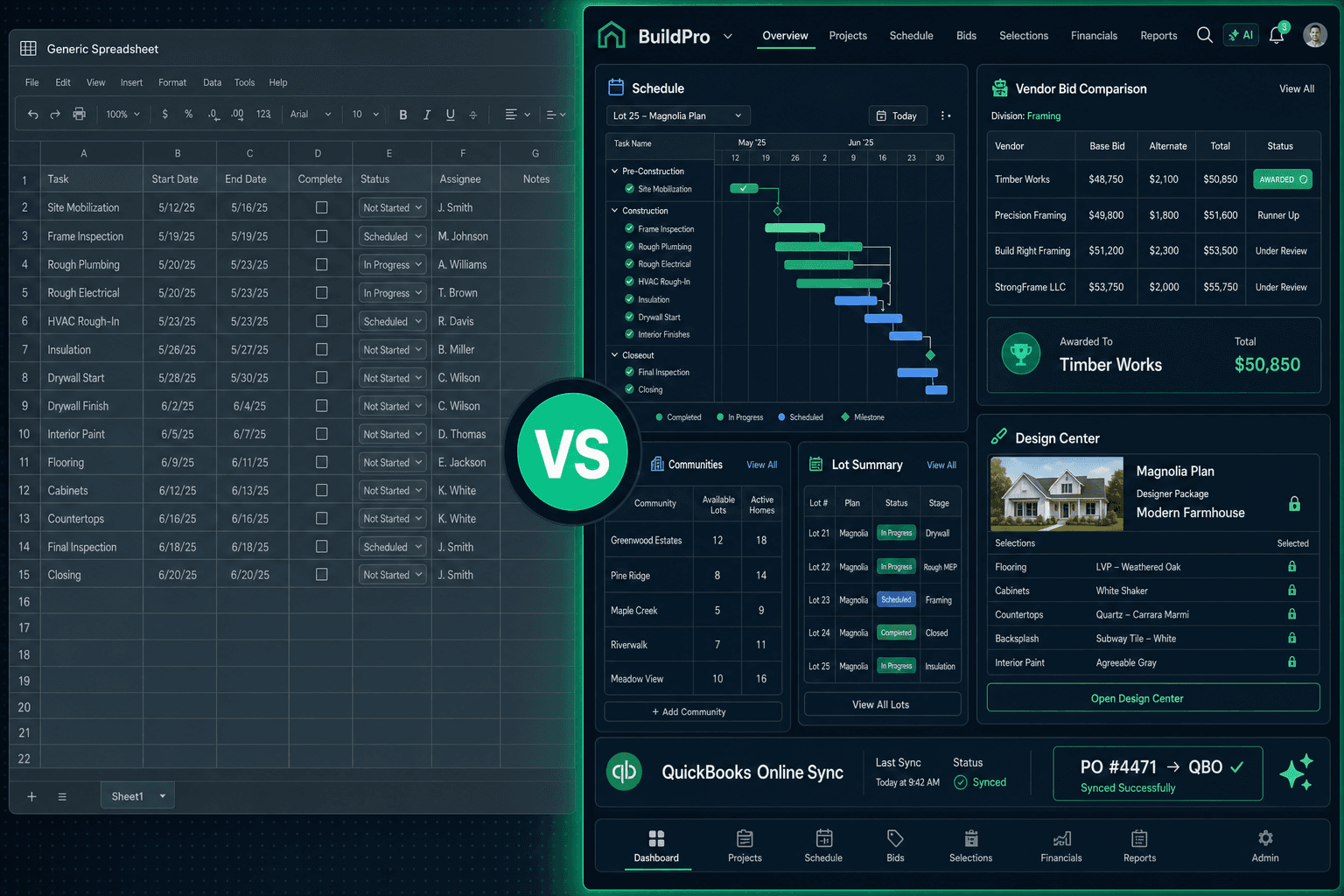
Smartsheet vs Cornerstone PM: A Grid Is Not a Building System
Smartsheet is a genuinely good general-purpose work platform. Builders who moved off raw Excel got something real: shared views, real-time updates, automations, and dashboards that don't live in someone's inbox. But a grid stores rows — it doesn't know what a floorplan is, what a spec level means, or that picking Carpet excludes Tile. Cornerstone PM is built for production home builders — where those abstractions are not optional.
This post draws the line honestly. Smartsheet is a strong tool for teams that need shared task tracking across departments. Production home builders need something architecturally different, and the mismatch shows up in six specific places that no amount of custom columns or Smartsheet automations can fix.
What does Smartsheet do well for builders?
To be fair: Smartsheet is better than a shared Excel file for tracking a construction schedule. Multiple people can edit it at once, you can set up dependency columns, conditional formatting catches a few mistakes, and dashboard widgets give a project manager something to show in a Monday meeting. For a small builder running a handful of jobs, those wins are real.
The limit is not Smartsheet's fault — it's its purpose. Smartsheet is a work management platform designed to work for any team: marketing, IT, HR, operations, construction. That “any team” promise is exactly what produces the gaps a home builder runs into.
Where the spreadsheet-grid approach breaks
The six places where a grid runs out for production home builders:
1. No floorplan model. A production builder builds the same Hawthorne plan 40 times across three communities. In Smartsheet, each start is a fresh set of rows — someone copies the template, updates the dates, and hopes nothing breaks. There is no concept of a floorplan as a reusable object with its own scope items, structural options, and community-specific vendor pricing. Change the framing labor rate in Smartsheet and you change one project; in Cornerstone PM, you change one scope item and every home of that plan reprices across every community.
2. No options engine.Every buyer of the Hawthorne picks flooring, cabinets, countertops, and exterior colors. That option set is shared across every sale of that plan. A grid forces someone to re-enter those options for every buyer — or copy a “template” sheet and update prices by hand when vendor rates change. Cornerstone PM's production design center prices options once at the floorplan level and reuses them across every sale, with 64 curated Designer Packages and exclusion groups that make conflicting picks structurally impossible.
3. No vendor bid workflow. Getting quotes from subcontractors in Smartsheet means emailing a spreadsheet, waiting for a reply, reformatting the numbers to match your template, and comparing them manually. Cornerstone PM sends scope-filtered Excel bid templates (Base, Structural, and Designer tabs) automatically, vendors submit through a no-login portal, and submitted bids appear side-by-side for comparison. Awarded pricing locks so neither the builder nor the vendor can quietly revise it.
4. No purchase order generation. When a task completes in Cornerstone PM, the purchase order generates automatically and emails itself to the vendor — no one opens the purchasing screen. In Smartsheet, a completed row is still just a completed row. Someone still has to write the PO, send it, and remember to enter it in QuickBooks.
5. No accounting sync. Cornerstone PM posts approved purchase orders, change orders, bills, and vendors to QuickBooks Online automatically, with each Community mapped to a QBO Customer and each Home mapped to a Project for real per-home P&L. Smartsheet has no accounting integration that does that — you are manually bridging the two systems forever.
6. Automations break when people leave. Every Smartsheet automation is a rule someone hand-configured: a formula, a notification trigger, a workflow. When the person who built it leaves — and they will — the system degrades invisibly. Purpose-built construction software encodes cascade scheduling, auto-PO generation, and vendor notification structurally, so the workflow survives staff turnover.
Feature comparison
What does Cornerstone PM replace — and what doesn't it touch?
Cornerstone PM replaces the Smartsheet schedule, the vendor bid spreadsheet, the purchasing worksheet, the options pricing file, and the manual QuickBooks entry. It does not replace your accounting software — it connects to it. Approved purchase orders, change orders, bills, and vendors post to QuickBooks Online automatically, one direction, with community, lot, address, PO number, and cost code in every transaction memo so any QuickBooks line is traceable back to the exact home and trade.
The Foreman AI agent goes further. Foreman has 396+ skills across 20 categories that read and write real data — it creates area costs, updates vendor pricing, generates scope-of-work documents, analyzes jobsite photos with AI vision, and runs multi-step purchasing workflows without anyone opening a screen. Foreman also carries per-user memory, so it learns each team member's vendor preferences and builder defaults across sessions. That is not a Smartsheet automation — it is a construction agent that works the platform on your behalf.
What about migration from Smartsheet?
Smartsheet exports to CSV and Excel — and Cornerstone PM's AI migration wizard reads those exports and maps columns automatically, so a Smartsheet export is a valid starting point. Most of the actual setup work is structural: creating communities, uploading floorplans, adding vendors, and building the schedule template that will drive every future start. Once that structure exists, the workflow runs on its own — cascade scheduling adjusts downstream tasks when one trade slips, tasks fire purchase orders on completion, and bids come back through a no-login vendor portal without anyone coordinating by email.
And if you ever want out: Cornerstone PM exports the full database as CSV or JSON at any time, from Settings → Backups. No support ticket, no export fee, no hostage-taking. A platform that is easy to leave is easier to join.
The honest answer on who Smartsheet still fits
If you are a builder running one or two custom homes per year with a small team and you genuinely only need shared task tracking, Smartsheet is reasonable and cheap. It is not designed for home builders but it is not harmful for that scale.
If you are doing plan repeats across communities — selling the same floorplans to multiple buyers, running the same trades at community-negotiated rates, and needing buyer selections managed at the plan level — Smartsheet cannot model your business. You will spend more time maintaining the Smartsheet system than you would spend using software built for production home building.
The construction site does not care what is in the spreadsheet. The schedule cascade, the vendor bid, the purchase order, the design center appointment — those are not rows. They are workflows that construction software should run for you.
Stop maintaining the grid. Run the build.
Floorplan-level takeoffs, auto-generated purchase orders, a production design center, and one-way QuickBooks sync — purpose-built for home builders who repeat plans across communities.
Request Early Access