Vendor Payment Schedules for Home Builders: Net Terms to Semi-Monthly
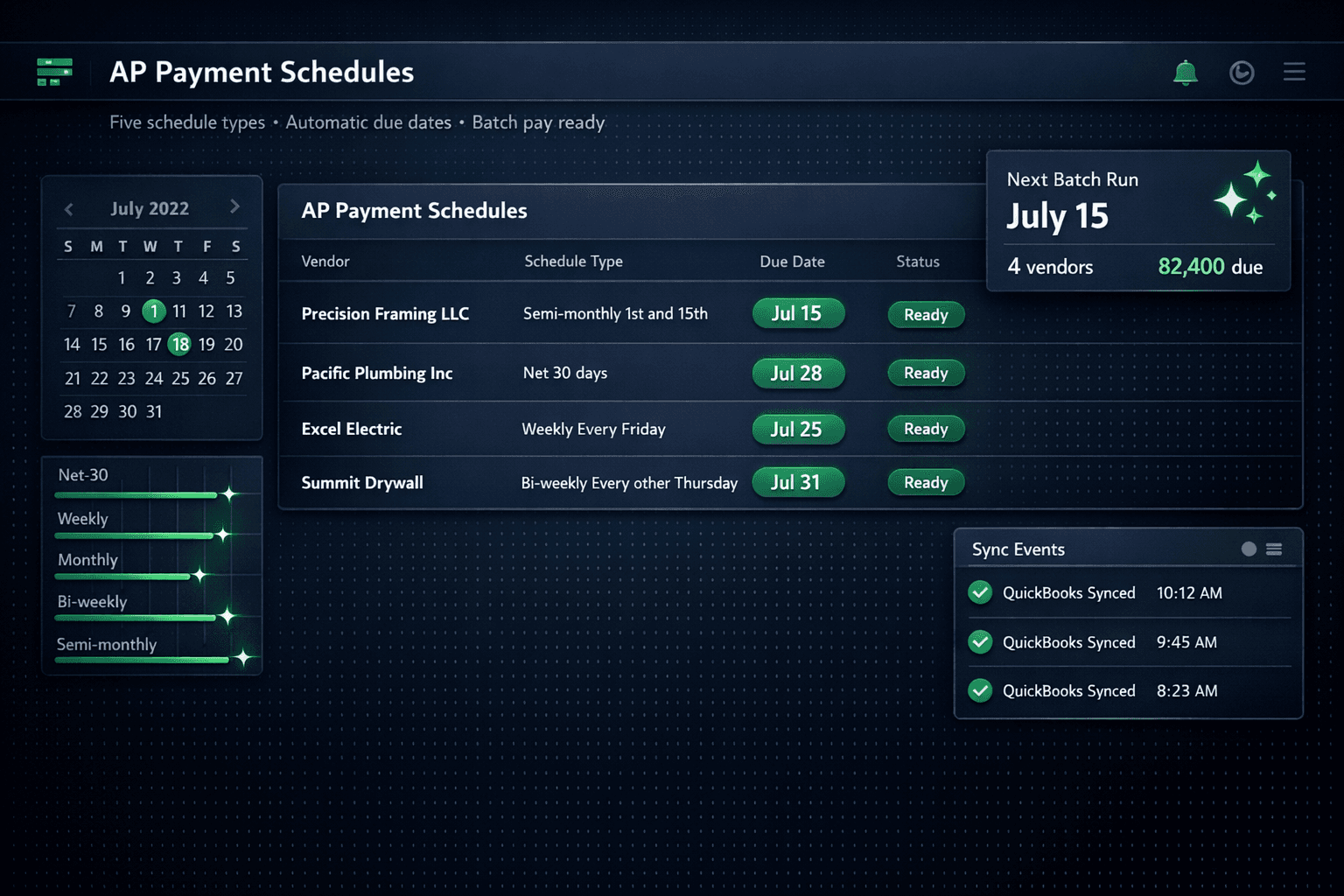
Set a payment schedule per vendor in Cornerstone and every bill that syncs to QuickBooks gets its due date computed automatically — so on payday you batch-pay every vendor in one approval run inside the purchasing module, not one invoice at a time.
Most builders pay vendors reactively: an invoice arrives, someone figures out when it's due, it sits in a pile until the check run, and half the time the due date is wrong because no one remembered what terms were negotiated. Multiply that across 20 active vendors and 40 live homes and you're spending more time managing the AP pile than building houses.
Cornerstone PM's AP payment schedule system removes that friction from both ends. Configure a schedule once per vendor and Cornerstone computes the correct due date on every bill — automatically, every time, carrying it into QuickBooks with the synced transaction.
What are the five AP schedule types?
Different vendors run on different payment cycles. A national lumber supplier may want Net 30. Your framing crew might expect a check every Friday. Cornerstone supports five schedule types to match how you actually pay:
Semi-monthly is the newest addition — two fixed paydays per month (say, the 1st and the 15th), keyed off the invoice or bill date. It works well for builders who want a mid-month run for recent completions and an end-of-month run to clear the rest, without tracking individual Net-X windows per vendor.
All five schedule types compute the due date from the invoice or bill date. That due date carries automatically into the QuickBooks Bill when Cornerstone creates it via the one-way sync.
How does the AP loop work end to end?
The payment schedule is one piece of a complete AP automation flow. Here's every step from task to paid:
- Task completes in the build schedule. Cornerstone auto-generates a PO and emails it to the assigned vendor — no manual PO creation.
- PO sent → Purchase Order in QuickBooks. The committed cost appears in your books immediately as an outstanding PO. Drafts stay private.
- PO marked received → Bill auto-creates. Cornerstone creates the matching Bill in QuickBooks, linked to the PO, which then closes. No dangling open POs, no duplicate lines.
- AP schedule sets the due date. The bill's due date computes from the invoice/bill date using the vendor's schedule — Net-X, Weekly, Monthly, Bi-weekly, or Semi-monthly — and lands on the QuickBooks Bill automatically.
- Builder batch-pays on payday. All bills due by that date appear together in QuickBooks for one manual approval run. One payday, one check run, no hunting across the vendor list.
Human pay gate: Cornerstone creates the bill and sets the due date. QuickBooks holds it for payment. The builder manually approves every payment in QBO — Cornerstone never auto-pays, and that gate cannot be disabled.
Why does batch-pay beat one-off approvals?
The real payoff from AP schedules is cash-flow control. When every vendor bill lands in QuickBooks with a pre-computed due date, your bookkeeper can run a simple report on a Monday morning and see exactly what's due by Friday. All framing bills due the 15th? One batch approval. All plumbing bills due weekly every Friday? One batch approval.
Compare that to the alternative: hunting through 30 open bills of varying ages, trying to remember what Net terms you negotiated with each vendor two seasons ago, and manually entering due dates that may or may not match what the vendor expects. That's not bookkeeping — it's archaeology.
Cornerstone's purchasing module takes the archaeology out of AP. One schedule per vendor, set once, applied automatically to every bill for the life of the relationship.
What does the QuickBooks Bill look like?
Each synced Bill carries a structured memo so any transaction in QuickBooks is traceable back to the exact home and trade without leaving QBO:
Example Bill memo in QuickBooks
Community: Riverside Estates | Lot 7 | 1204 River Bend Dr
PO #2091 | Cost Code: Framing
Vendor: Precision Framing LLC
Community name, lot number, street address, PO number, and cost code — all in one line. A bookkeeper can pull the transaction from the QBO register and immediately know which home and trade it covers without opening Cornerstone.
For push visibility, Accounting → Sync Eventsin Cornerstone shows every push to QuickBooks — timestamp, result status, and retry history if a push failed. You always know what landed in QuickBooks and what's still pending, without logging into QBO to check.
How do AP schedules fit the broader purchasing platform?
AP schedules are the accounting endpoint for a purchasing workflow that starts well upstream. Cornerstone's full purchasing module covers vendor bid requests with auto-generated scope-filtered Excel templates, a no-login vendor portal for bid submission, side-by-side bid comparison, community-assigned vendor awards with locked pricing, and auto-generated POs from the awarded bid. The AP schedule system is where that work lands in QuickBooks — with the right due date, the right memo, and zero manual entry.
This also connects to Foreman AI, Cornerstone's construction AI agent with 396+ skills. Foreman can handle multi-step purchasing workflows — generating scope items, managing vendor bids, and updating pricing — so the AP schedule is the automated endpoint for a process that Foreman can start from a single chat prompt.
What Cornerstone handles vs. what stays in QuickBooks
For builders running 50+ homes per year across multiple communities, AP schedules are the difference between an uncontrolled pile of invoices and a clean, predictable cash-flow process. The vendor does their job. Cornerstone handles the paper trail. QuickBooks shows a dated AP register ready for one batch-pay run on payday — every time.
Put your AP on a schedule.
Set payment schedules per vendor in Cornerstone PM and stop managing due dates by hand. Net-X, weekly, bi-weekly, monthly, or semi-monthly — every bill lands in QuickBooks with the right date, ready for one batch-pay run on payday.
Request Early Access