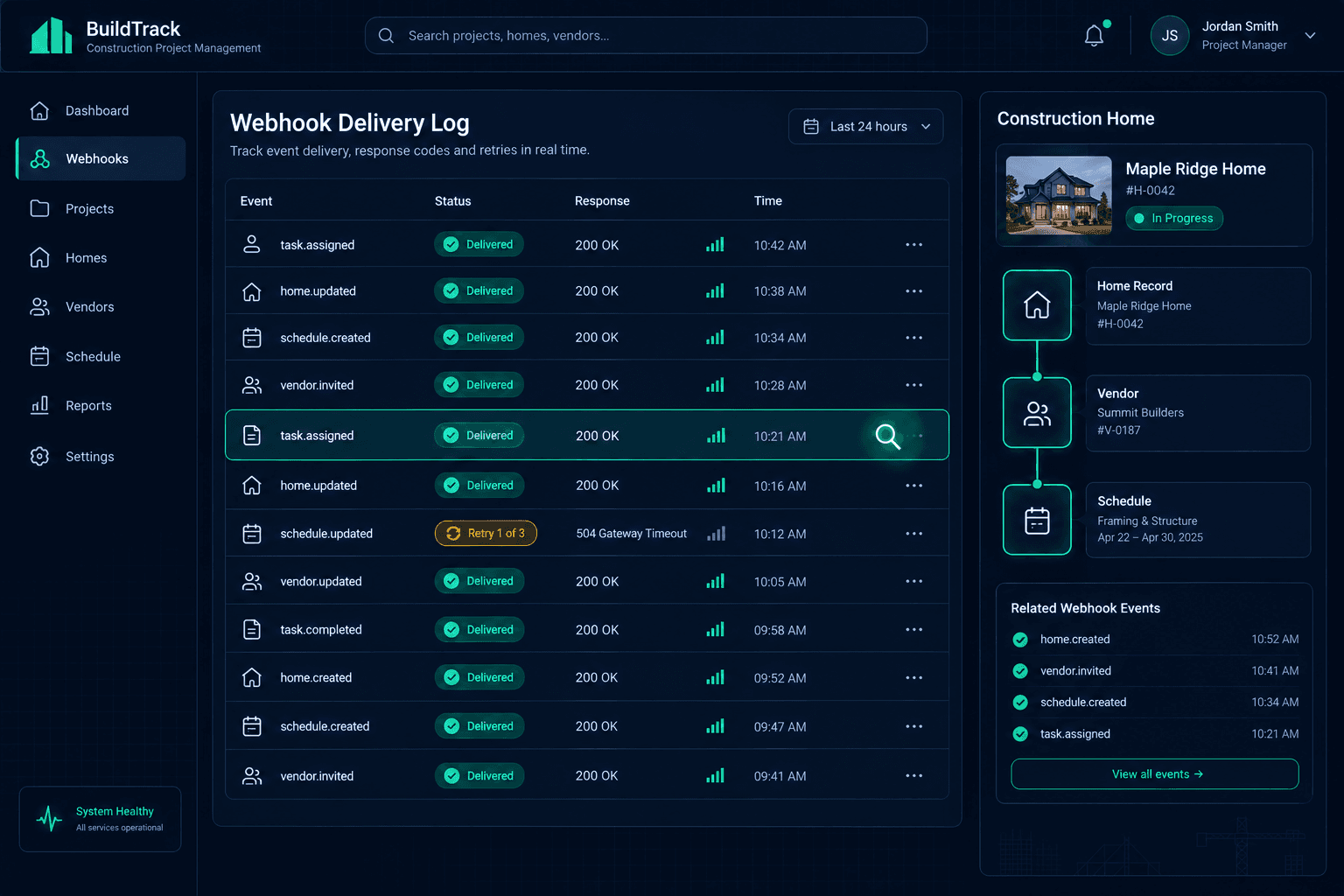
A Webhook Failed: Trace the Delivery Before Repeating the Action
When a teammate says a notification never arrived, check the delivery log before you repeat the action. A clean 2xx delivery and a failed downstream automation are two different problems with two different owners — confusing them is how a retried webhook turns into a duplicate SMS, a double-booked voice call, or a CRM record updated twice.
Cornerstone PM's Foreman AI platform ships 37 named webhook events with typed payloads, HMAC-SHA256 signatures, delivery logs, and automatic retry. That infrastructure, added in the May 7 webhook release, gives builders and integration owners real visibility into what happened when an automation appears to have misfired. This post is a field guide to reading that visibility correctly — not another walk through the event catalog.
Why does a successful delivery not guarantee the automation ran?
A webhook delivery is one HTTP request: Cornerstone PM POSTs a signed, typed payload to your endpoint, and your endpoint returns a response code. When that response is 2xx, Cornerstone PM considers the delivery complete and logs it as such. Everything your receiver does after accepting that payload — parsing fields, calling Twilio, pushing a CRM update, kicking off a Bland or Retell voice call — happens in your integration code, outside anything Cornerstone PM can observe or log.
That boundary matters the moment something looks broken. A super says the sub never got a text when a task was assigned. The instinct is to assume the webhook failed and manually resend the notification. But the delivery log might show a clean 2xx response at the exact timestamp in question — meaning the event was delivered correctly, and the actual failure is in the receiver's Twilio call, not in Cornerstone PM's webhook pipeline. Repeating the action at that point doesn't fix anything; it just risks a second message once the real bug in the receiver gets fixed.
How do I trace a failed delivery before repeating an action?
Four checks, in order, separate a delivery problem from a downstream problem:
1. Confirm the delivery attempt
Did Cornerstone PM try to deliver this event?
Open Settings → Webhooks and find the event by type and approximate timestamp. If there's no delivery attempt at all, the event either didn't fire on the Cornerstone PM side or hasn't been triggered yet — that's a different problem than a failed delivery, and it points you back to the home, task, or vendor record instead of the webhook pipe.
2. Read the response code
Did the endpoint acknowledge it?
A 2xx response code means your endpoint accepted the payload — delivery succeeded from Cornerstone PM's side. A non-2xx response or a timeout means Cornerstone PM queued a retry with exponential backoff. Check whether a later attempt in the same log eventually got a 2xx. If it did, the event was delivered; it just took more than one try.
3. Separate delivery from downstream work
Did the receiver's action actually happen?
A successful delivery only proves your server returned a 2xx — not that the SMS sent, the CRM updated, or the voice call connected. That logic lives in your receiver, after it accepts the payload. If the delivery log is clean but nothing downstream happened, the investigation moves to your integration code and the third-party service it calls, not back to Cornerstone PM.
4. Check for a duplicate before repeating anything
Could this already have happened once?
Retries mean a receiver can see the same event more than once. Before manually re-triggering a notification or re-running an action, check whether the event ID in the payload was already processed. A receiver that keys off the event ID for idempotency won't double-fire on a legitimate retry — one that doesn't will.
What does the Cornerstone PM delivery log actually show?
In Settings → Webhooks, every configured endpoint has a delivery log: event type, timestamp, target URL, response code, and the exact payload sent. This is the first place to look, and usually the only place you need to look to answer "did this fire, and did my endpoint accept it." It does not — and cannot — tell you whether your receiver's downstream call to Twilio, your CRM, or a voice vendor succeeded, because that logic runs on your server after the delivery completes. If you need visibility into that half of the chain, it has to be logged in your own integration.
For a full rundown of the event catalog, payload typing, and the HMAC signature verification that confirms a request actually came from Cornerstone PM, see the 37 webhook events overview. This post assumes that infrastructure exists and focuses specifically on reviewing a delivery after something looks wrong.
Why automatic retry doesn't mean exactly-once delivery
When an endpoint returns a non-2xx response or times out, Cornerstone PM queues a retry with exponential backoff rather than dropping the event. That's the right behavior for a momentary outage — a redeploy, a cold start, a brief network blip — but it has a side effect worth planning for: a receiver can end up seeing the same event delivered more than once. If your endpoint accepted the payload and started processing it, but was slow enough that Cornerstone PM didn't see the 2xx in time, a retry can arrive on top of work that's already underway.
This isn't a defect in the retry system — it's the standard tradeoff every at-least-once delivery system makes, and it's the reason exactly-once guarantees are rare in real webhook infrastructure. The responsibility for handling it sits with the integration owner, not the platform: a receiver that checks the event ID in the payload against what it's already processed won't double-fire a Twilio SMS or a CRM update on a legitimate retry. A receiver that skips that check will.
A quick before-you-repeat-it checklist
Before manually re-triggering a notification, a voice call, or a CRM push, confirm:
- The delivery log shows either no successful attempt, or a string of failures with no eventual 2xx — not just a single retry that later succeeded.
- You've checked your own receiver's logs for the same timestamp, not just Cornerstone PM's delivery log.
- The event ID from the payload hasn't already been processed by your receiver, so a manual retrigger doesn't stack on top of a delivery that actually succeeded.
- If the fix is on your end — a receiver bug, a downstream API outage — you're fixing that, not treating Cornerstone PM's delivery log as the source of the problem.
Builders running automation on top of Cornerstone PM's API and webhook layer get the visibility to answer these questions in minutes instead of guessing. The delivery log tells you what Cornerstone PM did. Your own receiver logs tell you what happened next. Keeping those two investigations separate is what keeps a single failed notification from turning into a duplicate one.
Build automations on a webhook layer you can actually debug.
Cornerstone PM ships 37 named webhook events with HMAC signatures, per-event delivery logs, and automatic retry — the visibility builders need to trust their automation stack, not just enable it.
Request Early Access →