The Buyer Orientation Walkthrough: A Pre-Closing Checklist Home Builders Can Actually Trust
A buyer orientation walkthrough only protects a closing date if every item raised during the walk gets a room, a trade, and an owner before the homeowner signs — not a verbal promise that someone will "get to it" after they move in.
Most builders already run some version of the pre-closing walk: a superintendent or customer care rep tours the finished home with the buyer, points out how systems work, and writes down whatever the buyer flags along the way. The walk itself is rarely the weak point. What happens to that list in the hours after the buyer leaves is where closings get complicated.
What should a buyer orientation checklist actually cover?
A useful pre-closing checklist does more than list rooms to visit. It defines what "done" looks like for each item raised during the walk:
Walk every room, not just the ones the buyer flags
Buyers focus on what catches their eye first — a scuff on a wall, a sticking door. Superintendents still need to walk garages, laundry rooms, and mechanical closets that buyers rarely think to check before they own the house.
Tag every item to a room and a trade before you leave
An item written down as 'kitchen thing' with no trade assigned is a problem for someone to decode later. Tag the room and the responsible trade on the spot, while the context is still in front of you.
Separate cosmetic items from anything safety- or system-related
A loose cabinet hinge and a tripped GFCI outlet are not the same priority. Severity tags at the point of capture keep the punch list from treating every item as equally urgent — or equally ignorable.
Get a signed confirmation, not a verbal walk-off
Closing on a verbal 'looks good' leaves no record of what the buyer actually reviewed. A signed confirmation tied to the specific list of open items protects both sides if a dispute comes up after move-in.
Notify the vendor before the buyer leaves the driveway
The gap between 'item identified' and 'vendor knows about it' is where punch lists rot. If notification depends on someone typing up notes back at the office, plan on a multi-day delay before any trade even knows they have work to do.
Why does the walk-to-vendor gap matter so much?
A buyer orientation walk usually happens on a tight schedule — often the same week as closing, sometimes the same day. If the list of open items sits in a notebook or a text message until someone gets back to the office to type it up, the vendor notification slips by a day or two. That delay doesn't just annoy a buyer who wants the touch-up paint fixed before move-in; it also means the builder has no documented record of what was open at the moment the buyer signed off, which matters if a dispute comes up later about what was or wasn't promised.
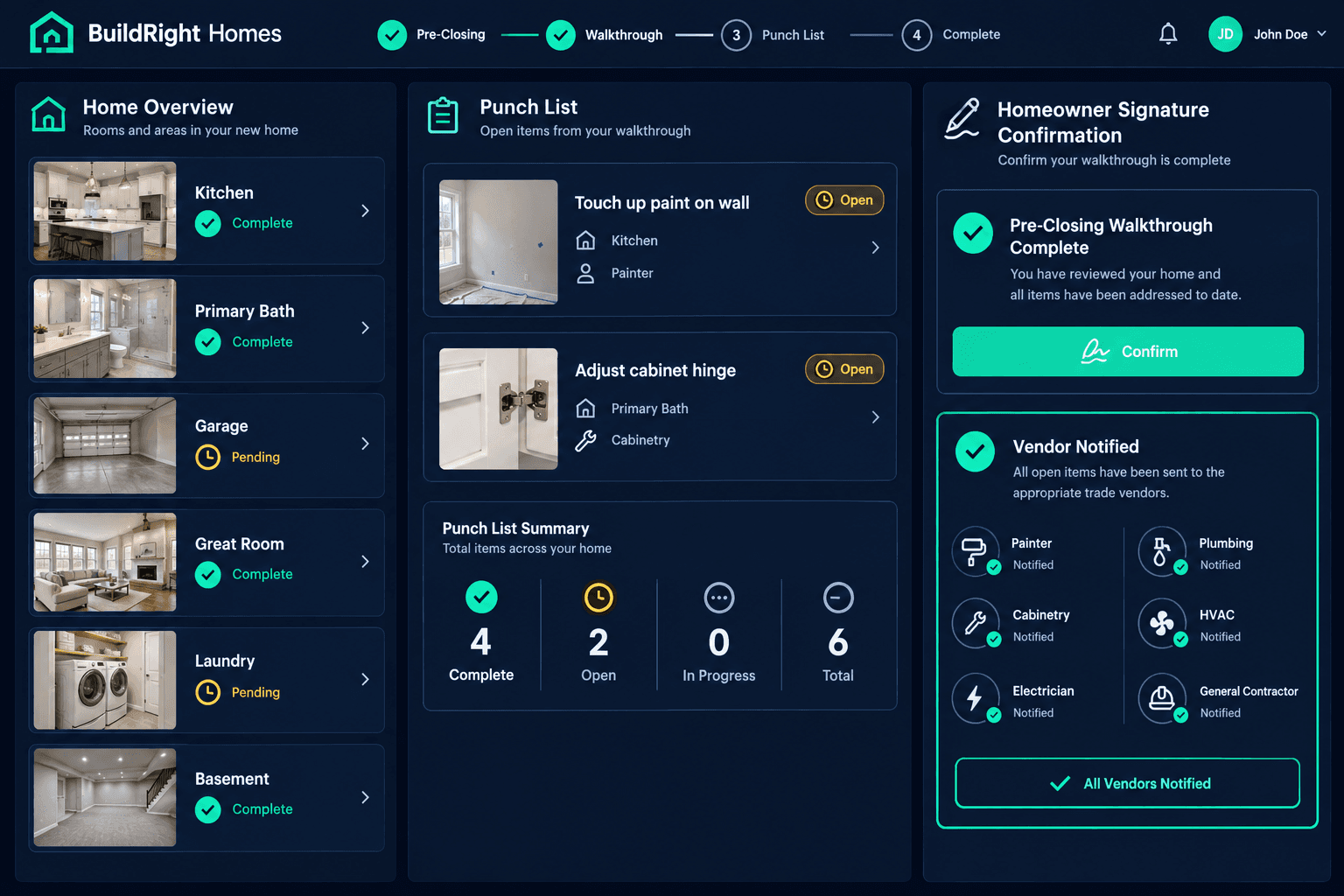
The same Punchlist AI workflow that handles the pre-drywall, final, and 11-month warranty walk applies here too. The superintendent records the buyer orientation walk on their phone the same way they'd record any other walkthrough. Punchlist AI transcribes the audio, reads the video, tags each item's room, trade, and severity, and adds it directly to the home's existing punch list — no separate closing spreadsheet, no re-typing after the fact.
What the buyer sees before they sign
A specific, room-by-room list of open items
Not a blank page they're asked to sign against — an actual list, tied to the rooms they just walked, with a trade already assigned to each one.
A confirmation tied to that exact list
The homeowner's sign-off references the same items the vendors are about to be notified on — so there's no gap between what was promised and what gets tracked.
Does this replace the closing paperwork?
No — it complements it. A signed confirmation inside the homeowner's buyer portal doesn't substitute for a closing attorney's documents; it gives customer care and the buyer a shared, dated record of exactly which punch items were open at the moment of closing, and it starts the vendor-notification clock immediately instead of after someone gets back to a desk.
The orientation walk is the last checkpoint before a builder hands a house over and a punch list becomes a warranty conversation instead of a construction one. Whether that handoff produces a clean, dated record or a stack of sticky notes shouldn't come down to how busy the closing calendar is that week.
Turn the closing walk into a tracked, signed record.
Punchlist AI records the buyer orientation walk, tags every open item to a room and trade, notifies vendors instantly, and captures the homeowner's sign-off — all inside Cornerstone PM.
Request Early Access