Change Order Management for Production Home Builders
Change orders shouldn't live in email threads. In Cornerstone PM, every change order is priced from accepted vendor bids, approved in-platform, and synced one-way to QuickBooks automatically — no re-keying, no CSV exports, and one honest source of truth.
A change order is one of the most financially dangerous documents in residential construction. It changes scope after the contract is signed. Every number in it needs to be defensible — the buyer will ask, the bookkeeper will reconcile, and the lender may audit. Yet most production builders run change orders through email threads, whiteboard tallies, and copy-pasted spreadsheet rows that get re-entered by hand into QuickBooks at month-end.
That gap between the field approval and the accounting entry is where margin disappears. A CO that doesn't make it into the books is revenue you never collect. A CO priced from memory instead of vendor data is a number you can't defend. And a CO that gets double-entered — once in the build system, once in QuickBooks — is a reconciliation problem waiting to happen.
How does Cornerstone handle the change order lifecycle?
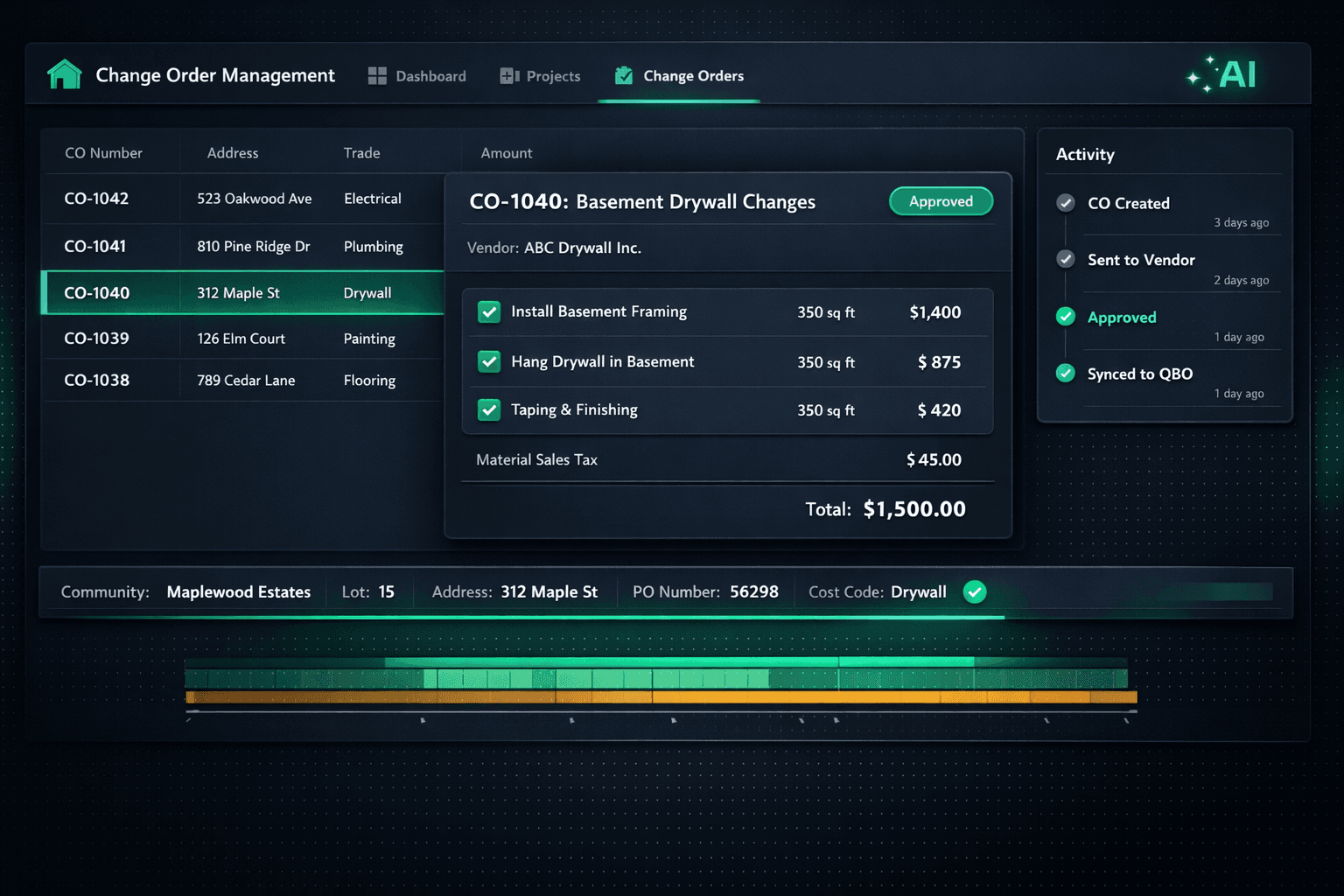
Cornerstone's change order flow is wired into the same purchasing and accounting stack as everything else on the platform. From pricing to approval to QuickBooks sync, nothing requires a manual handoff:
Change order flow — start to books
Priced from accepted vendor bids
Every line item pulls cost from awarded vendor pricing — no stored defaults, no estimator fudging. A line with no accepted bid shows $0 / needs pricing.
Sales tax applied automatically
Material lines are taxed; labor lines stay exempt. The split happens automatically on every PO and change order — no manual tax calculation.
Approved in-platform
Builder approves the change order inside Cornerstone. Drafts stay private until approval, so nothing goes out until it's deliberate.
Auto-posted to QuickBooks
The approved CO syncs one way to QuickBooks carrying community, lot, address, PO number, and cost code in the memo — no re-keying.
Rolls into per-home P&L
Because each Community maps to a QuickBooks Customer and each Home to a Project, the CO hits the right job automatically.
The result: the moment a change order is approved in Cornerstone, QuickBooks has the right number, in the right job, with the right memo — without anyone opening a second screen.
Why every dollar has to trace back to a vendor bid
Cornerstone follows a platform-wide hard-cost rule: nothing carries a stored or default cost. All cost flows from accepted vendor pricing. A line with no awarded bid shows as $0 / needs pricing instead of pulling a synthetic estimate from a cost library.
This matters most on change orders. When a buyer asks why basement finishing costs $18,400, the right answer is "because ABC Drywall submitted that number in their bid and you accepted it" — not "because that's what our cost library says." Vendor-priced change orders are defensible. Estimated change orders are guesses.
The same rule applies to the auto-quantity scope items that drive material and labor costs across floorplan budgets. A change order for a structural option — a finished basement, a third-car garage — pulls its pricing from the same accepted vendor rates as the base home. The math is consistent across every line, not re-estimated per CO.
Automatic sales tax: materials taxed, labor exempt
Most construction jurisdictions tax materials but exempt labor. Getting that split right by hand on every change order is tedious and error-prone — the wrong tax rate applied to labor looks like fraud to an auditor, and forgetting to tax materials leaves money on the table with the state.
Cornerstone applies sales tax to material lines only and keeps labor exempt, automatically, on every purchase order and change order. The calculated tax carries into the QuickBooks sync, so the amount in QuickBooks matches the amount on the field paperwork exactly — no manual tax splits, no reconciliation gymnastics at year-end.
One-way sync: Cornerstone to QuickBooks, never back
Once a change order is approved, it posts itself to QuickBooks Online. Because Cornerstone's QuickBooks sync is one-directional, there's no risk of a QuickBooks-side edit silently overwriting the approved number in Cornerstone. The construction platform stays the source of truth — QuickBooks reflects it, not the other way around.
Every synced change order memo carries community name, lot number, address, PO number, and cost code. A bookkeeper looking at a QuickBooks bill can trace that transaction back to the exact home and trade in seconds, without opening Cornerstone or asking the superintendent.
What the QuickBooks sync carries for every change order
Community → QuickBooks Customer
Per-community P&L rolls up automatically
Home → QuickBooks Project
Per-home margin visible inside QBO without a journal entry
Transaction memo
Community · Lot · Address · PO# · Cost Code on every synced record
Material sales tax
Calculated and synced — labor stays exempt, no manual split
Sync Events log
Accounting → Sync Events shows every push and retry — no black box
The Sync Events log: audit trail for every push
Most accounting integrations are a black box. Data leaves the construction system and bookkeepers pray it showed up correctly in QuickBooks.
Cornerstone makes the sync visible. The Accounting → Sync Events log shows every push to QuickBooks Online — including the status of each sync and any retries — so builders can verify exactly what synced and when. If a record failed to sync, it shows up in the log with enough context to diagnose. No more month-end mystery variances between the build system and the books.
Cornerstone never auto-pays — the human pay gate is permanent
Payment approval always stays in QuickBooks
Cornerstone posts the approved change order as a Bill in QuickBooks, but it never initiates payment. The builder reviews and pays manually in QuickBooks on whatever payment schedule they've configured. The human pay gate is intentional and permanent — no change order auto-pays in this platform.
This is part of the broader AP loop Cornerstone runs: approved POs post to QuickBooks as commitments, bills auto-create on completion, and builders batch-pay on payday — but the pay button never presses itself.
How change orders fit the full purchasing picture
Change orders don't exist in isolation. In Cornerstone they sit inside the same purchasing module as purchase orders, vendor bids, scope items, and the Master Cost Budget. A change order for additional framing updates the Master Cost Budget for that home, surfaces in the per-home P&L inside QuickBooks, and can be initiated by Foreman AI — Cornerstone's 396+ skill construction agent — if you prefer to manage purchasing by chat.
Because the same hard-cost rule applies everywhere — the base contract, POs, and change orders all pull from accepted vendor pricing — there's no inconsistency between what was budgeted and what the change order charged. The buyer-facing design center, the vendor bids, and the accounting entries all reference the same underlying numbers.
For builders running 20, 50, or 100 homes a year across multiple communities, that consistency compounds. A change order that takes 30 seconds to approve and zero seconds to enter into QuickBooks isn't just a convenience — it's the difference between a close that reconciles cleanly and a month-end scramble.
Frequently Asked Questions
What is construction change order management software?
How does Cornerstone price change orders?
Does Cornerstone sync change orders to QuickBooks?
Does Cornerstone auto-pay change orders?
How is sales tax handled on change orders?
What information appears in the QuickBooks memo for a change order?
Can I see which change orders have synced to QuickBooks?
Change orders that close the loop — not open a spreadsheet.
Cornerstone PM prices change orders from real vendor bids, routes them for approval, and syncs them to QuickBooks automatically — with every dollar traced and the books updated before you close the tab.
Request Early Access