Before Booking the Concrete Pour: A Builder Coordination Checklist
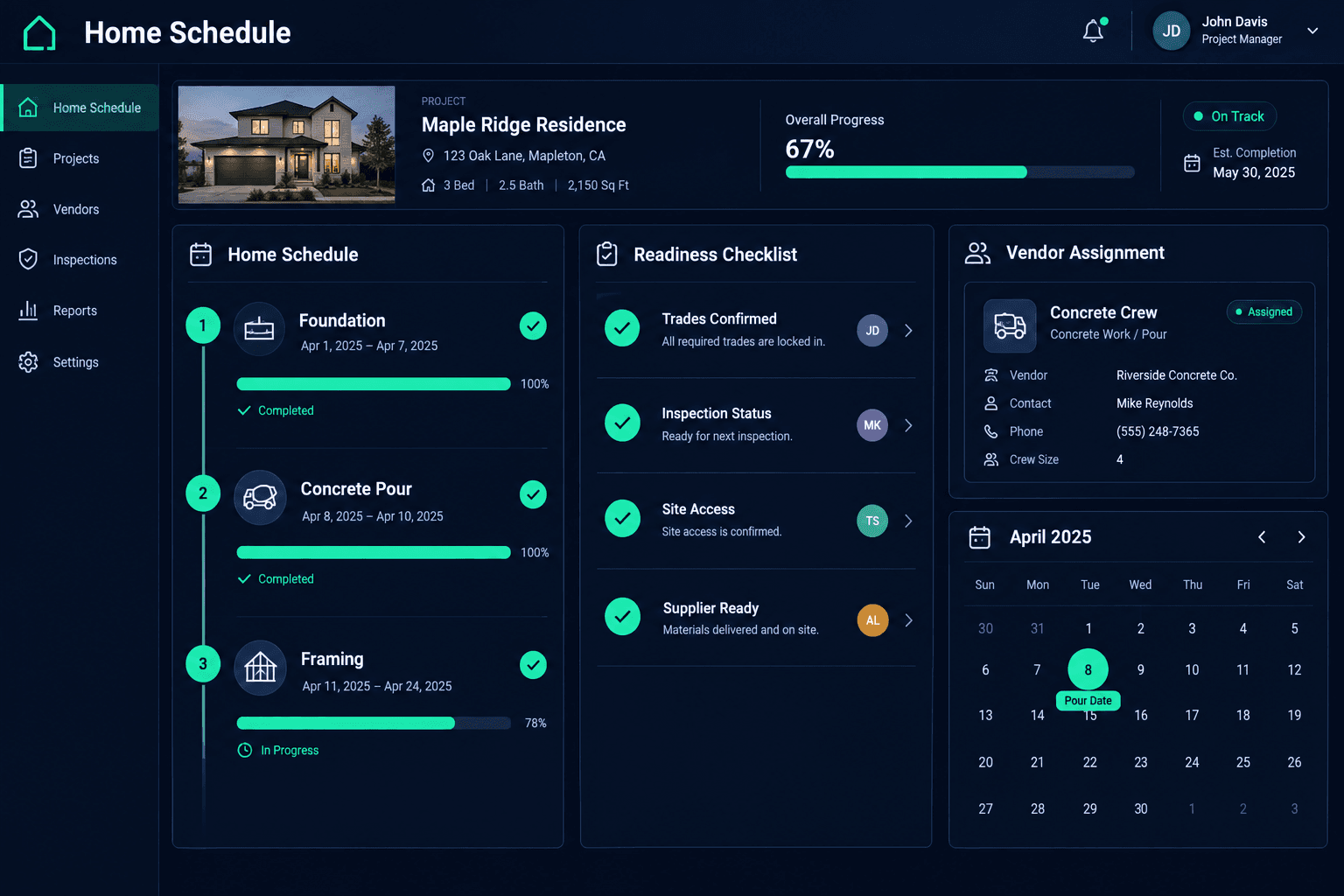
Before you book a concrete pour, confirm that the prerequisite work is finished, the required inspection status is known, the site is accessible, and the crew and supplier are both available. Then record who confirmed each item in your home schedule.
A pour date is one of the harder dates to move. The concrete crew, the supplier, and a long list of trades behind them all key off it. Releasing it on a hopeful guess means a scramble of calls when something turns out not to be ready, and every later task on that home inherits the slip.
This is an operational coordination checklist. It is not engineering advice, and it does not define inspection criteria. What is required before a pour depends on your jurisdiction, your plans, and your engineer. The checklist helps a superintendent make sure the people who know those answers have given them before the date is set.
What should be confirmed before releasing a concrete pour?
Five things belong on the review. Each one has an owner who can confirm it, and the owner's name goes next to it.
Pre-pour readiness review
Prerequisite work
Confirmed finished in the field by the superintendent, not just marked complete
Inspection status
Any required pre-pour inspection confirmed, with the confirming person's name
Site access
Truck path, equipment access, and lot conditions checked for the pour date
Trade and supplier availability
Concrete crew and supplier each confirmed for the target date
Follow-on dates
Dependent tasks and trade assignments reviewed once the date is set
How do you confirm the prerequisite work is really done?
Start from the home's schedule and list the tasks that must finish before concrete is placed. Then ask the superintendent to confirm them on the lot. A task marked complete in any system tells you that someone reported it. It does not tell you the work was checked. The superintendent's field confirmation is the item that counts.
Inspection status works the same way. If an inspection is required before the pour, the superintendent confirms whether it has been passed and who told them. Cornerstone does not check inspection compliance or approve a pour. It gives the team one shared schedule to record the outcome against.
Why check site access and the crew separately?
Access problems rarely show up in a schedule. A truck path blocked by a staged material pile, soft ground after rain, or a lot that neighbors have boxed in can stop a pour that looks ready on paper. Someone should look at the lot in the days before the date, not just on the morning of the pour.
The crew and the supplier are two different confirmations. The vendor assigned to the home may be free while the supplier is booked, or the reverse. Keeping vendor assignments on the home in Cornerstone makes it clear who the concrete trade is, and your purchasing records keep the related orders in the same place. The availability itself still comes from a phone call or message to each party.
A recommended practice, not a built-in gate
Cornerstone does not automatically block a pour date or verify that a checklist item is true. This checklist is a team practice. The schedule and vendor assignments are the shared reference, and people confirm the rest.
Why record who confirmed each item?
When a pour goes wrong, the first question is what was checked and who checked it. A short note next to each readiness item, with a name and a date, answers that in seconds. It also keeps the review honest. Writing a person's name beside "site access confirmed" makes the superintendent actually ask.
Keep it light. The name, the date, and a few words are enough. The point is that the date is set on confirmed information, and anyone looking at the home later can see the basis for the decision.
What happens to other work when the pour date changes?
Once the date is set, review what depends on it: the trades that follow the concrete work, material deliveries timed to those trades, and any vendor you have already told about a start date. If the pour moves, run the same review for the downstream tasks. A slipped task can cascade through the home's schedule, so the follow-on dates need a second look.
Weather deserves its own communication step. If rain pushes the pour, the trades behind it need a clear update, and our weather delay checklist covers how to give each one a next step.
How does Cornerstone support this checklist?
Cornerstone keeps the home schedule, the assigned vendors, and purchasing records connected, so the person running the review is not hunting across a whiteboard and a spreadsheet. The prerequisite tasks, the concrete vendor, and the follow-on trades for a home are in one place on the construction schedule. The superintendent's confirmations make the date reliable.
Set the pour date on confirmed information.
See how Cornerstone connects the home schedule, vendor assignments, and purchasing for every home you build.
Request Early Access