Designer Packages: Curated Selections That Sell Homes Faster
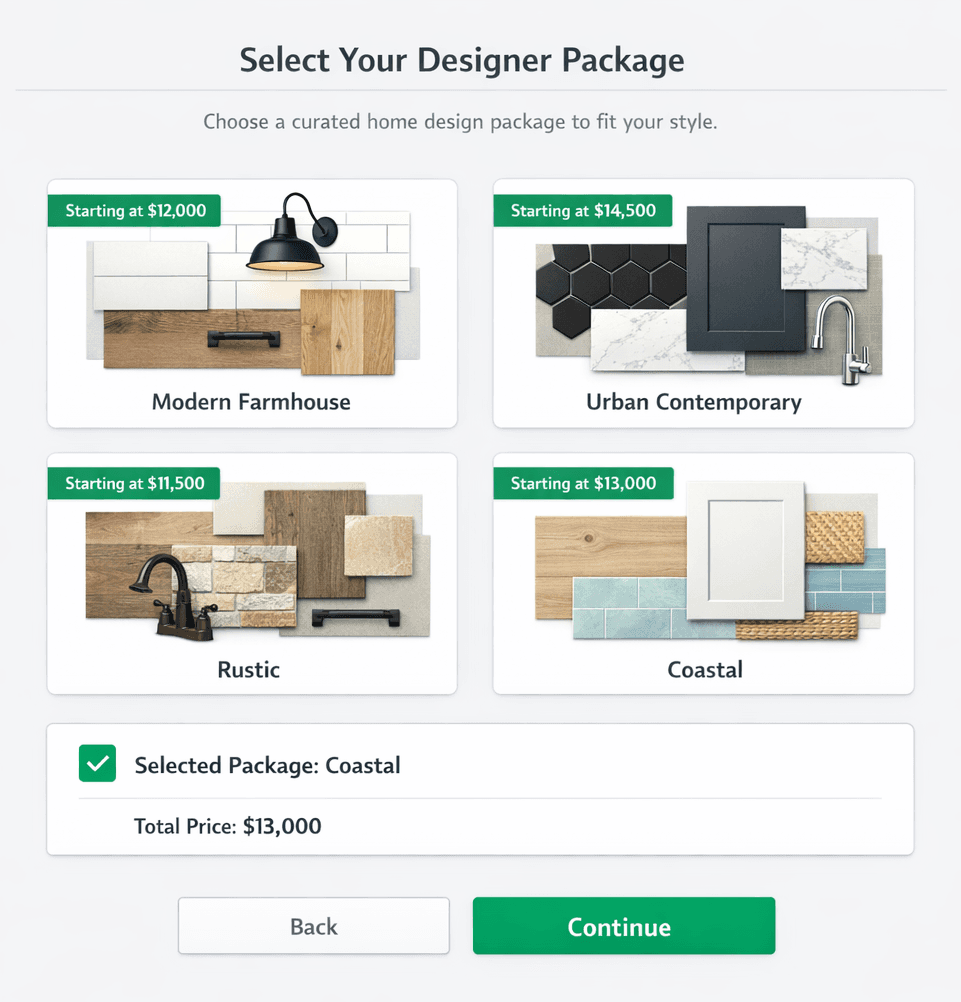
Cornerstone PM's Designer Packages let buyers choose a curated design bundle — “Modern Farmhouse,” “Coastal,” “Urban Contemporary” — and every option in every category auto-locks to that coordinated look. One decision. Zero spreadsheet. Real vendor pricing behind every item.
The selections process is where buyer confidence either builds or collapses. Hand someone a spreadsheet of 300 raw options and you've handed them a decision paralysis problem. Hand them six curated design styles with real photos and real pricing and you've made your design studio a sales asset. Cornerstone PM's design center is built around exactly this insight: the way you present choices shapes how quickly — and how confidently — buyers make them.
What is a Designer Package?
A Designer Package is a named, curated collection of pre-priced design selections that spans every category in your design center — flooring, cabinetry, countertops, tile, fixtures, paint, and more. When a buyer picks a package, Cornerstone automatically locks every category option to the corresponding selection for that style. No separate flooring decision. No separate countertop decision. One package pick coordinates the whole home.
Builders configure up to 64 packages across 7 categories. Each package has a name, a visual, and a real price tied to actual vendor bids — not estimator fudge factors or allowances. When you update vendor pricing, the packages update with it.
How a package plays out across 7 categories
Flooring
The Modern Farmhouse package auto-selects wide-plank white oak LVP — no separate flooring decision required.
Cabinetry & Hardware
The Coastal package locks in shaker-style white cabinetry with brushed nickel pulls — one pick, entire kitchen coordinated.
Countertops
The Urban Contemporary package selects honed concrete-look quartz — no countertop selection loop, no buyer indecision.
Tile & Backsplash
Subway tile or large-format porcelain — defined by the package the buyer already chose, not a separate decision.
Fixtures & Plumbing
Fixtures match the package finish — matte black for Urban Contemporary, brushed gold for the Transitional package.
Interior Paint
Each package carries a curated paint palette — walls, trim, and accent — so the whole home feels designed, not assembled.
Exterior Elevation
Some packages extend to exterior color palettes and trim details, completing the look from curb to closet.
Why do packages shorten the selections cycle?
Decision fatigue is a documented sales killer. When buyers face an open-ended field of 50 flooring choices, 40 cabinet options, 30 countertop surfaces, and 25 tile patterns independently, two things happen: the process takes weeks longer than it should, and anxiety creeps in as buyers second-guess whether their individual picks actually go together.
Packages solve both problems at once. A “Coastal” package is a promise: these finishes are curated to work together. The buyer is making one style decision, not 200 isolated material decisions. The coordination work was done once, by your design team, when you configured the package — not repeated by every buyer who walks into your design studio.
The result: faster selections appointments, fewer callbacks, fewer change requests after signatures, and a buyer who walks out feeling confident rather than overwhelmed.
À la carte is still available — and it's the right fallback
Packages aren't a cage. The moment a buyer removes a package, every category unlocks for individual selection. This is intentional: some buyers want to mix a Modern Farmhouse floor with an Urban Contemporary cabinet finish — and that's fine. The package is a starting point, not a locked contract.
In practice, most buyers who start with a package end up keeping 70–90% of its defaults and swapping one or two items. That's exactly the behavior you want: fast package adoption, minimal individual decisions, a manageable number of custom changes to process.
Real pricing integrity: no filler, no allowances
This is where Cornerstone PM diverges sharply from most design center implementations. Many platforms let you enter an allowance — “$8,500 flooring allowance” — and call it a selection. The allowance is a placeholder, not a price. It tells the buyer almost nothing about what they're actually getting, and it creates a reconciliation headache at closing when actuals don't match the estimate.
Cornerstone removed filler and default pricing across the entire platform. Every dollar in a Designer Package traces back to an actual vendor bid, a real takeoff part, and a confirmed scope item. When a buyer picks the Modern Farmhouse package, the flooring line in their contract reflects what your LVP vendor actually quoted for that plan — not an allowance you hope covers it.
This pricing integrity flows directly from the production builder platform architecture: options link to scope items, scope items link to vendor bids, and vendor bids feed the Master Cost Budget. The design center and the purchasing module are one system, not two spreadsheets you reconcile at month end.
Plan repeats: configure once, sell across every community
Here's the production builder unlock that job-level selection tools miss entirely.
In Buildertrend, CoConstruct, or a generic PM tool, every home is a fresh selections job. You set up the Magnolia plan's design options, then do it again for the next Magnolia, and again for the community after that. There is no concept of “this plan's options are the same across every home of this plan in every community.”
Cornerstone is built around plan repeats. Configure the Magnolia plan's Designer Packages once. Assign the Magnolia plan to five communities. Every Magnolia sold in every community pulls from the same option configuration, with community-level pricing adjustments (Area Cost Pricing) where the market requires it. Selling 80 Magnolias a year means 80 design-center interactions, not 80 setup sessions.
This is the difference between a design center and a production design center.
How Cornerstone's design center compares
Designer Packages: Cornerstone PM vs. typical selections software
Exclusion groups: the detail that makes packages complete
Packages handle most of a buyer's decisions. But some categories are inherently pick-one choices even outside of a package: flooring material (carpet or LVP or tile, not all three), countertop surface (granite or quartz), roofing (asphalt or metal).
Cornerstone's exclusion groups handle this cleanly: configure a group, drag in the relevant option classes, set “Pick One,” and the category marks complete the moment the buyer makes a single selection. Previously, marking a category “required” forced buyers to pick every option in it — which doesn't work for mutually exclusive choices. Exclusion groups fix the logic so selection-progress dashboards actually reflect reality instead of showing every carpet-vs-tile category as permanently incomplete.
Granular upgrade control: mark any option as a paid upgrade
Packages define what's included in the base price. But what if one finish in a package should be an upgrade rather than standard? Cornerstone gives builders granular control down to the individual option.
Go to Purchasing → Options, open the option, change its Spec Level from Standard to Upgrade I, Upgrade II, or Premium, and save. That one option drops out of the base price and becomes a paid +$X line item. You don't have to promote an entire category — just the specific finish you want to monetize. This is the margin protection story that most design center tools leave on the table.
Combined with community-based upgrade pricing, the same finish can be standard in one community and a $1,500 upgrade in a higher-margin community — all managed inside the same platform without separate price lists.
The Foreman AI connection: packages meet 396+ construction skills
Design center work doesn't live in isolation. When a buyer picks a Designer Package, the downstream purchasing workflow — vendor scope, bid templates, Master Cost Budget lines — updates automatically because options link to scope items. Foreman AI, with 396+ construction skills and per-user memory, can run that chain: look up which vendor is assigned to a community for LVP installation, pull current pricing from the bid on file, flag any pricing gaps, and draft the purchase order — without you leaving the app.
That's not a chatbot layered on top of a design center. That's a construction agent that reads and writes the same data your design center uses. The package a buyer picks in the design studio flows through to the purchasing module, the vendor's scope, and the job cost report — automatically.
A design center that actually sells homes
64 Designer Packages across 7 categories. Real vendor pricing. Auto-lock on selection. Plan repeats across every community. Exclusion groups. Upgrade pricing down to the individual option. This is what a production design center looks like — not a spreadsheet with allowances.
Request Early Access