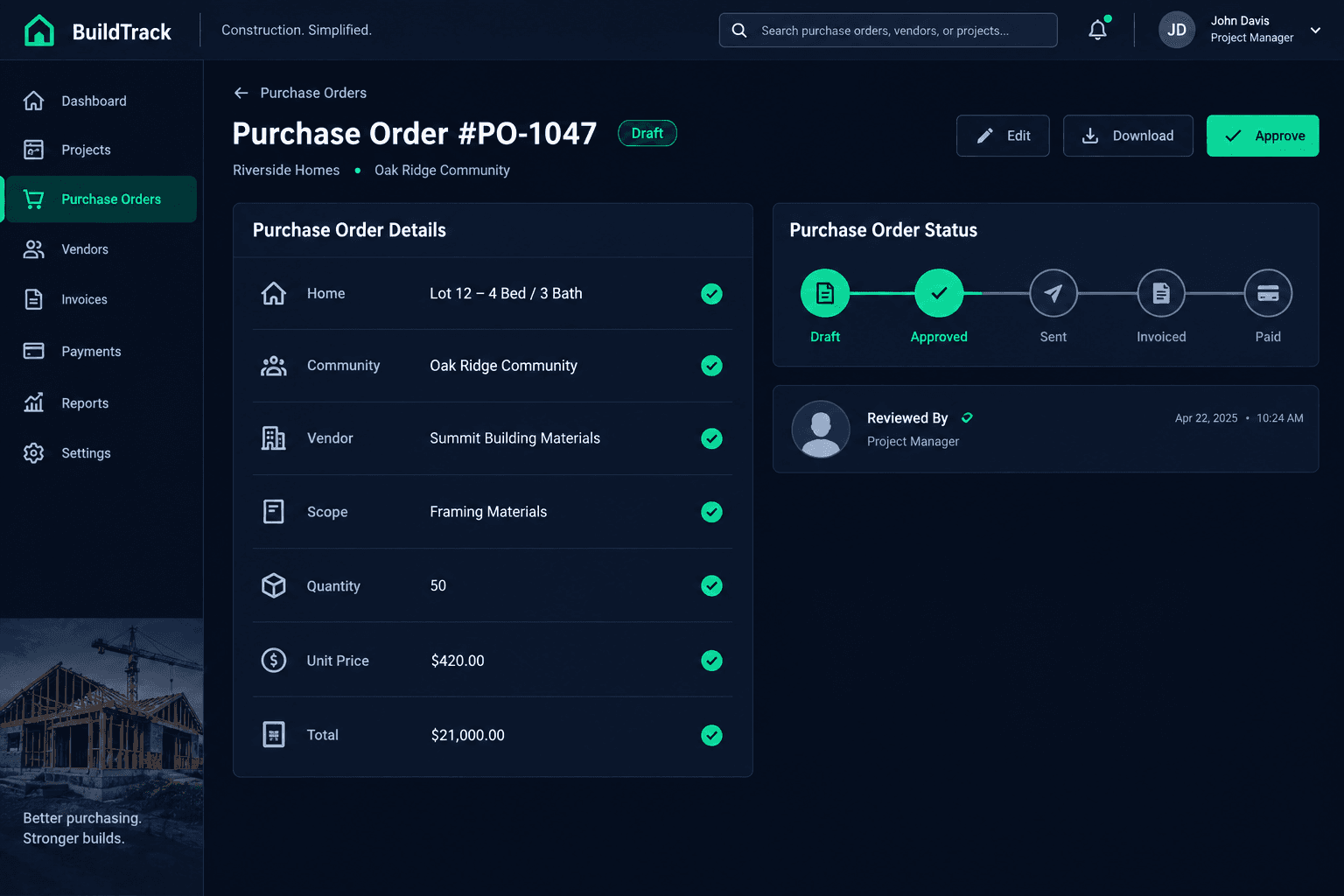
Before a Purchase Order Leaves Draft: Review the Commitment
Before a purchase order leaves draft, confirm it's tied to the right home, the vendor actually won the scope, the quantities match what's being built, and the pricing matches the accepted bid — because once it's approved, it becomes a real commitment that flows into your accounting workflow.
A draft purchase order costs nothing to be wrong. It can sit with a stale vendor, an outdated quantity, or last month's pricing and nobody notices, because a draft hasn't committed anyone to anything yet. The moment it's approved and sent, that changes — it's now a real commitment tied to a specific purchasing record, and in Cornerstone, approved and sent purchasing records are what enter the outbound accounting flow. The review described here is the five-minute check that happens before that line gets crossed.
What's the actual boundary between a draft and a commitment?
In Cornerstone, drafts stay private — they don't go anywhere until someone approves and sends them. That's the boundary worth understanding clearly: a draft is a working document you can edit freely, and an approved, sent purchase order is a commitment the system treats as real. Nothing automatic decides when a draft is ready to cross that line. A person has to review it and make that call.
What the review checks
Home and community
The draft is attached to the correct home — not carried over from a copied template
Awarded vendor
The vendor named on the draft actually won this community's bid for this scope
Scope and quantities
Every line reflects this home's actual scope, including selected structural options
Accepted pricing
Each priced line matches the vendor's accepted bid, not a placeholder or budget estimate
Named owner for mismatches
Any discrepancy assigned to a specific person, resolved before the PO is approved
Why does the vendor need a separate check from the scope?
A purchase order can have the right home, the right scope, and still carry the wrong vendor — usually because the draft was built from a template or copied from an earlier community before a bid was finalized. Check that the vendor named on the draft is the vendor who actually won this community's award for this scope. A correctly priced PO sent to the wrong vendor isn't a pricing error; it's a commitment made to the wrong company.
Scope and quantities get their own check for a different reason: they drift. A buyer's late selection change, an added structural option, or a revised plan can leave a draft reflecting an earlier version of the home. Walk the line items against what's actually being built for this home today — not the version that existed when the draft was first created.
How is a purchase order different from a bill?
A purchase order is a commitment — it says what was agreed to, with which vendor, for which scope, at what price. A bill is a vendor's invoice for work performed or materials delivered against that commitment. They're not the same document and they don't carry the same risk: a wrong PO commits the builder to bad terms before any work happens, while a wrong bill is caught later, against an already-approved PO. That's exactly why this review belongs before the PO leaves draft — it's the cheapest point to catch a mistake, before it becomes the baseline everything else gets checked against.
This review doesn't replace human judgment
Cornerstone doesn't run an automatic completeness gate that blocks a draft from being approved — there's no built-in screen that stops a mismatched PO from going out. The person approving the purchase order is the check. This checklist is what they should be looking at before they click approve.
Does approving a purchase order mean a vendor gets paid?
No — and this is worth being precise about. Approving and sending a purchase order commits the builder to the vendor's scope and pricing; it doesn't authorize payment. Payment approval is a separate, later decision that happens on the bill, inside QuickBooks, on the builder's own schedule. Cornerstone never auto-pays a vendor. The draft review covers the commitment, not the payment — those are two different gates, and conflating them is how builders end up either too cautious on routine POs or too relaxed about reviewing bills later.
What happens after a purchase order leaves draft?
Once approved and sent, the purchase order moves into Cornerstone's outbound accounting flow and reflects as a committed cost. Changes made directly inside QuickBooks don't flow back and overwrite that record in Cornerstone — Cornerstone stays the source of truth for the commitment itself. That's another reason the draft review matters: it's the point where a builder has full, easy control over the details, before the PO becomes part of a one-way accounting record.
How is this different from the PO-to-bill sync?
The two-stage sync that turns a PO into a bill happens later, after the purchase order is already approved and the vendor has delivered or completed the work. The draft review covered here happens earlier and checks a different question — not "has this PO been invoiced correctly" but "is this commitment correct before it exists at all." Skipping the earlier check doesn't get caught by the later sync; a wrong vendor or stale price just becomes the baseline the bill gets measured against.
How does Cornerstone support this review without replacing it?
Cornerstone keeps the home, the vendor award, the scope, and the accepted bid pricing in one purchasing record, so reviewing a draft is checking one screen instead of cross-referencing a bid spreadsheet, a vendor email, and a separate budget line. What Cornerstone doesn't do is make the approve decision for you — that judgment call, on every draft, before it becomes a real commitment, stays with the person reviewing it.
Review the commitment before it leaves draft.
Cornerstone keeps the home, the awarded vendor, the scope, and the accepted bid pricing on one purchasing record — so the draft review is a five-minute check instead of a cross-reference exercise.
Request Early Access