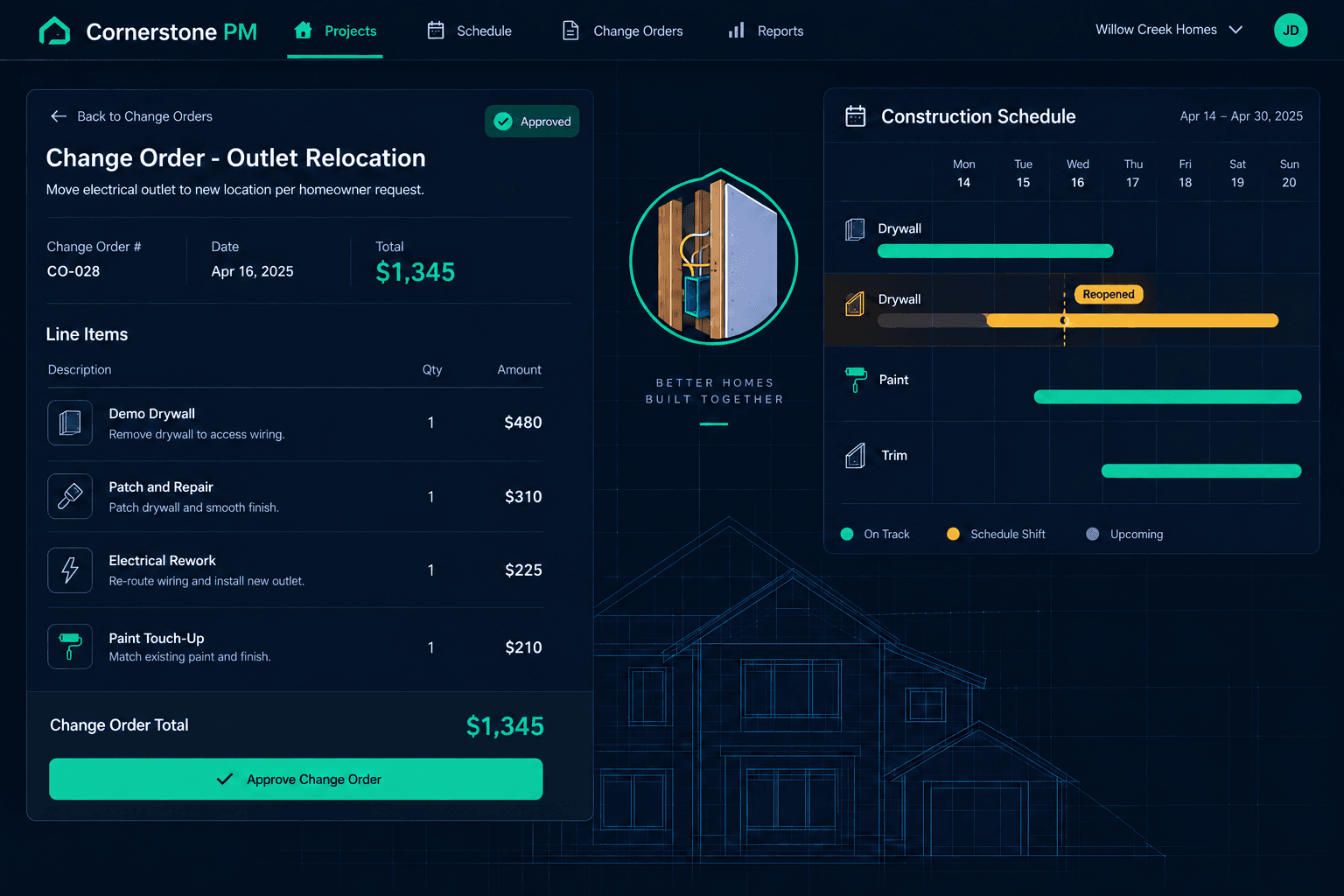
Illustrative mockup, not an actual product screenshot. Example amounts only.
A Buyer Requested a Change Order After Drywall: What to Check Before You Price It
A change order after drywall is never just the one trade the buyer thinks of. Confirm what's actually closed in behind that wall using the home's task history, price the demo and re-install as separate line items against real scope items priced from Cornerstone records, check the schedule hit, and get signed approval before any crew touches the wall.
Every production builder gets this call eventually: drywall is hung, maybe already painted, and the buyer wants an outlet moved, a doorway widened, or a closet reconfigured. The instinct is to either quote a quick number off the top of your head or push back entirely. Neither protects the budget or the buyer relationship. A late change order deserves the same discipline as any other change — just applied faster, because every day it sits unpriced is a day closer to the next trade showing up for a stage that just got reopened.
What should you actually confirm before pricing anything?
Before quoting a number, pull up the home's completed task history and confirm exactly what's behind that specific wall — rough electrical, plumbing, insulation, and which inspections already passed. A wall on an exterior corner with a plumbing stack behind it is a different job than an interior partition wall with nothing but a single electrical run. Guessing from memory about what's inside a closed-in wall is how a $200 estimate turns into a $1,200 surprise once the drywall actually comes down.
Confirm what's actually closed in
Check completed task history for the specific wall before assuming the scope of the change.
List every trade the change really touches
A moved outlet usually means drywall, paint, and trim come back too — not just electrical.
Why does the same change cost more now than it would have before drywall?
Because rework has a teardown cost the original install never had. A change requested during framing is one install. The same change after drywall is three stages: demo the finished surface, repair or modify whatever the demo exposes, then reinstall and refinish. Pricing it as if it were still a single install — the mistake that turns change orders into margin losses — undercounts the labor every time. Price the demo and the rebuild as separate scope items so the number traces back to real vendor rates instead of a round guess, the same hard-cost discipline that keeps the rest of the budget honest.
Will this actually delay the home, or can it be absorbed?
That depends entirely on where the trades involved are today, not where they were when they finished this house. If the drywall and paint crews have already moved to three other homes in the community, reopening this wall isn't a same-day favor — it's a re-sequencing problem that competes with every other home on their schedule. Check the actual schedule impact before quoting a completion date along with the price, so the buyer isn't told “a couple days” for something that's actually a two-week wait behind other active homes.
No verbal go-aheads on closed-in work
A trade reopening a finished wall on someone's say-so, without a signed price and schedule impact on file, is exactly how disputes happen at final walkthrough. Get the sign-off first.
From an emailed fill-in request to a priced change order
The request does not have to start with someone typing into a form. With a connected AI agent and a dedicated accounting inbox, an emailed fill-in request or attached invoice can become a change order in Cornerstone, ready for a human to review. The agent handles the repetitive intake and line-item preparation; your team makes the approval decisions.
- Read the request. The agent reads the email and attachment, identifies the home and requested work, and flags missing or ambiguous details. An invoice describes what the vendor is requesting; it is not automatic authorization for extra work or payment.
- Build out every line. The agent prepares the CO with the applicable parts and scope items, quantities, unit prices, and line totals from Cornerstone. For an outlet moved after drywall, that means accounting for the electrical work, opening and patching the wall, and paint or trim restoration where needed, not hiding everything in one miscellaneous charge. Your team confirms the scope is complete.
- Use your system's pricing. The incoming vendor email or invoice does not set the CO price. The agent uses the accepted pricing already in Cornerstone for the matched parts and scope items. A different invoice amount is a discrepancy to review, not a reason to overwrite your records. An item without accepted pricing remains $0 / needs pricing until resolved; the agent does not invent a number.
- Put approval in human hands. Review the itemized CO, confirm quantities and schedule impact, resolve exceptions, and obtain the required approvals before authorizing the work. AI prepares the record; it does not approve its own change order.
- Carry approved work into QuickBooks. Eligible approved or sent purchasing records sync from Cornerstone to QuickBooks; drafts stay private. A sent PO is a commitment, and the matching Bill follows receipt or invoice through the configured PO-to-Bill workflow. Keep the buyer's change order and the vendor payable distinct so the same work is not entered twice.
- Review the bill and click Pay. The builder or authorized accounting person makes the final payment decision in QuickBooks. Cornerstone never auto-pays. The administrative work can be largely automated while CO approval and release of funds remain human decisions.
This is a configured Bring Your Own Agent workflow, not an email inbox included automatically with QuickBooks sync. Connect the agent to your email and Cornerstone API; direct QuickBooks access for the agent requires its own connection. The payoff is simple: receive the request, prepare a fully itemized CO at your system's prices, approve it, sync the accounting records, and pay without re-keying the same details at every step.
Who needs to sign off before a crew touches the wall?
The buyer signs the priced change order, and whoever owns the schedule for that home confirms the revised completion date — in writing, before any trade is dispatched. Cornerstone connects the change order to the home's purchasing record and budget, so the approved price traces to real scope items and the revised date is visible on the same schedule everyone else is working from — not a side conversation that only the superintendent remembers having.
Document which trades were re-dispatched and why, the same way you'd document any other change order. A late change that gets priced correctly and approved in writing is a routine part of production building. One that gets waved through on a handshake is how a builder ends up eating a rework cost that was never actually billed to the buyer.
A late change order is routine — an unpriced one isn't
Buyers ask for changes after drywall regularly; it's one of the most predictable friction points in a production build. Confirming what's actually behind the wall, pricing demo and re-install separately against real vendor rates, checking the real schedule impact, and getting signed approval before any trade is re-dispatched is what keeps a late change order from turning into a margin loss or a schedule dispute.
Price late change orders against real numbers, not guesses
Cornerstone PM connects every change order to the home's actual task history and vendor-priced scope items, so a late request gets priced correctly the first time.
Request Early Access