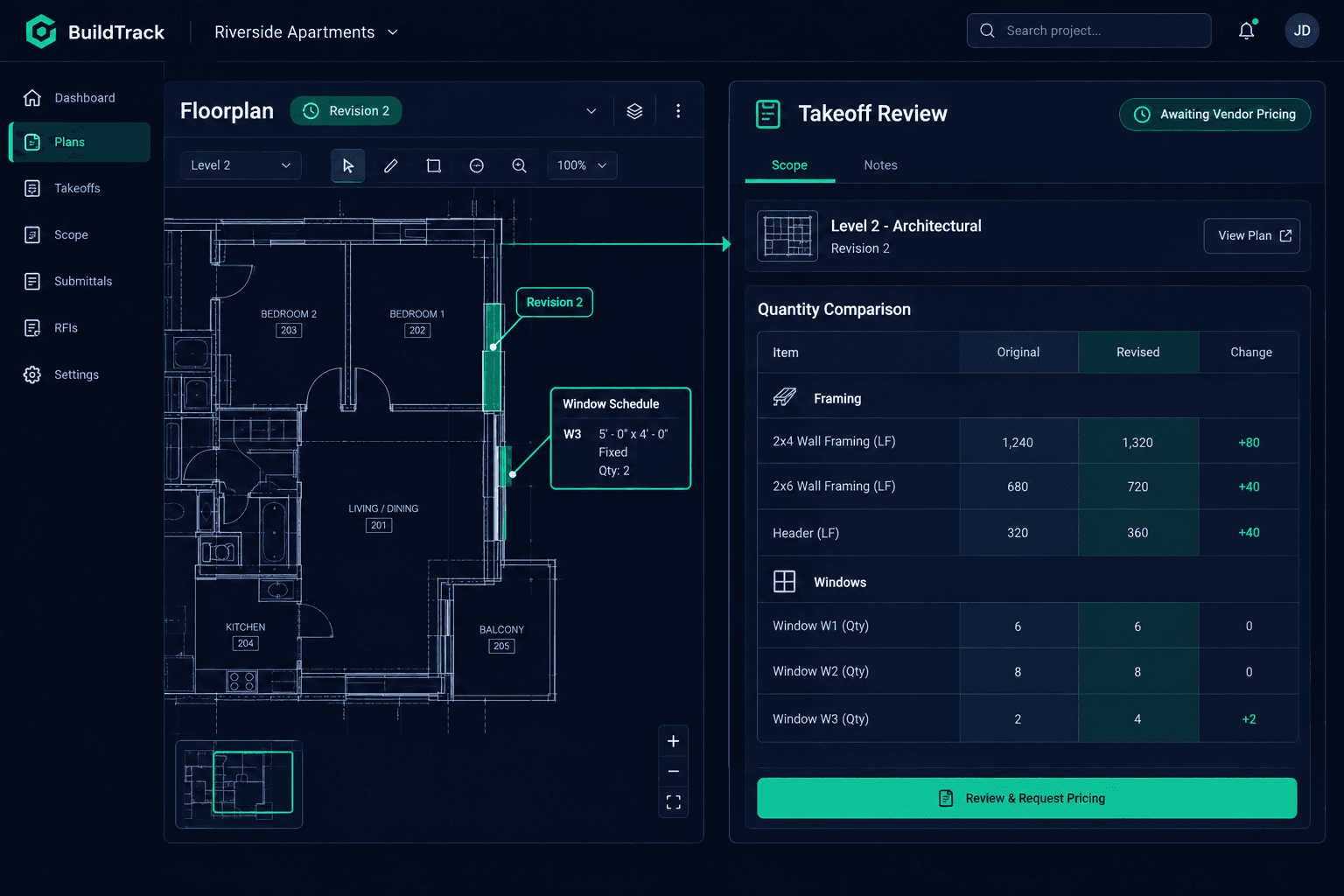
A Revised Floorplan Arrived: Review Quantities Before Asking for New Bids
When a revised plan set lands on an active home, don't run a fresh takeoff and send it straight to vendors. Record the revision, find out which sheets actually changed, trace them to the affected scopes, and check what's already awarded or on a purchase order before anyone requests new pricing.
Plan revisions happen for all kinds of reasons — an engineering correction, a structural fix, a buyer change that made it back into the base plan. Whatever the cause, the risk is the same: treating the revised set as a brand-new takeoff with no connection to the original invites duplicate bid requests, confused vendors, and a budget that no longer matches what's actually been committed.
What's the first thing to do when a revised plan set arrives?
Record it as its own source. Cornerstone PM's AI takeoff logs the revised plan set with its own revision date and file name rather than overwriting the original takeoff record. That matters because the entire point of the review is comparison — you need the original quantities and the revised quantities both available side by side, not a single record where the old numbers quietly disappeared.
Find the changed sheets first
Check the revision notes or sheet index against the original set. A single sheet moving doesn't mean the whole home needs a new review.
Trace sheets to locations, then scopes
A changed window schedule touches specific rooms. Those rooms touch specific scope items. That chain is what tells you which trades are actually affected.
How do you find which scopes the revision actually touched?
Cornerstone PM's floorplan locations attach quantities to the rooms where materials actually go, not just a single house-wide total. That structure is what makes a revision review tractable: walk the changed sheets to the locations they touch, then from those locations to the scope items tied to them. A roof plan revision traces to roofing and framing. A window schedule change traces to windows, framing rough openings, and interior trim around those openings — and nothing else.
This is a human review step. Cornerstone doesn't automatically compare two drawing sets and flag what changed — your team identifies the changed sheets and works through the location chain. What the system does is make that chain traceable once you've identified where to look, instead of forcing someone to manually cross-reference a spreadsheet against a stack of PDFs.
How do the new quantities compare to the original takeoff?
Run a new takeoff on the revised sheets and place the resulting quantities next to the original numbers for the same scope items. The point isn't the new total — it's the delta. A framing quantity that moved by four linear feet because of a corrected window opening is a different conversation than a quantity that doubled because a whole wing was added. Reviewing the delta before anything goes to a vendor is what keeps the rebid request scoped to what actually changed.
A new takeoff doesn't rewrite what's already committed
Cornerstone has no feature that automatically repriced a locked vendor award or an issued purchase order when a new takeoff runs. Those stay exactly as accepted until your team reviews the quantity change and decides what to do about it.
What do you do with scopes that already have an awarded vendor or an issued PO?
Check the purchasing record for every affected scope before requesting new pricing. A scope with a locked vendor award and a quantity that only shifted slightly might not need a rebid at all — a quick confirmation with the vendor may be enough. A scope where the issued purchase order no longer reflects the actual quantity is a different situation, and it's one your team resolves deliberately rather than letting a new takeoff silently sit next to an outdated PO.
The goal is keeping the two numbers distinct: the new estimate from the revised takeoff, and the actual accepted cost sitting in the budget from the award or PO. Cornerstone keeps both visible so nobody mistakes a fresh estimate for a confirmed price.
How do you request updated pricing without over-scoping the rebid?
Once the affected scopes are identified, send scope-based bid requests only to the vendors tied to those scopes. A framer whose scope didn't change shouldn't receive a bid request because the electrical rough-in moved. Keeping the request targeted means vendors spend less time evaluating pricing on work that hasn't actually changed, and your team isn't waiting on responses from trades that were never affected.
Until a vendor responds with updated pricing, the affected scope shows as awaiting confirmation rather than carrying a guessed number. The budget reflects what's actually known at each stage of the review — not a placeholder dressed up as a real cost.
The review stays manageable when it stays scoped
A revised plan set doesn't have to mean reopening every vendor conversation on a home. Recording the revision as its own source, tracing changed sheets through locations to scopes, and comparing quantities side by side before anything reaches a vendor keeps the rebid request narrow — and keeps awarded pricing and issued purchase orders exactly where your team left them until a deliberate decision says otherwise.
For more on how plan quantities flow into purchasing, see the AI takeoff hub.
Keep revised plans from blowing up your budget
Cornerstone PM keeps takeoff versions, scope locations, and purchasing commitments connected, so a plan revision is a scoped review instead of a guessing game.
Request Early Access