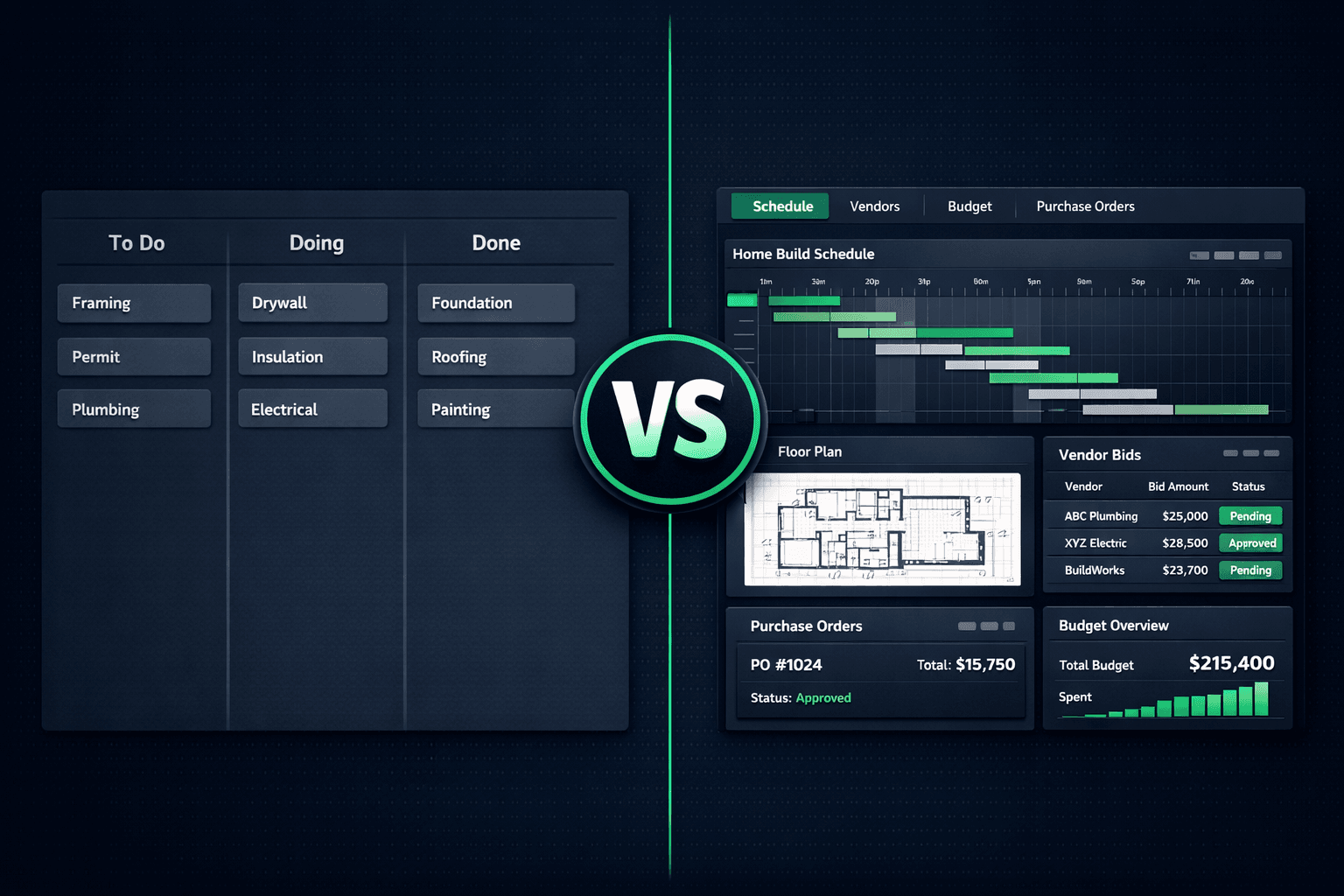
Trello vs Cornerstone PM: A Kanban Board Is Not a Home Builder Operating System
Trello is a genuinely good tool for visual task tracking — and a genuinely bad foundation for running a home building operation. It has no idea what a floorplan, a scope item, a vendor bid, or a community is, which means every construction-specific workflow gets bolted on with spreadsheets, email threads, and manual updates that someone has to remember to make.
If you landed here comparing project management tools for a home building business, start with the category overview at home builder project management software to see what purpose-built actually means. This post digs into exactly where a Kanban board breaks down for production and semi-custom builders, and what a platform built for the build looks like instead.
Why do builders start with Trello?
It's free to start, visually simple, and nearly everyone has used a Kanban board somewhere before. For a builder doing a handful of homes a year, dragging a card from "Permit" to "Framing" to "Drywall" feels like enough structure to stay organized without paying for — or learning — dedicated construction software.
The cracks show up as volume grows. A board that tracked one home fine starts to multiply: one board per home, or one giant board with columns that no longer map to anything meaningful. Nobody can see whether the framing delay on Lot 14 is about to push the electrical rough-in on Lot 15, because Trello doesn't know those two cards are related.
That's the structural issue. Trello is a general-purpose visual list tool. Home building is a domain with dependency chains, priced options, buyer selections, and vendor accountability — none of which a card and a column are built to hold.
The 6 gaps that break a Kanban board for builders
Gap 1: No linked schedule or cascade logic
A card moving to 'Done' doesn't tell drywall it can start early or push out an inspection date behind a delayed rough-in. Every dependency has to be tracked by a human, on every home, every time.
Gap 2: No floorplan or options pricing model
There's no concept of a floorplan, a structural option, or a plan repeat. Every home is a fresh board with cards created from scratch — pricing for options lives in a spreadsheet Trello knows nothing about.
Gap 3: No buyer-facing design center
Flooring, countertop, and cabinet selections happen over email or in a showroom, then get typed into a card description if they get recorded at all. There's no portal, no completion status, no feed to purchasing.
Gap 4: No vendor bid templates or comparison
Sending scope to subs and comparing what comes back means attaching files to cards and building a comparison sheet by hand. Trello has no bid portal, no scope-filtered templates, and no award-to-PO flow.
Gap 5: No community or lot hierarchy
You can't assign a vendor to one community without also touching every other board. Community-specific pricing and vendor awards require manual filtering across boards that don't talk to each other.
Gap 6: No job costing tied to accepted pricing
A Trello card can hold a budget number someone typed in. It can't trace that number back to an accepted vendor bid, a scope item, or a purchase order — so cost drift is invisible until someone reconciles by hand.
Why doesn't moving a card actually reschedule anything?
A construction schedule is a chain of dependencies: framing has to finish before insulation, insulation before drywall, drywall before paint, and inspections have to land at specific points in that chain. When framing runs a week late, everything downstream needs to move — and every vendor assigned to those downstream tasks needs to know.
Trello has no dependency model. Moving the "Framing" card to "Done" is a visual update, nothing more. Nobody gets notified, nothing recalculates, and the person who remembers to manually push out the drywall date (and call the drywall sub) is doing the job the software was supposed to do.
Cornerstone PM ships cascade scheduling: when a task date changes, every dependent task recalculates and the affected vendors get notified automatically. That's the difference between a board that looks organized and a schedule that actually holds builders and vendors accountable to real dates.
Where does buyer selection data actually go?
Every production or semi-custom builder runs buyers through a selections process: flooring, countertops, cabinets, structural upgrades. On a Trello board, this usually lives as an attachment on a card, a link to a spreadsheet, or a note from a showroom appointment that has to be typed up later. There's no portal for the buyer, no completion status, and no automatic handoff to purchasing.
Cornerstone PM's design center gives buyers a real portal with curated Designer Packages and exclusion groups, so a flooring selection completes the category the moment a buyer picks Tile — no follow-up needed to confirm they don't also want Carpet, LVP, and Hardwood. Completed selections flow straight into purchasing, with nothing re-typed from a card description.
What happens to vendor bids without a bid portal?
Sending scope to ten subs on a Trello workflow means ten separate emails, ten attachments, and a comparison spreadsheet built by hand once responses start trickling back. There's no scope filtering — every vendor either gets the whole job's information or someone manually trims it down — and there's no lock on an awarded price once a bid is accepted.
Cornerstone PM auto-generates scope-filtered Excel bid templates, emails them to vendors, and lets vendors submit through a no-login portal. Side-by-side comparison appears automatically once two or more bids come in, and accepting a bid locks that price and turns it directly into a purchase order — with a full trail back to which vendor, which scope, and which community it belongs to. See purchasing for the full bid-to-PO flow.
TCO: what a Kanban-board workflow actually costs a growing builder
Trello's Standard plan runs roughly $5–$10 per seat per month — cheap on its own. The real cost shows up in the hours spent maintaining everything Trello has no model for.
| Cost item | Trello | Cornerstone PM™ |
|---|---|---|
| Monthly platform fee (10-seat team) | $50–$100 | $199–$599 |
| Cascade schedule updates | ||
| Vendor bid portal (no login required) | ||
| Buyer-facing design center | ||
| Purchase orders traced to accepted bids | ||
| Hours/week reconciling schedule and vendor data | 4–8 hrs | ~0 |
On a build schedule running even a dozen homes at once, the labor spent manually keeping a Trello workflow in sync with the real schedule and real vendor pricing outweighs the subscription savings within the first few months.
What should Trello still be used for?
Trello remains genuinely useful for internal checklists that don't need to connect to live construction data — a hiring checklist, a marketing content calendar, an office move. The recommendation isn't to delete Trello. It's to stop routing schedule, vendor, selections, and purchasing data through a tool that has no model for any of it.
The build itself — schedule, vendor bids, design selections, purchase orders, and job costing — needs a platform that understands those workflows natively. For the full picture of what purpose-built home builder software covers, see home builder project management software. For the same segment-mismatch analysis applied to other generic tools, see ClickUp and monday.com for Home Builders: Where Generic PM Tools Break.
Your build deserves more than a board of cards.
Cornerstone PM™ connects schedule, vendors, design selections, and purchasing into one system — with cascade scheduling, a no-login vendor bid portal, and Foreman AI with 396+ construction skills built in.
Request Early Access →