A Vendor Declined Your Bid Request: What to Check Before Inviting Another
When a vendor declines a bid request, don't jump straight to inviting the next name on your list. Confirm the decline is real, ask the vendor why, review the scope package they saw, and keep the budget gap honest until a replacement vendor actually submits pricing.
A decline before award is a different situation than replacing a subcontractor who's already working on a home. Nothing has started, nothing is behind schedule, and no work needs to be torn out. The only real risk is reacting too fast — inviting a replacement vendor before you understand why the first one said no, or quietly filling in a guessed cost so the budget looks complete when it isn't.
How do you know the vendor actually declined?
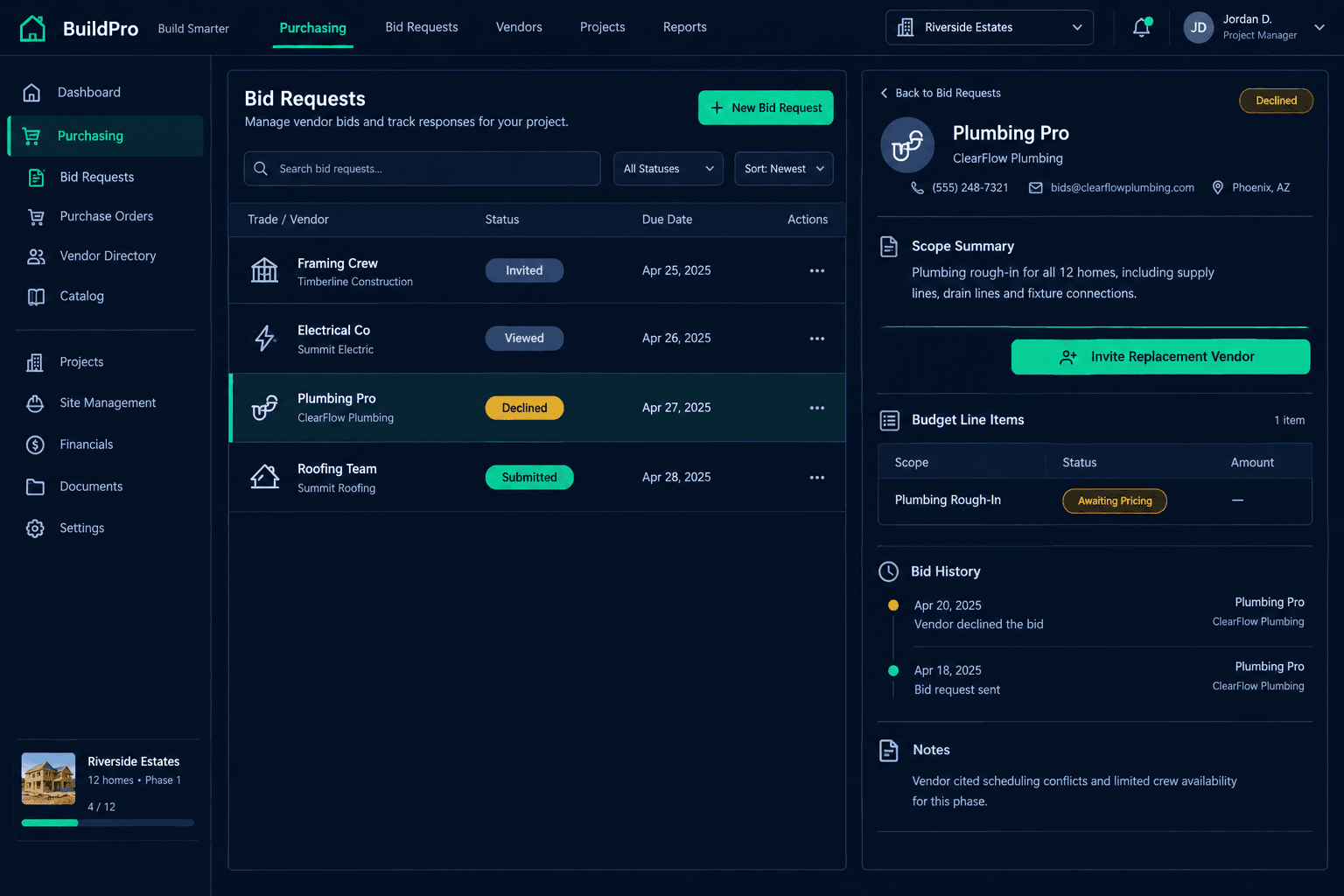
Check the bid status before assuming anything. Cornerstone tracks every bid request through Invited, Viewed, Submitted, or Declined, with timestamps on each step. A vendor who hasn't opened the link yet looks similar to a vendor who declined if you're only glancing at the list — but the two call for completely different follow-ups. One needs a nudge. The other needs a conversation or a replacement.
Ask before you assume
Timing, crew capacity, or a scope concern are three different problems with three different fixes. A short call usually tells you which one you're dealing with.
Review the scope package they saw
Sometimes a decline is really a scope problem — a missing line item or an unclear boundary — not a scheduling problem.
Why ask the vendor instead of just moving on?
Cornerstone doesn't capture a structured decline reason or run analytics on why vendors say no — that part is still a conversation, not a dashboard. A quick message or call asking about timing, scope fit, or crew availability tells you whether this vendor is simply unavailable right now or whether something about the request itself needs fixing before it goes to anyone else. If three vendors in a row decline the same scope, that pattern is worth noticing before you invite a fourth.
What should you check in the bid package itself?
Open the same scope-filtered bid template the vendor received. Each vendor's template only shows the line items tied to their trade, so it's worth confirming the quantities, deadline, and scope boundaries actually look reasonable from their side. A decline tied to a deadline that was simply too tight is a different fix than a decline tied to a scope item that doesn't match how that trade normally bids a job.
This review step matters most when a decline feels surprising — a vendor you've worked with before, declining a scope that looks routine. That's usually a sign to look at the package before assuming the vendor is simply busy.
Does the scope still need to be covered?
Before inviting a replacement, confirm the scope item is still active on the floorplan. A buyer change, a structural revision, or a prior resolution elsewhere can mean the scope no longer needs a vendor at all. Chasing a replacement bid for work that's already been handled wastes everyone's time, including the next vendor you'd invite.
A new invitation is not an award
Cornerstone doesn't automatically replace a declined vendor or extend the original deadline. Inviting a replacement is a manual next step, and the scope stays unawarded until that vendor actually submits pricing you accept.
How do you invite a replacement without over-scoping the request?
Send a new bid request to an alternate vendor using the same scope items that went to the first one. There's no reason to reopen pricing across the whole home because a single trade declined. Keep the replacement invitation scoped to exactly what the original vendor was asked to price, with a deadline that reflects whatever you learned from their decline reason — tighter if timing wasn't the issue, looser if it was.
What does the budget show while you're waiting on a replacement?
The scope stays visible as awaiting pricing rather than picking up a placeholder number. That matters because a guessed figure sitting in the budget can look like a confirmed cost to anyone glancing at the report — and a vendor decline is exactly the kind of gap that's easy to paper over if the system fills it in automatically. Cornerstone doesn't fabricate a number here; the scope shows what's actually known until a replacement vendor's bid is accepted.
For more on how bid requests move from invitation to award, see the purchasing hub.
A decline is routine — reacting to it doesn't have to be
Vendors decline bid requests for ordinary reasons: a full calendar, a scope that doesn't fit this time, a deadline that's too tight. Confirming the decline, asking why, checking the scope package, and inviting a replacement with the same scope keeps the process predictable — and leaving the budget gap visible instead of guessed keeps the report honest until the next vendor actually commits.
Keep every bid request visible, from invite to award
Cornerstone PM tracks bid status, scope packages, and budget gaps together, so a declined vendor is a quick follow-up — not a mystery in the budget.
Request Early Access