Why Your Subcontractors Ignore Your Bid Requests
If half your bid invites go unanswered, the problem is almost always friction — not the vendors. Subcontractors want the work. What they won't do is jump through unnecessary hoops to submit a number. Cornerstone PM's purchasing module removes the five most common friction points — each one a specific reason subs quietly ignore a request and move on.
Low bid response rates are usually treated as a vendor-relationship problem. They're actually a workflow-design problem. The builder who makes it easiest to respond gets the most quotes — and more quotes means better pricing and more schedule flexibility. Here is where the friction shows up and how to eliminate it.
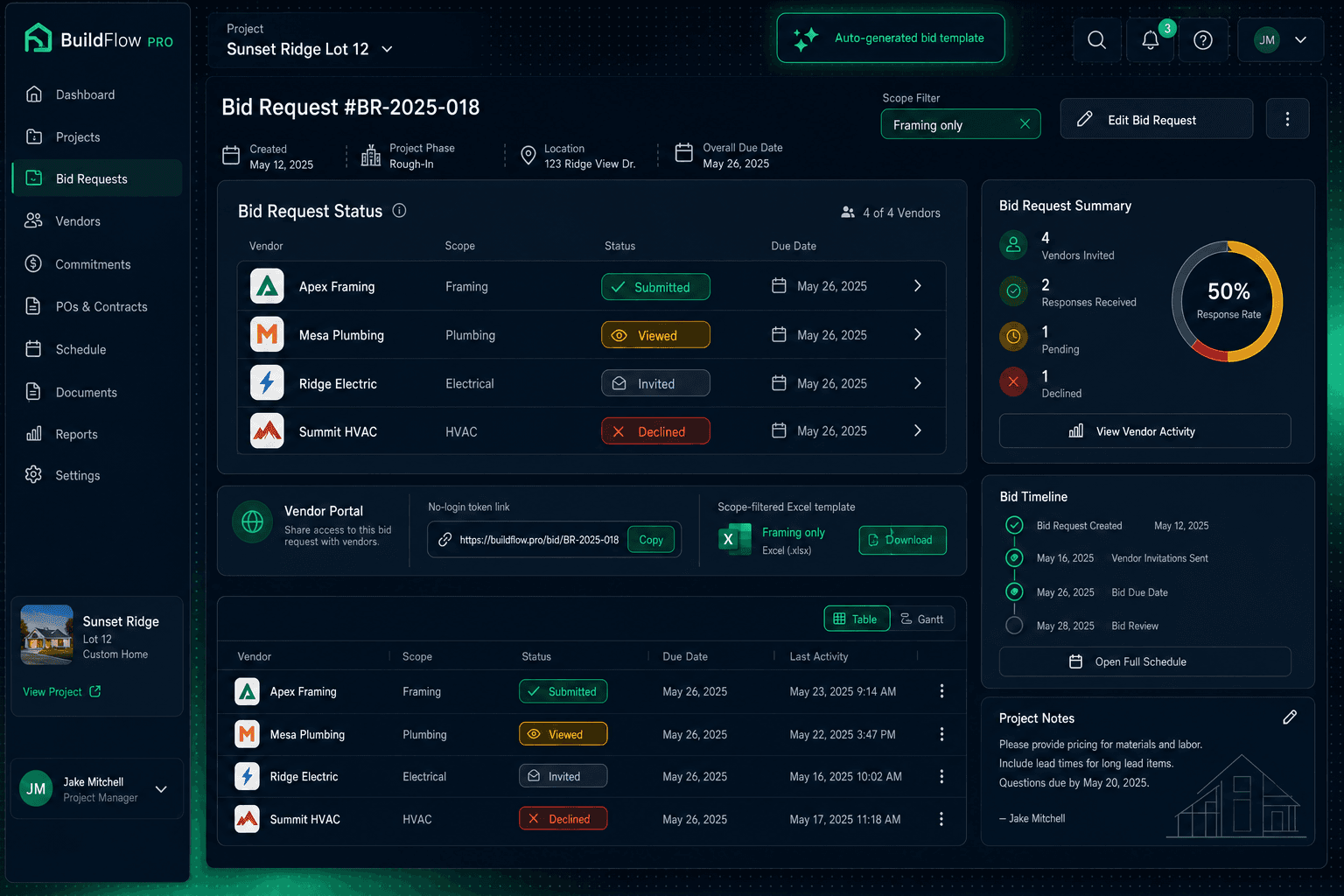
Bid Request — Framing Package · Oak Creek Community
Apex Framing
Framing
Mesa Plumbing
Plumbing
Ridge Electric
Electrical
Summit HVAC
HVAC
Per-vendor status tracking — know exactly who has viewed, submitted, or declined before the deadline.
Reason 1: You asked them to create an account
A vendor who bids across ten builders is not going to create ten accounts. If your bid request lands in their inbox and the first click goes to a login screen, most subs close the tab.
The fix:Cornerstone PM's vendor portal is token-protected and needs no login. Subs click one link in the email, land directly in the bid portal, and see their scope-filtered template ready to download. No credentials, no account setup, no friction between the email and the bid. The token is specific to that vendor and that request — security without the barrier.
Reason 2: You sent the whole plan set and made them hunt
Sending a framer a 48-sheet plan set and saying “find the framing details” is asking them to do your work before they've been paid a dollar. Most won't. The ones who do will take longer, introduce interpretation errors, and price a contingency into their number for the ambiguity.
The fix:Bid templates in Cornerstone PM are scope-filtered automatically. A plumber sees plumbing scope items. A framer sees framing scope items. The auto-generated Excel template has three tabs — Base, Structural, and Designer — and each vendor's copy shows only the lines that belong to their trade. They open the file, see exactly what to price, and fill it in. Nothing to hunt, nothing to interpret.
Reason 3: You gave them a blank spreadsheet
Asking vendors to populate a blank spreadsheet with their own format is the highest-friction request in construction procurement. Every vendor organizes labor and material differently. The result is five spreadsheets in five formats, none of which compare cleanly, and a purchasing manager spending two hours trying to normalize them before deciding anything.
The fix: The auto-generated template tells vendors exactly what to price and how to format it — scope item by scope item, with columns for labor and material already split. When two or more vendors submit, their numbers land on the same rows and side-by-side comparison takes seconds instead of hours. Vendors who know the template makes their bid easy to evaluate are more likely to submit — because they know the process is fair.
Reason 4: You have no idea who opened it
When there's no tracking on bid invitations, follow-up becomes spam. You blast the whole vendor list two days before the deadline because you have no way to know who has already started their quote, who never opened the email, and who decided to pass and just never said so. The vendors who were working on it resent the interruption. The ones who were ignoring it still don't reply.
The fix:Every bid invitation in Cornerstone PM moves through four tracked states: Invited, Viewed, Submitted, and Declined. Purchasing can see in real time who has opened the portal link and when — so follow-up is targeted. Chase the vendors at “Invited” who haven't opened yet. Leave the ones at “Viewed” alone while they work. And recognize when a non-reply is actually a quiet decline so you can move to the next candidate before the deadline.
Deadline discipline matters
Bid requests in Cornerstone PM carry an explicit deadline. Vendors see it the moment they open the portal, and they can decline in one click instead of ghosting. A clean decline is far more useful than silence — it frees you to invite the next vendor before time runs out.
Reason 5: The deadline was fuzzy and declining felt rude
“Get me a number by end of week” is not a deadline. It's an invitation to procrastinate. And vendors who know they can't compete on this job — because they're booked, or the scope isn't their specialty, or they already lost on price last time — often don't decline explicitly because it feels awkward. They just go quiet. You spend a week chasing a number that was never coming.
The fix:Every bid request carries a hard deadline date that vendors see immediately. More importantly, vendors can decline with a single click from the invitation email — no account, no explanation required. A one-click decline removes the social friction of saying no, which means you hear “no” faster and can move on. Silence stops being the default response for a disinterested vendor.
What happens after the quote lands
Removing friction at the invitation stage only matters if what follows is equally clean. In Cornerstone PM, quotes that come through the vendor portal arrive on the same scope-item lines they were requested on — which means side-by-side comparison is immediate when two or more vendors submit.
Award decisions in Cornerstone PM are not lowest-bid auctions. Vendors are awarded by community — one vendor wins Oak Creek, another wins Elmwood — and builders can maintain multiple accepted bids on file for different geographies or schedule windows. Once awarded, pricing locks: neither the builder nor the vendor can revise the number after acceptance. Every downstream budget line traces back to that locked, awarded price under the hard cost rule.
The full loop runs from bid request to purchase order without anyone opening the purchasing screen manually. Once a task completes, the PO auto-generates and emails the vendor with the awarded pricing. The vendor's only job in the entire cycle — from invitation through final payment — is to submit a bid once and then do the work. That is the kind of workflow good subs tell other good subs about.
Stop chasing bids that were never coming.
Scope-filtered templates, a no-login vendor portal, per-vendor status tracking, and one-click decline. Cornerstone PM removes every reason a subcontractor has to ignore your bid request.
Request Early Access