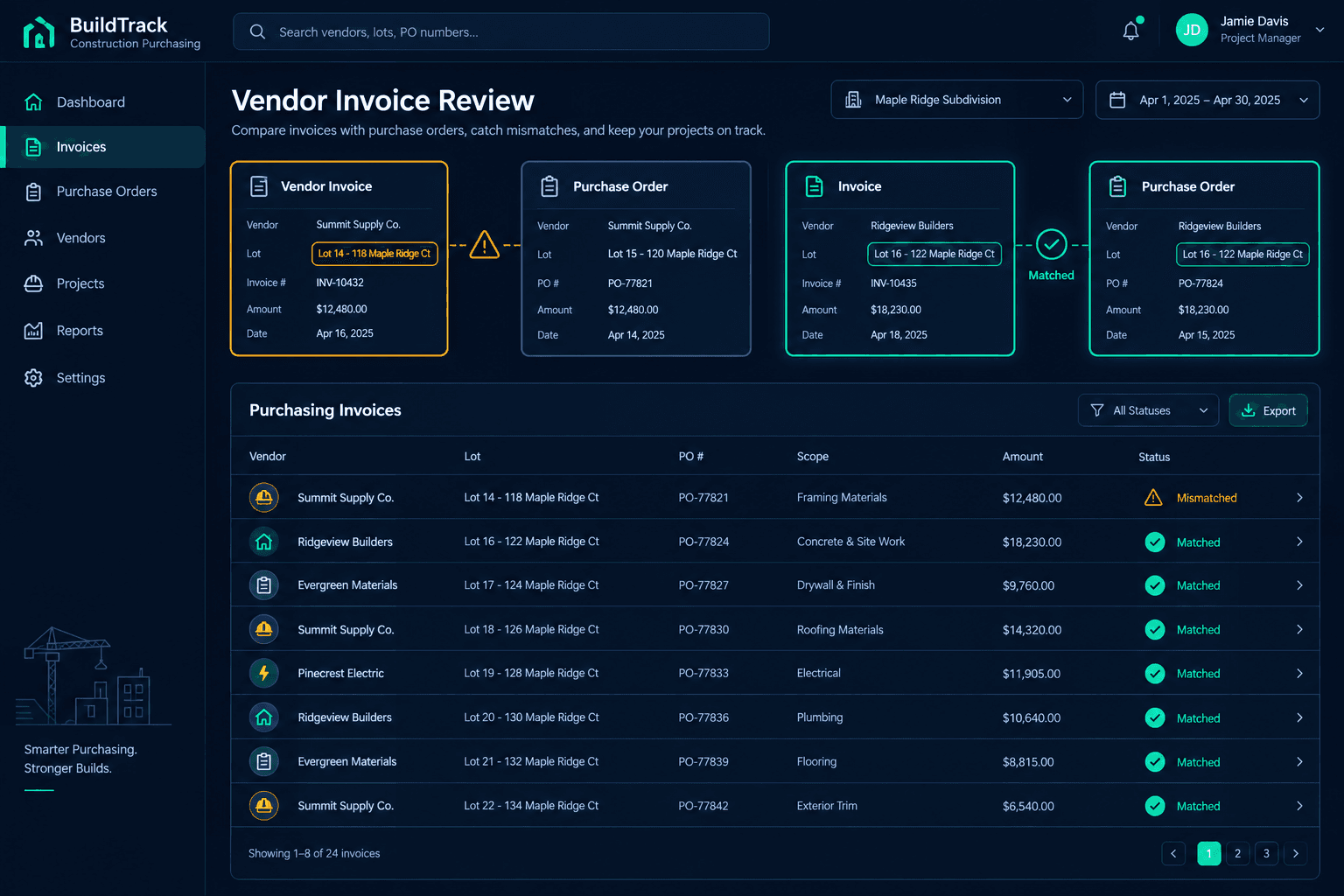
The Invoice Names the Wrong Lot: Check the Job Before Approving It
Before approving any vendor invoice, confirm the community, home address, and purchase order it references actually belong to the job it's billing — a wrong or ambiguous lot reference is one of the easiest ways for a correct vendor charge to land on the wrong home's budget.
A wrong-lot invoice isn't a software failure or a sign a vendor is padding their bill. It's almost always a simple mix-up: two homes in the same community with nearly identical addresses, a crew working four lots in the same phase in one week, or a back-office biller who copies the wrong job number from a prior invoice template. The charge itself can be completely legitimate — it's just pointed at the wrong house.
What does a wrong-lot invoice actually look like?
Picture a community with Lot 14 at 118 Maple Ridge Court and Lot 15 at 120 Maple Ridge Court, both framed by the same crew in the same week. The framer's invoice lists "118 Maple Ridge" but the PO number stamped on it actually belongs to Lot 15. On paper, everything looks fine — a real address, a real scope, a real dollar amount. The only thing wrong is which home's budget it's about to land on.
It shows up just as easily across phases: a vendor finishing Phase 2 houses while starting Phase 3 pours references the wrong phase number, or an ambiguous address with no lot number at all ("the Johnson house on Maple Ridge") gets matched to the wrong buyer's home by whoever is keying it in.
Looks Right
Real community, real address, real scope, real price. The invoice reads cleanly on its own — the error only appears when you check it against the actual home it's billing.
Wrong Lot
The address, PO, or lot number on the invoice points to a different home than the one the vendor actually worked — often a neighboring lot in the same phase or community.
How should a reviewer check an invoice before approving it?
Start with the community and address printed on the invoice, not the dollar amount. Confirm they match the job you're reviewing before looking at anything else. Then pull the purchase order the invoice references and verify that PO was actually cut for that specific lot — a PO number is a much harder thing to misremember than a street address, so when the two disagree, trust the PO and investigate further.
Last, check the scope. Does the trade and work described on the invoice match what was ordered on that PO for that home? A matching address with mismatched scope — framing labor billed against a PO cut for drywall — is still worth a second look even if the lot itself turns out to be correct.
Why are adjacent lots and active phases the highest-risk spots?
Wrong-lot invoices cluster where addresses look alike and crews move fast: a single framing crew running four lots on the same street in the same week, a roofing vendor closing out Phase 2 while starting Phase 3, or a punch-out trade hitting six nearly finished homes in one community visit. The more similar the addresses and the faster the crew is moving between homes, the more likely a biller grabs the wrong job folder when writing the invoice.
This is also exactly where reviewing a delivery or invoice against its PO pays off — the PO was cut for one specific lot, and reconciling against it is what catches a swapped address before the charge ever reaches accounting.
Cornerstone preserves job context — the lot check is still manual
Every Cornerstone purchase order is tied to a specific home, and outbound QuickBooks transaction memos carry the community, address, and PO number with the sync. Cornerstone does not automatically match, recode, or correct an invoice that references the wrong lot — reading the community, address, and PO against the job is still a human review step, and payment approval stays manual in QuickBooks.
What should happen once a wrong-lot invoice is caught?
Hold it. Don't approve it as-is and don't quietly recode it to the correct lot yourself — that edits a record the vendor never actually issued and can create a mismatch later if the vendor's own books still show the original lot. Send the invoice back with the correct community, address, and PO number, and ask for a corrected copy. Once the corrected invoice lines up with the job, approve it for payment in QuickBooks like any other vendor bill.
None of this requires new software — it requires reading the community, address, and PO line with the same attention as the total due, every time, especially on multi-lot weeks. For the full purchasing workflow this review sits inside, from bid award through accepted price, see Cornerstone PM's purchasing module.
Keep every vendor invoice tied to the right home.
Cornerstone PM links every purchase order to a specific lot and carries that job context into QuickBooks, so reviewers always have the full picture before approving a payment.
Request Early Access