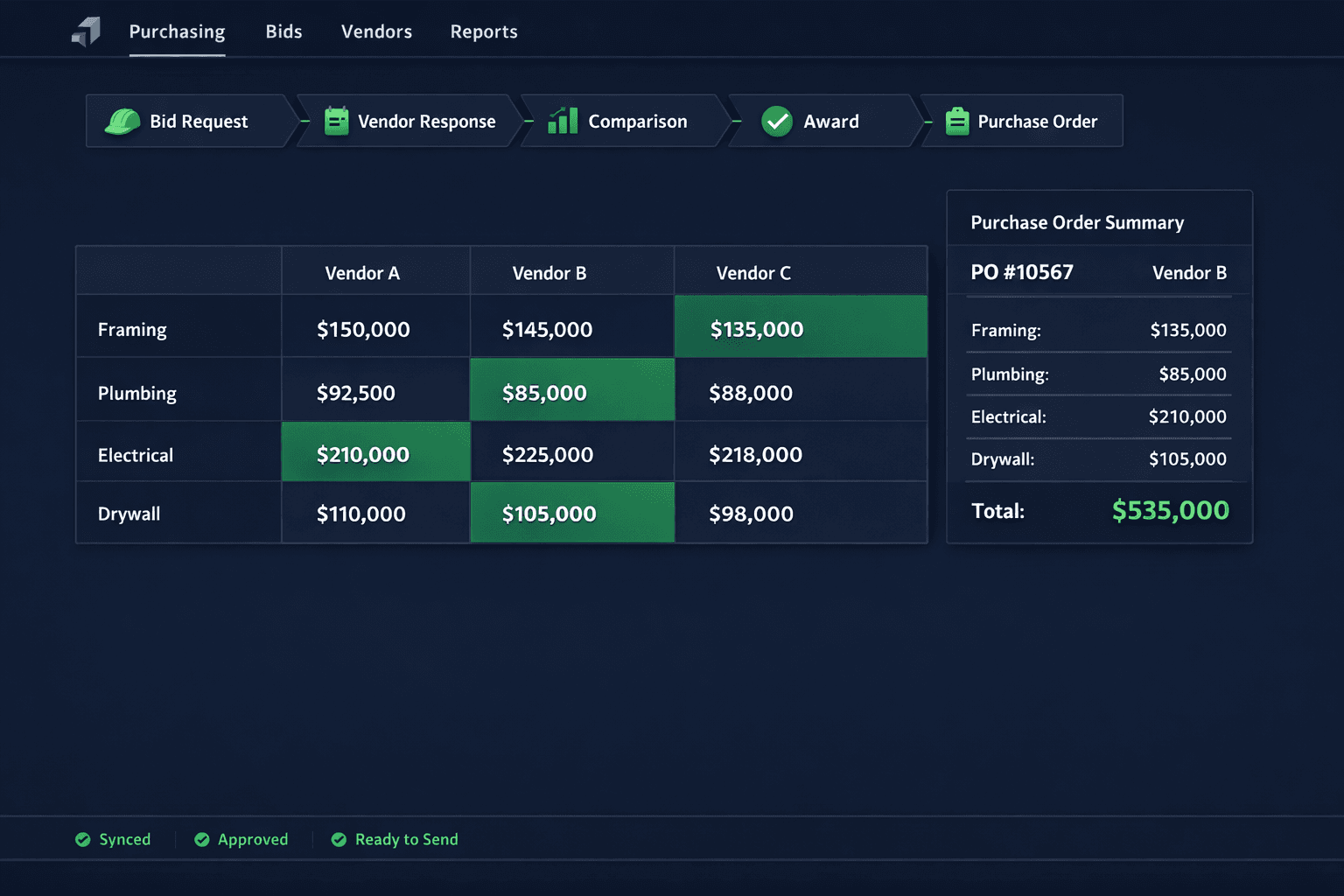
From Bid Request to Purchase Order: One Connected Purchasing Workflow
A construction purchase should move from bid request to vendor award to purchase order without anyone retyping scope, pricing, community, or floorplan data along the way. Cornerstone PM connects every step of that handoff so the numbers you accept are the numbers that land on the PO.
Most builders don't lose money on a single bad bid. They lose it in the seams between tools — the moment a bid request gets typed into one spreadsheet, the vendor response gets pasted into another, the comparison happens in a third, and the purchase order gets built from whatever the buyer remembers about who won. Every retype is a chance for a price to drift, a scope item to get dropped, or a community assignment to get mixed up. Cornerstone PM's purchasing module treats the whole chain as one connected workflow instead of four disconnected tasks.
What does the connected purchasing workflow actually look like?
Four stages, one data thread running through all of them:
Bid request
Floorplans, vendors, and scope items go out together. The request already carries the data your purchasing team configured — nothing gets typed twice.
Vendor response
Vendors price the exact scope items you sent through a no-login portal. Their submission maps directly to your scope structure, not a freeform reply.
Comparison
Two or more responses line up side-by-side against identical scope items — no manual reconciliation of differently formatted vendor quotes.
Award & purchase order
Award locks the accepted pricing, updates the budget, and the purchase order is generated from that same accepted bid — vendor, scope, and price intact.
The key detail is what carries forward between stages: the same scope items, the same floorplan context, and the same community assignment persist from the original bid request all the way to the finished purchase order. Nobody re-selects a floorplan or re-types a scope description at any point in the chain.
Where do disconnected purchasing tools force rekeying?
Ask a purchasing coordinator running Buildertrend, JobTread, or a spreadsheet-and-email process where they lose the most time, and the answer is rarely the bidding itself — it's the handoffs between stages:
Bid request to vendor response
Scope gets described in an email or a generic spreadsheet, and every vendor formats their reply differently — so the buyer retypes numbers into a comparison sheet before any real comparison can happen.
Comparison to award
The winning number lives in a comparison tab, but the tool that tracks the budget doesn't know about it until someone manually updates a separate cost sheet.
Award to purchase order
The PO gets built from whatever the buyer remembers or copies over — vendor name, scope, price, and community assignment all re-entered by hand, with no guarantee they match what was actually awarded.
Each of those handoffs is a place where a wrong price, a missing scope item, or a community mix-up can slip through. None of them are hard problems on their own — but they compound across a builder running dozens of floorplans and multiple communities at once.
How does Cornerstone PM keep the scope and pricing consistent end to end?
The bid request, the vendor portal, the comparison view, and the purchase order all reference the same underlying scope items and floorplan records. When a vendor submits a bid, they're pricing the exact scope items the builder selected — not re-describing the work in their own words. When a builder compares bids, they're comparing prices against identical line items. And when the PO gets generated, it pulls directly from the accepted bid rather than a manually rebuilt summary.
That's a meaningfully different architecture than stitching together a bid tool, a spreadsheet, and an accounting system that don't share a data model. Cornerstone PM's no-login vendor bid portal and scope-filtered bid templates both feed the same scope structure the purchase order eventually pulls from — the consistency isn't a manual process, it's how the data is modeled.
What happens to the budget when a bid gets awarded?
Awarding a bid isn't just a status change — it updates the master cost budget for that floorplan and community with the accepted pricing. The number the builder agreed to is the number that shows up in cost reporting, without a separate step where someone manually enters the awarded price into a budget spreadsheet after the fact.
Award locks the pricing on both sides. Neither the builder nor the vendor can quietly adjust numbers after acceptance, which keeps the budget grounded in what was actually agreed to rather than what someone remembers agreeing to.
How does the purchase order get built from there?
The purchase order is generated directly from the accepted bid — vendor, community, scope items, and pricing all carry over as awarded. There's no intermediate step where a buyer manually assembles the PO from notes or a separate comparison document. That matters most at volume: a builder issuing purchase orders across a dozen floorplans and several communities in the same week doesn't want each one to be its own manual reconstruction of a decision that was already made during the award.
The result is traceability in both directions. From a purchase order, a builder can see exactly which bid it came from and what scope it covers. From a bid request, a builder can see whether it ever converted into an actual purchase — useful for spotting where invited vendors declined, went unanswered, or lost the award without follow-through.
Why does fewer handoffs matter more as a builder scales?
A five-community builder juggling dozens of active floorplans sends far more bid requests, comparisons, and purchase orders in a given month than a single-community custom builder. Every manual handoff in that chain scales with volume — meaning the cost of rekeying data doesn't stay flat, it grows with the business. A connected workflow doesn't just save time on any one purchase; it keeps the error rate from climbing as purchase volume climbs.
For a broader look at how Cornerstone PM's purchasing tools fit into the full platform, see the home builder project management software overview.
One thread, six stages
Bid request, vendor response, comparison, award, budget update, and purchase order — all referencing the same scope, floorplan, and community records instead of six separate documents that have to agree with each other.
Ready to run your purchasing workflow end to end?
From bid request to purchase order, without rekeying scope, pricing, or community data at any step along the way.
Request Early Access