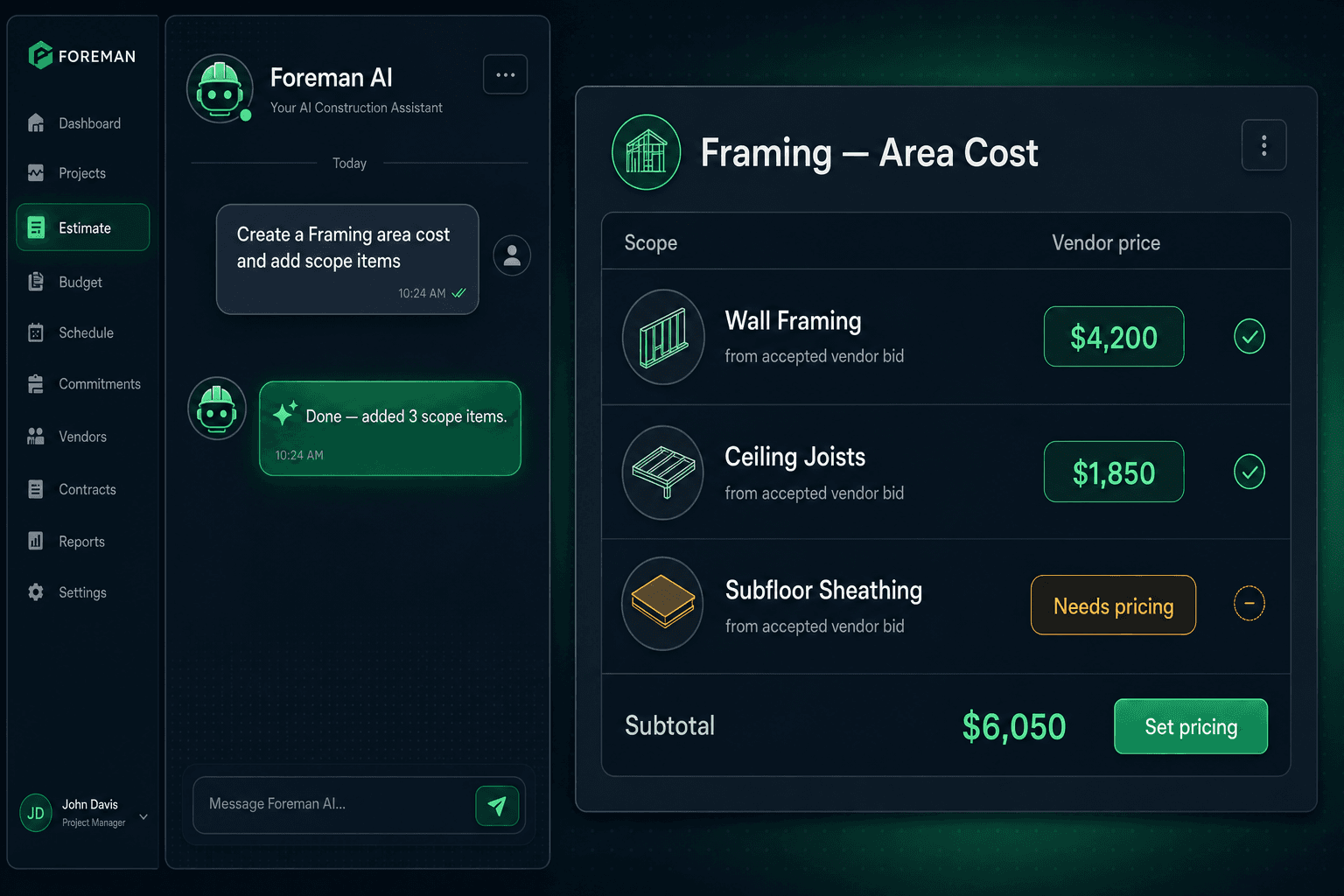
Ask Foreman AI to Build Your Budget: Area Costs by Chat
Foreman AI can build area costs for you by chat — creating scope buckets and adding scope-filtered Parts and Scope Items following the exact same flow a purchaser would use manually. You ask; Foreman builds. The hard-cost rule holds the entire time.
Setting up area costs is the kind of work that isn't hard — it's just tedious. Open the scope. Add the bucket. Switch to the picker. Filter to the right trade. Add each line. Repeat for every scope in the budget. By the time you're done, you've clicked through the same workflow fifteen times and you still have to wait for vendor bids before any of it shows a real number.
Foreman collapses that setup time to a single instruction. Tell it what scope to build, and it creates the area cost, adds the relevant Parts and Scope Items, and leaves everything showing $0 / needs pricing — honest placeholders waiting for real vendor bids, not fabricated defaults. The budget is structured before the bids arrive, which means you can send bid requests the moment the framework is in place.
What does area costs by chat actually look like?
Foreman reads and writes your actual data inside Cornerstone. When you ask it to set up a scope, it's not describing what you should do — it's doing it. A typical instruction might be:
“Create a Framing area cost for the Magnolia plan and add framing scope items.”
Foreman creates the Framing bucket, uses scope-filtered pickers to add the relevant scope items (wall framing, ceiling joists, subfloor sheathing, and so on), and every line comes in at $0 / needs pricing. The scope-filtering matters: Foreman adds items that belong to the Framing trade, not everything in the catalog. There's no risk of a plumbing fixture landing in the wrong bucket.
You can do this across multiple scopes in one session. Ask Foreman to set up Framing, then Plumbing, then Electrical — it works through each one, applying the same scope-first logic each time. The area cost structure for an entire floorplan can be in place before you've opened a single bid request.
Tell Foreman what scope to build
Type a plain-English instruction — 'Set up a Plumbing area cost and add scope items' — and Foreman creates the scope bucket and populates it with the right scope-filtered lines.
Scope-filtered items only
Foreman adds Parts and Scope Items that belong to that trade — not the entire catalog. No Framing items drifting into Electrical, no miskeyed costs in the wrong bucket.
Hard-cost rule holds, always
Lines without accepted vendor pricing show $0 / needs pricing — whether a human entered them or Foreman did. The AI never invents a default cost.
Why does it matter that Foreman respects the hard-cost rule?
Most AI tools, asked to “build a framing budget,” would fill in numbers. They'd pull from training data, regional averages, or published cost guides and give you a table that looks complete. The problem is that those numbers don't trace to your vendors, your community, your scope, or the market conditions your subcontractors are actually pricing right now.
Cornerstone's hard-cost rule is a platform-wide principle: no line item carries a stored default or made-up cost. All cost flows from accepted vendor pricing. A line with no awarded bid shows $0 / needs pricing — and that applies whether you created the line or Foreman did. The AI can't override the rule, and it doesn't try to. It builds the structure; the real prices flow in when bids are accepted.
This is the meaningful difference between an AI agent that operates inside a disciplined platform and a generic assistant you paste data into. Foreman can't accidentally inflate your framing budget with a national average that's 18 months out of date because it doesn't store averages. The only numbers in the system are the ones your vendors actually bid.
Part of a larger purchasing workflow
Area costs by chat is one skill inside Foreman's 396+ skill catalog. The same agent that builds your area cost structure can also:
- Generate and send bid requests to vendors for those newly created scopes
- Import submitted vendor bids and match them to the right scope items
- Create profitability reports once the bids are awarded and the budget is populated
- Answer questions about which scopes still show $0 / needs pricing
The area cost setup isn't an isolated task — it's the first step in a purchasing workflow that Foreman can run end-to-end. You define the scope structure by chat, send bid requests, receive vendor submissions through the no-login portal, accept the winning bids, and the Master Cost Budget fills with real numbers. Foreman is present at every step, not just the setup.
Who gets access?
Foreman AI — including area costs by chat and all 396+ skills — is available on the Pro+ plan. Role-based tool filtering means a vendor account can't access purchasing data, and every Foreman action is attributable to the user who initiated it. Foreman also carries per-user memory across sessions — so it already knows your preferred vendor, your naming conventions, and which communities you're actively building in when you sit down to build a budget.
That context matters when you're asking Foreman to create scope items. It can default to the vendors you actually work with, pick the right community, and organize the budget the way your purchasing team expects — not a generic template that needs editing before it's useful.
The bottom line
The time to build a well-structured area cost budget shouldn't be measured in hours. Foreman turns it into a conversation — one instruction per scope, properly filtered, properly organized, and honest about what still needs pricing. The AI does the setup; your vendors fill in the real numbers; the budget you end up with traces every dollar to an awarded bid.
That's not a chatbot. That's an agent running your purchasing workflow — and building the budget framework is where it starts.
Let Foreman build the structure. Let vendors fill the prices.
Foreman AI sets up scope-first area costs by chat — following the same vendor-priced flow your purchaser uses, with zero invented defaults.
Request Early Access